
Archives November 2025

How to Handle UK Payroll Data Compliantly


More business functions rely on payroll data than people realise. HR, finance, IT and compliance teams all need access, making coordination more complex than it once was.

From salary details to bank accounts, getting it wrong may lead to fines, employee mistrust and conversations with the ICO. In this guide, we’ll walk through what GDPR really means for payroll teams in the UK. 

Why payroll data is high-risk under UK GDPR

Payroll involves processing vast amounts of personal information every month. The breadth of data is staggering when you consider what goes into a typical payroll run. 

You’re handling salary and bonus figures that reveal earning patterns, National Insurance numbers that serve as unique identifiers, bank account details that provide direct access to personal finances, contact information and addresses that map out where people live and tax codes and pension contributions that expose financial circumstances and future planning decisions.

Each of these data points counts as personal information under UK GDPR. Collectively, they paint a very detailed picture of someone’s private life. Because of this, “GDPR payroll data” is considered high-risk. Employers and payroll providers have a duty to keep this personal information secure, accurate and only used for its intended purpose.

The compliance burden is significant. The ICO expects clear policies, lawful processes and strong technical safeguards.

Key GDPR principles payroll teams must follow

If you’re dealing with personal data under GDPR, everything starts with understanding the core principles that guide how you should handle that information. The GDPR sets out several principles that apply to any personal data processing:

Lawfulness, fairness and transparency

Payroll processing must be based on a lawful reason, such as a legal obligation to pay tax or a contractual need to pay wages. Fairness means employees should not be surprised by how their data is used. Transparency means explaining payroll processes in plain language in contracts or privacy notices.

Purpose limitation and data minimisation

Payroll data should only be collected for specific purposes. If you only need an employee’s bank details to pay them, don’t store copies of old accounts “just in case.” Data minimisation is about only holding what’s strictly necessary.

Accuracy and storage limitation

Mistakes in payroll can quickly cause serious harm. Data must be kept accurate and up to date. Storage limitation means you can’t hold onto payroll files forever. Once statutory retention periods have passed, securely delete them.

Integrity, confidentiality and security

This is the principle most people think of when they picture GDPR. Payroll data must be protected against unauthorised access, accidental loss or malicious attack. This usually involves encryption, secure logins, audit trails and controlled access permissions.

Who is responsible for payroll data?

Responsibility for payroll data can shift depending on whether you run payroll in-house or through a provider. Under GDPR, the key distinction is between controllers and processors.

Data controller vs data processor

Understanding these roles is crucial for compliance. The data controller decides why and how personal data is processed, for payroll, this is usually the employer who makes decisions about salary structures, payment schedules and what information to collect. 

The data processor acts on the controller’s instructions, this could be a software platform that calculates wages or a payroll bureau that handles the entire process on your behalf.

The employer doesn’t hand off all responsibility when using a processor. Controllers must ensure processors follow GDPR standards and have contracts in place to prove it.

In-house vs outsourced payroll: Roles and risks

The choice between internal and external payroll processing significantly impacts your compliance obligations. With in-house payroll, the employer is both controller and processor, meaning you have complete control over security measures and processes, but also carry full responsibility for every aspect of GDPR compliance. The risk is higher because all compliance safeguards rest internally.

With outsourced payroll, the provider processes data on the employer’s behalf. This reduces some risks by leveraging the provider’s expertise and security infrastructure, but adds new ones like vendor reliability, contract compliance and ensuring your provider meets GDPR standards.

If you’re considering outsourcing your payroll, Employment Hero provides comprehensive payroll software and support designed to help businesses navigate these compliance requirements. Our platform is built with GDPR considerations in mind, offering the security infrastructure and expertise that can help reduce your compliance burden.

What lawful basis applies to payroll data processing?

For payroll data, the lawful basis usually falls into two categories. Legal obligation covers situations where employers are legally required to pay staff, deduct tax and submit returns to HMRC. Contractual necessity applies when payroll fulfils the employment contract by ensuring staff are paid correctly and on time.

It’s important to document which basis applies in your payroll processes, which can serve as necessary evidence of compliance if the ICO ever comes knocking.

Maintaining a record of payroll processing activities

Under Article 30 of the GDPR, employers must keep a record of processing activities. For payroll, this creates a comprehensive audit trail that demonstrates compliance and helps identify potential issues before they become problems.

Record Component

Payroll Example

Review Frequency

Categories of personal data

Names, NI numbers, bank details, tax codes

Annually or when processes change

Data access permissions

HR manager, payroll administrator, finance director

Quarterly

Systems and providers

Payroll software, banking partners, pension providers

When contracts renew

Retention schedules

3 years plus current year for HMRC compliance, then secure deletion

Annually

Security measures

Encryption, access controls, backup procedures

Monthly

These records should be reviewed regularly. Responsibility usually sits with HR, payroll managers or data protection officers. You’ll want to be consistent. If an auditor asks, you need to show clear, up-to-date logs.

Payroll data breaches: Who notifies the ICO?

Data breaches happen, even with the best precautions. GDPR requires employers to report certain breaches to the ICO within 72 hours. As we’ve highlighted, payroll data breaches are particularly serious because they often involve financial information.

Common payroll breach scenarios

Real-world breaches often stem from seemingly minor mistakes that cascade into major incidents. For example, a payslip sent to the wrong employee. It might sound like a small mistake, but this exposes salary and personal details to an unauthorised person, potentially creating workplace tensions and privacy violations. 

Then there’s the lost or stolen laptop scenario, where a payroll administrator’s unencrypted device goes missing, creating a serious data security incident that could expose hundreds of employee records. Perhaps most concerning is the email phishing attack, where payroll staff are tricked into handing over login credentials, giving cyber criminals access to salary records, bank details and potentially the ability to redirect payments.

Who notifies the ICO and when

The employer, as the controller, is ultimately responsible for notifying the ICO. If a payroll provider discovers a breach, they must inform the employer immediately, but the employer carries the reporting duty.

What to include in a breach report

A GDPR breach report to the ICO must include the nature of the breach and categories of data involved, how many individuals are affected, the likely consequences and what mitigation steps are being taken.

Best practices to keep payroll data secure

Practical steps make the difference between proactive GDPR compliance and reactive damage control. The foundation of payroll security rests on multiple layers of protection that work together to create a good defence system.

Technical safeguards should include two-factor authentication for payroll systems, which adds a crucial second layer of security even if passwords are compromised. 

Access should be limited to those who absolutely need it, following the principle of least privilege, which simply means giving each person only the minimum level of access required to do their specific job.

Instead of emailing payslips directly, use secure portals that require employee authentication to access their information. All sensitive data should be encrypted both when stored on servers and when transmitted between systems. If we haven’t mentioned it already, leveraging payroll software can help you take your payroll digital for better security.

Beyond technology, regular security audits and security tests can help identify vulnerabilities before attackers do. A culture of security awareness is just as important as any software licence fee. 

Training staff to spot phishing emails, recognise social engineering attempts and follow secure procedures can prevent most common breach scenarios. Consider weaving security training into your Learning and Development programs.

Employee rights and payroll data

Employees have specific rights regarding their payroll data that employers must respect and facilitate. Under GDPR, employees can request access to their personal data, including historical payroll information, and employers must provide this within one month. 

They also have the right to correct inaccurate information, such as wrong bank details or issuing a change to tax codes, and in some cases, they can request deletion of their data once legal retention periods have passed.

The right to data portability means employees can ask for their payroll data in a machine-readable format when changing jobs, which can be particularly relevant for pension transfers or mortgage applications. Employers should have clear procedures for handling these requests and ensure payroll teams understand how to respond appropriately.

International considerations and data transfers

Many UK businesses operate across borders or use payroll providers with international operations. When payroll data crosses international boundaries, additional protections apply. 

Transfers to countries with adequate data protection (like those in the EU) are generally straightforward, but transfers elsewhere require additional safeguards such as Standard Contractual Clauses or certification schemes.

This becomes particularly complex with cloud-based payroll systems where data might be processed or stored in multiple jurisdictions. Employers should understand where their data goes and ensure appropriate transfer mechanisms are in place. So, when considering payroll systems, be sure that the one you choose factors in global employment.

How to make GDPR payroll compliance practical

GDPR compliance for payroll can feel overwhelming, but it boils down to three things: document your processes, protect personal data and train your people. A simple checklist approach can help:

  • Identify your lawful basis for payroll processing
  • Keep accurate records of data and retention periods
  • Review security measures regularly
  • Establish clear breach reporting procedures

If you’re unsure whether your payroll setup meets the mark, consider an internal audit or consult with an expert. Our payroll team can help you move digital, implement secure processes and tailor advice specific to your business situation.


Automotive

Agen Togel Terpercaya

Bandar Togel

Sabung Ayam Online

Berita Terkini

Artikel Terbaru

Berita Terbaru

Penerbangan

Berita Politik

Berita Politik

Software

Software Download

Download Aplikasi

Berita Terkini

News

Jasa PBN

Jasa Artikel
Top HR chatbots to improve employee experience


As many small businesses know, HR professionals are busy… and with a huge to-do list, it can be really difficult to find time to answer employee questions. Now, we’re not talking about important employee support, we’re referring to simple, repetitive questions like:

“How much leave do I have left?”, “Where can I find the expense policy?”, “Can you resend my payslip?”

This isn’t just inefficient, it’s holding your business (and your team) back. We all know that every repetitive task steals time from what really matters: building culture, developing people and driving strategy. It’s time to change that.

How? With HR chatbots. 

Chatbots in HR empower your people to get instant, accurate answers to their questions and take a huge administrative burden away from your human resources team. It’s a win-win.

We’ll dive into what they are, how they can support your business and some of the best on the market. 

What is an HR chatbot?

Starting off with the basics, a HR chatbot is an AI-powered virtual assistant that helps automate and streamline common human resources (HR) tasks and employee interactions. HR managers can think of it as an always-on assistant, ready to help your people whenever they need it. It’s an AI-powered tool built right into your daily workflow, giving employees instant answers to their questions and automating time-consuming admin.

It’s not about replacing people,  it’s about empowering them. A HR chatbot takes care of the repetitive, low-value tasks so your people team can focus on what really matters: supporting employees, developing culture and driving business growth.

Think of it as your first line of defence against admin overload,  one that keeps your team focused on the human side of HR. And with the right technology behind it, your HR chatbot becomes more than just a tool, it becomes a smarter, faster way to deliver an exceptional employee experience.

Rule-based vs. AI-powered HR chatbots: what’s the difference?

Chatbots in HR can be split into two categories and their capabilities are worlds apart. We’ll break them both down:

  • Rule-based chatbots are the more basic of the two. They operate like a simple decision tree, following a pre-written script. If an employee asks a question, the bot looks for keywords and provides a standard, pre-programmed answer. They are effective for handling a limited set of highly predictable FAQs but will fail the moment a question is phrased unexpectedly.
  • AI-powered chatbots are the real game-changers. These tools use natural language processing (NLP) and machine learning to understand the intent behind a question, not just the keywords. They learn from every conversation, becoming smarter and more accurate over time. It’s the difference between a static FAQ document and a truly intelligent HR assistant that can handle complex and personalised queries. This is the future of artificial intelligence in HR.

How HR chatbots can supercharge your employee engagement

According to Employment Hero’s Work That Works report, of 20 factors, job satisfaction has the strongest relationship to productivity. So it’s clear that disengaged employees are a direct threat to your productivity and profitability. One of the biggest drivers of disengagement? Frustration. The feeling of being ignored or having to wait days for a simple answer can quickly result in disengagement and a decline in productivity.  

HR chatbots tackle this problem head-on.

By providing instant, 24/7 support, you eliminate the friction and waiting times that kill morale. An employee can ask about their paternity leave policy at 10 PM on a Sunday and get an immediate, accurate answer. This simple act empowers your people, shows you respect their time and creates a more responsive and supportive culture where help is always available.

The real-world cost savings and efficiency benefits of chatbots in HR

Implementing an HR chatbot isn’t just a perk; it’s a strategic financial decision. The return on investment is clear and measurable. An HR chatbot crushes the mountain of repetitive tasks that bog down your people team, freeing them to become a strategic business partner rather than an admin function.

Think about the time saved. If your human resources team spends hours each week answering questions about holiday balances, automated tools can resolve those queries in seconds. This slashes the time spent on common queries, reduces the need for additional HR admin headcount and frees up thousands of hours for your team to focus on initiatives that actually grow the business. It’s a core component of any strategy to automate HR processes.

Automating recruitment and finding top talent faster

It’s not just people already working for your business that HR chatbots can help. It’s also beneficial for recruitment. 

The Work That Works report shows that three in four business leaders say recruitment is a challenge. And in a competitive talent market, the best candidates won’t wait around. A slow, unresponsive recruitment process is a guaranteed way to lose top talent to your competitors. 

Chatbots in HR can act as your 24/7 recruitment assistant, creating a seamless and impressive candidate experience from the very first touchpoint. A digital assistant on your careers page can instantly answer candidate questions about the role, benefits or company culture. It can pre-screen applicants against key criteria, collect essential information and even schedule first-stage interviews with your hiring team. This dramatically speeds up your time-to-hire and ensures every candidate receives a prompt, professional response, boosting your employer brand.

How to streamline employee onboarding with a chatbot

A clunky, paper-heavy onboarding process kills new-hire excitement and creates a poor first impression. A chatbot, on the other hand, can be a new employee’s best friend during their crucial first weeks.

Imagine a new starter being guided through submitting their paperwork via a simple chat interface. The chatbot can introduce them to key company policies, answer all their “silly” first-week questions, and proactively check in to see how they’re settling in. This creates a smooth, supportive, and highly organised onboarding experience that makes new hires feel valued and ready to contribute from day one. For a seamless setup, consider our expert HR implementation service.

Empower your people with self-service HR and instant answers

Stop forcing your employees to log a ticket or send an email just to find out their remaining holiday balance. HR chatbots put information and control directly into your employees’ hands, fostering a culture of autonomy and efficiency.

When employees can self-serve for common queries about leave policies, payroll dates, benefits information and more, everyone wins. Employees get the instant gratification of an immediate answer, and your HR team is freed from the distraction of constant interruptions. This is the foundation of modern, user-friendly HR software.

Beyond FAQs: powerful HR chatbot use cases

This is where it gets really powerful. While handling FAQs is a core function, modern HR chatbots can manage complex workflows and processes directly within the chat interface.

Here are some high-impact use cases:

  • Processing time-off requests: Employees can request holiday or leave directly in the chatbot, which then routes it to their manager for approval.
  • Managing employee referrals: A chatbot can manage your entire referral program, from submission by an employee to communication with the referred candidate.
  • Conducting pulse surveys: Quickly gauge team morale by deploying short, conversational surveys through the chatbot to get real-time feedback.
  • Facilitating performance check-ins: Use the chatbot to send automated reminders to managers and employees about upcoming performance conversations and help them prepare.

The importance of integrating other platforms

A tool that no one uses is worthless. The power of chatbots in HR lies in their seamless integration with the platforms your employees use every single day. They should live where your people work.

Whether your company runs on Slack, Microsoft Teams, or another internal messaging platform, your chatbot must be a native part of that ecosystem. This deep integration drives adoption and makes getting help as easy as sending a message to a colleague. It removes the friction of having to log in to yet another system and ensures that it  becomes a natural part of the daily workflow.

The top HR chatbots for 2026: a breakdown

Choosing the right tool is critical. Here is a no-nonsense breakdown of some of the best HR chatbots on the market for UK businesses.

Employment Hero

Key features: Fully integrated with a complete HR, payroll and benefits platform. AI-powered with deep customisation and workflow automation.

Best for: SMEs looking for an all-in-one, fully integrated solution to manage the entire employee lifecycle.

Pricing structure: Tiered subscription based on features and employee numbers.

Leena AI

Key features: Enterprise-grade AI, advanced workflow automation, and pre-built integrations with major HRIS systems.

Best for: Large enterprises needing a highly customisable chatbot to sit on top of their existing complex tech stack.

Pricing structure: Custom pricing based on modules and employee count.

Moveworks

Key features: Focuses on resolving all employee IT and HR issues from a single conversational interface. Strong NLP capabilities.

Best for: Mid-to-large companies wanting a single bot to handle cross-departmental support queries (IT, HR, Finance).

Pricing structure: Platform fee, typically for enterprise-level deployments.

Paradox.ai (Olivia)

Key features: Specialises in recruitment automation, from candidate screening and scheduling to answering questions.

Best for: Businesses with high-volume recruitment needs looking to automate their talent acquisition process.

Pricing structure: Based on recruitment volume and features.

Chatbot.com

Key features: A visual builder that allows you to create your own chatbot without coding. Integrates with many platforms.

Best for: Small businesses or teams wanting a simple, cost-effective way to build their own rule-based chatbots.

Pricing structure: Monthly subscription based on the number of active chatbots and interactions.

How to measure the ROI of your HR chatbot

Don’t invest on a whim. You must prove the business case with a clear framework for measuring the return on investment. Focus on hard metrics that demonstrate tangible value:

  • Reduction in HR support tickets: Track the percentage decrease in queries logged via email or your ticketing system for topics the chatbot covers.
  • Average time saved per query: Calculate the time saved for both the employee and the HR team for every interaction handled by the bot.
  • Improvement in employee satisfaction (eNPS): Measure the impact on employee experience by tracking your Employee Net Promoter Score before and after implementation.
  • Adoption rate: Monitor how many of your employees are actively using the chatbot. High adoption is a key indicator of its value.

Build vs. buy: should you create your own HR chatbot?

When considering a HR chatbot, you have two paths: build your own or buy an off-the-shelf solution. Here’s a breakdown of the two: 

  • Buying a proven solution is faster, more cost-effective, and gives you immediate access to sophisticated AI and years of development. You benefit from a platform that is constantly being improved and maintained by experts.
  • Building your own offers complete customisation but requires enormous investment in time, money, and specialist expertise (AI developers, conversation designers). It’s a high-risk path that distracts you from your core business.

For most organisations, buying a dedicated HR solution is the smarter, faster path to value.

The ethical considerations of using AI in HR

With great power comes great responsibility. Using AI in HR requires a thoughtful approach to ethics and data privacy.

You must be transparent with employees about when they are interacting with a bot versus a human. Ensure your chatbot provider is fully GDPR compliant and that employee data is secure. Finally, it’s crucial to regularly audit the chatbot’s logic and data to ensure its decisions are fair, unbiased, and compliant with UK employment law. For expert support, consider our HR advisory services.

It’s time to equip your HR team and your employees with the tools they deserve so they can do their best work. 

Still looking for more? Our Employment Operating System (OS) is designed to empower businesses, employees and job seekers alike and support teams through the entire employee lifecycle. Find and hire top talent, onboard, manage complex payroll, support compliance and more.


Automotive

Agen Togel Terpercaya

Bandar Togel

Sabung Ayam Online

Berita Terkini

Artikel Terbaru

Berita Terbaru

Penerbangan

Berita Politik

Berita Politik

Software

Software Download

Download Aplikasi

Berita Terkini

News

Jasa PBN

Jasa Artikel

Latest Feature Updates: October 2025


Welcome to the October 2025 product update from the Employment Hero team. We’ve got lots to share around custom workflows, API updates, timesheets, rostering and more. 

We’re here to make employment easier for everyone. If you aren’t on the Employment Hero platform and want to learn more, you can book a free demo today! 

HR

Leave Requests

Automatically block too many leave requests

Available to all subscriptions

Managers can now set rules to automatically block leave requests that overlap too much with team members, ensuring you always have adequate coverage. You can apply rules to specific teams and even target those with key certifications.

Learn more about overlapping leave rules

Choose to view leave balance with pending requests

Available to EOS Lite, Plus and Unlimited subscriptions

Admins can now choose to include pending time off requests in the “Prevent negative time off balance” calculation. This smart update ensures employees do not oversubscribe their entitlement while requests are awaiting approval.

Learn more about negative leave rules

Recruitment

Improvements to One-Click Job Posting

Available to Classic Standard, Premium, Platinum, EOS Lite, EOS Plus and Unlimited subscriptions

Our One-Click Job Posting now features a smart, new Natural Language Processing search bar. Simply type what you need (like “casual barista in London”) and the system instantly auto-fills details and generates a tailored AI job description with a live preview.

Learn more about one-click job posting

Custom Forms and Workflows

New forms in Employee Files

Available to Classic Platinum, EOS Plus and Unlimited subscriptions

The new Forms tab in the Employee File brings all of an employee’s completed submissions right to their record. It’s now searchable, sortable and includes status tracking, making compliance and admin a breeze.

New Linked Workflows to Custom Form Settings

Available to all subscriptions

Inside every custom form’s Settings tab, admins will find a new “Linked Workflows” section. This central view displays all published workflows using that form, helping you audit configurations, reduce duplication and troubleshoot with total confidence.

Configure my organisation’s form workflows

Introducing Quick Setup templates

Available to Classic Platinum, EOS Plus and Unlimited subscriptions

Get workflows up and running faster than ever with a guided, wizard-style setup that lets you configure fields like teams and categories. This expanded flexibility means more templates are now ready to use, helping you automate complex, unique organisational scenarios with ease.

See available workflow templates

CSS for Custom Forms

Available to Classic Platinum, EOS Plus and Unlimited subscriptions

Custom Forms now support Custom Security Settings (CSS), letting you decide exactly who can view, edit or delete forms and templates. Say goodbye to over-granting admin rights and hello to fine-tuned control over your form management.

Manage and complete forms

Custom Forms approval workflow

Available to Classic Platinum, EOS Plus and Unlimited subscriptions

Custom Forms now include an automatic approval workflow to enforce review and sign-off on submissions. You get a single-level approval process, email notifications and a clear audit trail.

Manage and complete forms

Two new Workflow templates

Available to Classic Platinum, EOS Lite, EOS Plus and Unlimited subscriptions

Tired of complex form approval setups? We’ve rolled out two smart new workflow templates. Quickly select to route all or specific custom forms for approval. It’s now super easy to add the approval steps you need to streamline your HR and payroll processes.

Manage and complete forms

Custom Form approval chains

Available to Classic Platinum, EOS Lite, EOS Plus and Unlimited subscriptions

Custom Forms just got a massive upgrade with multi-layer and parallel approvals. Now you can build sophisticated workflows, set backup approvers, and get crystal-clear visibility. Time to automate those complex, compliance-heavy processes.

Configure my organisation’s form workflows

New templates added to the Template Hub

Available to Classic Platinum, EOS Lite, EOS Plus and Unlimited subscriptions

We’ve launched 38 new workflow templates to the Template Hub, bringing our total to 72. You can now activate automation in seconds using One-Click or Quick Setup templates for key processes like Onboarding, Offboarding, Employee File Change, Leave and Expenses.

See available workflow templates

Enhanced Workflow Email Notifications

Available to Classic Platinum, EOS Lite, EOS Plus and Unlimited subscriptions

Your workflow emails just got a major upgrade. The “Send Email Notification” action now supports sending rich text messages with hyperlinks and dynamic fields in the subject line to both internal and external contacts. Plus, you can notify multiple recipients in a single action, saving you hours of manual setup time.

Setup custom email notifications within a workflow

Employee and Contractor Management

Grant permission to the Work Eligibility tab

Available to all subscriptions

Admins can now manage Work Eligibility data with greater control. We’ve introduced three new permission levels (View, Modify and Use) allowing you to precisely define who can view, edit or initiate right-to-work checks via Zinc. This keeps your data secure and supports compliance.

Learn more about managing work eligibility

Grant learning access to contractors

Available to Classic Premium and Platinum, EOS Plus and Unlimited subscriptions

You can now enable Learning access for contractors directly from the platform via Settings. This automatically provisions their accounts, creating a consistent and unified learning experience for your entire workforce and supporting your compliance integrity.

Enhanced Employee Profile fields

Available to all subscriptions

We’ve added Primary Worksite and Position fields to the Employee Profile. This enhancement gives every employee a consistent ‘home role’ that automatically syncs data across rostering, timesheets, and reporting for clearer, more efficient workforce management.

Manage Primary Worksite and Position fields

New name for Requisitions and Onboarding Approvals

Available to Classic Premium and Platinum, EOS Plus and Unlimited subscriptions

We’ve made a small but mighty update to our platform. To clear up any confusion with our new Workflows engine, we’ve renamed the security setting for Requisitions and Onboarding Approvals.

Worksites and Positions CSV import

Available to all subscriptions

Our new CSV Import lets admins bulk-create Worksites and Positions, and assign employees or teams in one go. Say goodbye to manual entry and hello to lightning-fast onboarding with built-in data validation for perfect accuracy.

Import Worksites and Positions via CSV

Developer API Updates

Updated UI to Open API Developer docs

Available to Classic Platinum, EOS Plus and Unlimited subscriptions

We’ve overhauled the OpenAPI Developer Docs with a polished UI, Dark Mode and powerful new tools. Use the new regional filter to focus on relevant fields and rely on our tidier versioning system for seamless API integration management.

Learn more about API references

Updated OpenAPI Rostering APIs (Time & Attendance and Leave)

Available to Classic Platinum, EOS Plus and Unlimited subscriptions

We’ve added new fields to the Get Rostering Shifts APIs to enhance your Time & Attendance (T&A) and Leave integrations. You can now access detailed Work Site Name/ID and Position Name/ID, making it easier to capture and manage granular rostering data for greater accuracy.

Learn more about API references

Updated OpenAPI Rostering APIs (Shift Costs)

Available to Classic Platinum, EOS Plus and Unlimited subscriptions

We’ve added a new API to help you manage costs! The Get Rostered Shift Costs API allows you to calculate labour costs using flexible filters. Plus, we’ve enhanced security by adding channels to employee audit trails and increased the maximum webhook URL limit for better integration support.

Learn more about API references

Updated OpenAPI Employee Fields

Available to Classic Premium and Platinum, EOS Plus and Unlimited subscriptions

We’ve added new API features that let you quickly add employees and contractors and manage employee documents with ease. Our updated developer docs make it simple to get started.

Learn more about API references 

OpenAPI timesheets update

Available to Classic Platinum, EOS Plus and Unlimited subscriptions

Our new T&A APIs let you bulk-create timesheets in a single request and retrieve granular break data. Plus, we’ve optimised employee retrieval, making API calls up to 10 times faster for large organisations.

Check out our Developer documentation

Expanded Leave request APIs and webhook

Available to Classic Platinum, EOS Lite, EOS Plus and Unlimited subscriptions

Our leave request APIs and webhook have been updated with several enhancements. We’ve added the ability to create leave requests via API and improved data accuracy by providing a detailed hours-per-day breakdown for leave measured in days.

Check out our Developer documentation

Rostering and Time Management

Real-time shift costing for Rostering

Available to Classic Platinum, EOS Lite, EOS Plus and Unlimited subscriptions

Roster Managers can now view real-time shift costing directly in the roster, giving you full visibility into labour costs before publishing. Quickly spot overtime and compliance risks to create smarter, more cost-effective schedules and stay on budget.

Learn more about managing rosters

Roster Management on the EH Work app

Available to all subscriptions

Roster Management on the EH Work app is now available for all organisations using Work Sites and Positions. You can also copy multiple shifts to the next day with a simple tap. Manage your team’s schedule faster and easier, right from your phone.

Learn more about Roster Management

Empty shift creation made easier

Available to Classic Premium and Platinum, EOS Lite, EOS Plus and Unlimited subscriptions

We’ve made a small but powerful improvement to Roster Management. Roster managers can now create empty (placeholder) shifts without needing to enable the Shift Bidding setting. Previously, you had to turn on Shift Bidding just to create placeholder shifts. This update makes the process simpler and faster.

Learn more about open shifts and employee features

Roster templates now available on Work Sites rosters

Available to Classic Premium and Platinum, EOS Lite, EOS Plus and Unlimited subscriptions

Tired of building rosters shift by shift? Say hello to roster templates for Work Sites and Positions rostering. Roster Managers can now quickly load entire shift patterns, dramatically cutting down on admin time and freeing you up for more important tasks.

Manage Worksites and Positions

Print rosters easily

Available to Classic Premium and Platinum, EOS Lite, EOS Plus and Unlimited subscriptions

The new Print Roster feature is here for Work Site and Position-based rostering. Managers can now effortlessly print offline copies for their on-site teams. Customise what you print, including date range and specific Work Sites, keeping everyone informed, online or off.

Manage Worksites and Positions

Expense Management

Automated receipt scanning for expense submissions

Available to Classic Premium and Platinum, EOS Plus and Unlimited subscriptions

Our new automated receipt scanning uses smart technology to instantly extract and pre-fill four key details from your uploaded receipt images. Simply snap a photo or upload, and watch the system do the work, making expense reporting quicker and easier than ever.

Learn more about expense claims

EH Work App and Platform Experience

EH Work app now offers “Quick Log Out”

Available to all subscriptions

The EH Work app now offers two options when logging out: “Quick Log Out” and “Full Log Out”. Quick Log Out ends your session while retaining settings for faster login, eliminating unnecessary passcode resets. Full Log Out clears all session data and user settings, and requires the full sign-in process to be completed next time, including authentication and passcode setup.

Learn more about navigating the EH Work app

EH Work app security enhancement

Available to all subscriptions

The EH Work app now automatically blocks passwords that have been exposed in known data breaches. When setting or changing your password, you’ll be prompted immediately if it’s compromised, ensuring your account always has a secure layer of protection.

Learn more about how we’re keeping employee data safe

EH Work app update

Available to all subscriptions

Make sure to update your EH Work app. Dive into Dark Mode for a comfortable viewing experience, and use our new Quick Log Out feature to keep your settings saved for speedy logins. Plus, we’ve boosted security to prevent compromised passwords. Simple, fast, and secure.

Learn more about how we’re improving the EH Work app experience

Improvements to Settings UI

Available to all subscriptions

A fresh new look has arrived to your Settings pages. This new look features a more streamlined design for a smoother and more intuitive experience. As part of the upgraded experience we’ve also given admins faster access to the settings they want, a clearer page structure and smarter search to manage platform configurations.

Learn more about Settings

Enhanced Company Feed 

Share more engaging announcements

Available to all subscriptions

We’ve given the Company Feed a major upgrade to make sharing updates and celebrating wins more engaging than ever. You can now add videos, multiple images and links to your posts, making it easier to tell your company’s story. And with a new “Regular Post” type, you can share everyday updates without needing to make a formal announcement, perfect for quick wins, news and highlights that keep everyone connected.

Learn more about the company feed

Reach your people better with updated Announcements 

Available to all subscriptions

We’ve made big improvements to how announcements reach your people. Now, all employees will always be notified when an announcement is posted, ensuring no important update goes unseen. You can disable comments to keep messages focused and enable read receipts to confirm who’s seen it, which will also pin the announcement to the top of the Feed and mobile Work dashboard until they’ve been acknowledged. Your company-wide communications just got a whole lot clearer.

Learn more about the company feed

Celebrate birthdays and work anniversaries easier

Available to all subscriptions

We’ve made it easier to celebrate the moments that matter. Birthdays and work anniversaries are now front and center in the Company Feed, helping teams celebrate their colleagues and strengthen company culture. Prefer to keep things private? No problem. Employees can easily opt out of displaying their birthday in their profile settings. A more connected, celebratory workplace is just a post away!

Learn more about the company feed

Timesheet submission is now easier

Available to all subscriptions

Say goodbye to daily timesheet data entry. Employees can now reuse their last submitted timesheet with a single tap. It’s the fastest way to log your hours. Just tap, quickly review, and submit. We’re making timesheet management effortless and error-free.

Learn more about timesheet submission

Payroll

Increased security with 2FA for EH Work App

Available to all subscriptions

You can now set up both an Authenticator App and SMS for two-factor authentication on the EH Work App. This dual-method option gives you more control and flexibility while keeping your data safe.

Learn more about two-factor authentication

Improved payroll account recovery process

Available to all subscriptions

We’ve streamlined the Payroll Account Recovery process to reduce lockouts and help you stay on schedule. New in-flow guidance clarifies verification steps, including mandatory checks for selfie submissions. Plus, new account creation now strongly advises using legal names to guarantee easy future access.

Learn more about Payroll account recovery

Jump into the Employment Operating System today 

Employment doesn’t have to be hard. Streamline every step of the employment lifecycle so you and your team can run ahead. Our world-first all-in-one Employment OS integrates HR, Payroll, Recruitment and Workforce Management to make employment easier for everyone. 

Not using Employment Hero yet? Book a free demo with our business specialists and unlock more time in your day.


Automotive

Agen Togel Terpercaya

Bandar Togel

Sabung Ayam Online

Berita Terkini

Artikel Terbaru

Berita Terbaru

Penerbangan

Berita Politik

Berita Politik

Software

Software Download

Download Aplikasi

Berita Terkini

News

Jasa PBN

Jasa Artikel

AI in the accounting profession: Make your voice heard


AI is rapidly becoming the baseline for modern accounting practices.

Taking a wait-and-see approach might seem tempting, but this is technological change on the same scale as the move from horse and cart to motorised transport.

This is why Sage is joining forces with AccountingWEB to invite you to share your views and insights about AI within the profession.

Read on to learn more. Here’s what we discuss:

Shaping the future of AI in accountancy

Accountancy is a dichotomy. In a profession where change is a constant, its participants can be surprisingly conservative.

Some practices are progressive. Others, less so. Some accountants are already deeply embedded in AI, while others are peering in curiously through the window.

But the reality is that artificial intelligence has moved past being an emerging trend. It’s an integral part of the accountancy technological landscape.

The best time to adopt AI was yesterday. The second-best time is today.

That itself presents a dichotomy because, while AI is driving transformational change in the profession, it’s still in its nascent stages.

In short, what we have today is game-changing, but a mere hint of what we’ll see in the coming decade.

And this is where your input is needed. With the AccountingWEB and Sage survey you can help paint a picture of AI within the profession and share your insights and views on the future of AI.

The survey takes less than 10 minutes to complete, and you’ll be entered into a prize draw to win an Amazon voucher. You’ll also be among the first to get access to the results when they’re published. 

AccountingWEB and Sage: AI in the accounting profession

Share your views: Are you concerned about AI, adopting it, or both? How are you currently using AI, and where do you see its greatest future impact?

Take the survey

Why AI matters in accounting: Making Tax Digital

Why is AI so necessary?

You need only look at the introduction of Making Tax Digital (MTD) for Income Tax, starting in April 2026.

What was once a yearly compliance touchpoint for many clients becomes quarterly. Furthermore, if a client has several businesses, the work at that quarterly touchpoint is multiplied.

AI a basic necessity for managing the increased workload. For some practices, it could even make the difference between sink and swim.

The Sage MTD Agent debuted at Accountex Manchester in October 2025 and it demonstrates how AI has arrived at just the right time for the accountancy profession.

Agents are proactive implementations of AI that work in the background, as well as alongside you. In this case, the Sage MTD Agent relieves the burden by automatically segmenting clients based on complexity, as well as setting up tasks and reminders, chasing documents, and flagging potential issues early.

It’s part of Sage Copilot and empowers an end-to-end workflow.

How AI lets you take advantage of MTD

It isn’t just managing the workload where AI can be deployed.

MTD brings with it the potential for closer client relationships. The fact that the data arrives with you more frequently provides space for predictive analytics.

Your role as the accountant is switched from looking in the rearview mirror, to looking at the road ahead.

You can use insights from the active and regular flow of data to warn your clients of upcoming cash flow pressures or opportunities for tax efficiency. Instead of reacting to deadlines, you can help your clients plan payments, manage reserves, and optimise timing of investments or expenses.

Natural language processing tools via tools such as ChatGPT can help convert complex tax data into client-friendly insights, as well as near-instantly create board packs or improvement plans.

When we talk of AI being a game changer, this is exactly what we mean. There’s no area of accounting and business management that AI won’t enhance. It’s there for the taking.

Your role as an accountant can fundamentally evolve, without the need to abandon traditional work. The Sage MTD Agent helps take care of compliance, while Sage Copilot helps daily tasks like writing emails for clients. This lets you exploit the stronger client relationship and the time freed-up by letting agentic AI take care of the details.

AI is amplification of the human in accounting

The human elements of judgment, ethics, and contextual understanding remain central to every financial decision.

AI process data. It even interprets and creates upon demand. But it can’t interpret client goals, business models, or risk appetite. It can’t see the human behind each client business.

Accountants will always provide the trust and perspective that clients depend on. AI simply clears away administrative noise so professional expertise can be applied where it matters most.

An intelligent implementation of AI within a practice automatically creates space for growth. Not only that, it’s also a growth plan that’s low-risk and runs on rails.

Accountants who are adopting AI are building are building resilience as well as a competitive advantage. They move closer to the heart of financial decision-making for their clients, where the value lies.

Final thoughts

So, do you agree with everything said so far?

Or do you see an alternative path for AI, or a unique way it can be implemented?

Share your views with AccountingWEB via its survey.

AccountingWEB and Sage: AI in the accounting profession

Share your views: Are you concerned about AI, adopting it, or both? How are you currently using AI, and where do you see its greatest future impact?

Take the survey


Automotive

Agen Togel Terpercaya

Bandar Togel

Sabung Ayam Online

Berita Terkini

Artikel Terbaru

Berita Terbaru

Penerbangan

Berita Politik

Berita Politik

Software

Software Download

Download Aplikasi

Berita Terkini

News

Jasa PBN

Jasa Artikel

Dashboards for nonprofits – 5 examples to inspire you


Imagine a dashboard as the control centre of your nonprofit organisation—a place where all of your key metrics, data, and insights come together in one visually appealing interface.

It is like having all the dials and gauges you need to monitor your organisation’s performance in real-time at your fingertips.

In this article, we will explain the purpose of dashboards for nonprofits and reveal why they are a powerful tool for executive insight.

We will present five examples of dashboards in Sage Intacct that provide nonprofit leaders with real-time, curated insights, and data visualisations that improve visibility and help with planning and decision-making.

Here’s what we’ll cover:

What is a dashboard?

A dashboard is a visual representation of data that makes it easy to track performance, monitor trends, and identify areas for improvement.

Cloud-based nonprofit accounting software, like Sage Intacct, enables nonprofits to quickly customise dashboards to deliver at-a-glance insights for specific roles, programmes, and reporting purposes.

With a well-designed dashboard, nonprofit leaders can quickly assess how well programmes are performing.

They can also track fundraising progress and identify areas for improvement.

Instead of sifting through endless spreadsheets or reports, dashboards present data in an easy-to-understand format that helps leaders make faster, more informed decisions.

But dashboards for nonprofits are more than just pretty graphs and charts.

They empower teams with immediate insights that drive action and impact.

By leveraging the power of data visualisation, nonprofits can transform complex data into decisions that deliver positive change and support the mission.

“In addition to the tremendous value of Sage Intacct’s dashboards and dimensions, it’s a great advantage to bring statistical information into the system so easily.

We monitor daily attendance from our members and the general public, and love that we can now marry the zoo’s financial information with these numbers.

As a result, we can react quickly versus waiting until month-end to see if attendance makeup, food sales per capita, or other trends are out of their normal range.”

Frank Fieseler, CFO & COO, Brevard Zoo

Let’s examine the types of dashboards available in Sage Intacct.

We’ll explore how each plays an important part in managing financial health, demonstrating impact and accountability, and achieving mission success.

1. Role-based dashboards

A role-based dashboard serves as a tailored tool that caters to the unique needs and responsibilities of different individuals within an organisation.

You can create a dashboard for your Executive Director, CFO, Controller, Programme Managers, even your Auditor.

These dashboards empower users to make informed decisions and take strategic actions that drive organisational success.

Rather than searching for information relevant to their job function or programmes, a role-based dashboard streamlines information delivery, displaying the most pertinent insights.

Ultimately, role-based dashboards help increase individual efficiency, enhance collaboration, improve decision-making, and align individual efforts with organisational goals.

As an example of a role-based dashboard for nonprofits, the Sage Intacct dashboard below was designed for a nonprofit CFO.

As you can see, this dashboard includes a mixture of report windows and data visualisations most pertinent to a nonprofit CFO.

It also includes a mixture of outcomes KPIs and financial performance data.

The CFO can see the big picture not only in terms of income/revenue and expense but also in terms of mission impact and results.

“During our monthly operations meetings, everyone’s able to look at their personalised Sage Intacct dashboards and see what’s going on in their part of the organisation at that moment.

It’s increased accountability across the team, and our CEO always knows if we’re on track with revenue and expenses.

She can spot problems early on and ask the right questions of a specific department or programme to help resolve them quickly.”

Tom Bland, CFO, International Living Future Institute

2. Outcome metrics dashboard

To make the biggest impact, it is essential to determine which programmes and activities produce the best outcomes.

Measuring outcome metrics allows you to determine whether the actions your organisation undertakes achieve the intended results.

Outcome metrics combine financial and operational data to provide an accurate picture of impact and programme efficiency.

Examples of nonprofit outcome metrics include:

  • Number of meals served and cost per meal
  • Number of patients seen and average cost per patient seen in different practice areas
  • Number of clean water wells drilled and the number of people served with water per dollar spent

The above dashboard gathers useful outcome metrics on a single screen.

It helps nonprofit leaders keep an eye on mission impact at all times.

Having a similar outcome metric dashboard—tuned for your organisation’s mission—can benefit your organisation by helping you:

  • Measure effectiveness
  • Expand impact
  • Demonstrate stewardship and provide accountability to funders
  • Identify underperforming programmes to cut or change
  • Win or unlock additional funding

“The CEO and I often leverage our operational dashboard in Sage Intacct, which displays important KPIs for the organisation, such as our average cost per site visit or per customer training, to drive key decisions.

It also helps us benchmark our fee revenue to grant revenue ratio and monitor our average revenue by health department size, so we can see the mix of both revenue and expenses coming in and know whether they are tracking against what we expected for the year.

Mark Paepcke, CAO, Public Health Accreditation Board

3. Nonprofit Digital Board Book

Nonprofits need a holistic view of their organisation to drive mission impact and ensure good stewardship of financial resources.

The right dashboards can help nonprofit decision makers gain insights that will help guide planning, strategy, and fundraising efforts.

Additionally, comparing financial performance to nonprofit sector benchmarks and best practices can be especially helpful for nonprofit decision makers seeking to optimise impact.

Sage Intacct offers the Nonprofit Digital Board Book—a set of ready-to-use dashboards that incorporate industry standards to help nonprofit leaders gauge organisational financial health and sustainability against best practice metrics.

By integrating data from various sources such as balance sheets, income and expense reports, donor management systems, and budgeting software, the Nonprofit Digital Board Book offers real-time graphical representations of essential metrics for decision-making.

Nonprofits use these dashboards to monitor balance sheet performance, funding sources, and overall income mix, ensuring long-term stability.

“Our CEO and board of directors have recognised how valuable Sage Intacct’s real-time dashboards are to the business because they increase our credibility and help executives better manage day-to-day operations.

Rather than creating dozens of different reports for various departments, we can get the right information to the right groups by putting top-level reports on a dashboard, and letting the appropriate staff or volunteers adjust filters to see whatever region, department, or sub-cost centres they care about.”

David Teske, Director of Finance & Administration, ACUI

4. Interactive dashboards

It is said a picture is worth 1,000 words.

Similarly, a good data visualisation can be worth 1,000 lines of an Excel spreadsheet in nonprofit finance!

One of the biggest benefits of cloud-based nonprofit financial management is the ability to explore data in real-time through charts and graphs, spot trends, and then drill deeper for more detailed analysis.

Sage Intacct Interactive Visual Explorer is an interactive visual analysis tool for nonprofits that helps decision-makers explore financial and operational data from multiple angles.

By visualising live performance data, leaders can identify trends quickly and adapt strategic plans to drive operational and mission success.

Featuring a library of more than 200 prebuilt visualisations, nonprofits can quickly create dashboards that incorporate visualisations tailored to their precise needs.

Choose from over 25 visualisation types and apply filters in just a few clicks to create the necessary visualisation.

You can even insert visualisations into reports to distribute at-a-glance insights to board members or other decision-makers.

“With the Sage Intacct custom dashboards, we’re equipping people outside the finance team with the specific real-time data they need.

Since they always have visibility into where they stand with actuals, they’re better able to stay on budget. It’s made finance more approachable and, in turn, a better partner to the whole organisation.”

Maggie Leaptrot, Director of Finance, Yeager Airport

5. Compliance dashboard

A compliance dashboard can help the finance team maintain compliance with charity accounting standards for financial statements.

In Sage Intacct, the Compliance dashboard displays real-time audit and tax information, including the Statement of Activities and Statement of Financial Activities.

The dashboard can enhance collaboration with an outside auditor and ensure financial transparency.

“Sage Intacct dashboards at our fingertips are a very valuable tool.

In finance, we can monitor cash levels and the upcoming payables workload.

Our operations specialist created a dashboard for vendor review processes, where we keep the vendor data clean, up to date, and in one place.”

Daniel Gould, Vice President of Investments and Operations, Marguerite Casey Foundation

Final thoughts

Dashboards for nonprofits supply an ever-ready window into your organisation’s financial and operational health.

Real-time dashboards can help every member of your team spot trends, improve results, and perform more effective planning.

Dashboards are often more effective than reports.

Visualisations make information easier to consume and help derive meaningful insights.

Dashboards can be customised to include evergreen information specific to different roles and operational areas.

Dashboards enhance collaboration and provide a great way to:

  • measure impact
  • monitor outcomes
  • demonstrate accountability with the executive team, the board, and funders.


Automotive

Agen Togel Terpercaya

Bandar Togel

Sabung Ayam Online

Berita Terkini

Artikel Terbaru

Berita Terbaru

Penerbangan

Berita Politik

Berita Politik

Software

Software Download

Download Aplikasi

Berita Terkini

News

Jasa PBN

Jasa Artikel

This small business is forged for the future with AI


Watsons Anodising has been giving metal its strength and shine since 1957.

Guided by steady hands and a craftsman’s patience, Watsons takes plain sheets of metal and make them more resilient, so they don’t rust or wear away. Then they add the extra details that give metal meaning: words, numbers, logos, and shapes, all formed with exacting care.

The results travel far. Some become signs in public places, helping local walkers find their way through Sheffield’s hidden river paths. Others find their place on machines in busy factories, where clear markings keep people safe at work.

The business stretches across three buildings in Barnsley—part laboratory, part workshop, part factory—where durability and detail are etched into every plate and panel that passes through with pride.

Over the decades, more tools have gathered around the heart of the workshop: one to ink, one to etch, one to carve and cut, while another joins pieces with bright sparks of welding light.

For all its machinery, the heart of Watsons’ work is still alive with the touch of its makers.

Neil Leach has watched Watsons widen its world: “I’ve been here 33 years now,” he reflects. “I started as a packer.” From the darkroom to the office, he climbed every rung until the day came when ownership was offered to him.

To go from the factory floor to owning the business is the kind of rise that gives every working dream a heartbeat.

“It was sleepless nights at first,” he says with a smile. “But I love what we do.”

That love met fresh ambition when he teamed up with Gareth Pedley. Gareth had joined from an accounting background—but quickly fell for the place. He tells us how empowered he felt stepping into ownership: “I got free rein to get my hands dirty, to change things.”

Here’s what we cover:

What does it take to modernise a legacy manufacturer?

Neil and Gareth became the new co-owners in 2024, taking on the company’s legacy with equal parts reverence and restless energy.

They plan on moving into bigger premises, adding newer equipment, and winning larger contracts.

Watsons is a business of positive paradoxes: old equipment kept alive through careful maintenance meets a hunger for the latest kit. Chemical baths that date back to industrial tradition, next to digital printers that place high-res logos on metal in seconds.

Like the metals they treat, Watsons has been toughened by pressure. A legacy business, recharged with new blood. Leaders who mix decades of experience with the hungry drive of a new generation. Proof that craft can survive change—and even be remade by it.

That same outlook shapes how they see technology. Where some see AI as disruption, Watsons see it as evolution—another tool in a long line they love, built to make good work even better.

How does early AI experimentation help entrepreneurs prepare for the future?

Gareth lights up when he talks about it. “I became an early adopter of Sage Copilot because I love utilising tools and being a beta tester for new processes. Getting those quicker helps you get ahead of the game.”

Curiosity is part of the company’s DNA—from experimenting with new finishes to fine-tuning process flow—and that same curiosity extends to other kinds of tech.

“Whenever there’s a new Sage Copilot feature, I’m all over it,” Gareth tells us. “What excites me is how this AI will keep developing—I’ve already seen the new things Sage has introduced over time.”

Gareth and Neil enjoy experimenting. Like many small business owners, they’ve never stopped asking how things work, and how they could work better.

The hidden power of small automations

“Sage Copilot increases my workflow productivity,” Gareth continues with enthusiasm.

“I can pull up insights for my purchase invoices and instantly see what’s due in the next seven days.”

A quiet adjustment with a big ripple, creating what every business owner craves: free time, the most elusive resource of all.

The repetitive admin that used to break up a day in boredom now happens almost invisibly in the background.

“You upload them onto the system,” Gareth says. “It’ll look at the supplier, match it to your system, fill in the amount, date, net and VAT, and keep that copy of the invoice. Then you can just quickly check and submit—which is brilliant.”

He’s seen how these little automations can build trust in the process and the confidence to let things run without you for a moment, so you can finally breathe.

What happens when your to-do list starts doing itself

The noise of chasing payments fades, leaving space for clearer thinking—and bigger ideas.

“The Sage Copilot payment reminder system sends out a reminder when each invoice is overdue,” he says, relieved.

“You can also set a second reminder, and then just leave it to do its thing in the background. You’ll get a notification saying, ‘Three reminders sent today’—so you can keep an eye on it as well.”

It’s automation that works in rhythm with you. Automation that keeps things flowing, so you can focus on leading.

For Gareth and Neil, the priority isn’t racing ahead, but moving forward with purpose, and saving time always helps with that.

“We’ve learned that you can’t rush quality,” Neil says. “But you also can’t stand still. The trick is to move forward without losing what makes you good.”

How Watsons Anodising keeps its edge

Running a manufacturing firm today means constant adjustment—to markets, prices, and people.

“You have to stay calm under pressure,” Gareth says. It’s how you keep adapting. “If your team see you adapt, they believe they can too.”

That sense of balanced leadership—meeting the future with intrigue, not fear—is what keeps the business calm when conditions aren’t.

In an industry built on precision, calm is a competitive edge.

“We’re building on what’s been done before us,” Neil says. “That’s the motivation—to hand over something even stronger.” It’s a legacy built not just in metal, but in mindset.

Steady change creates sustainable success

If there’s one thing they’ve learned, it’s that small shifts stack up.

“You don’t have to overhaul everything overnight,” Gareth reminds us. “You just need to keep looking for better ways—one process, one person, one idea at a time.”

It seems that the idea that incremental progress becomes lasting performance applies to just about everything in life.

This is an innovation story every growing business can relate to—no single grand overhaul, but a series of smart shifts that compound into significance. Watsons Anodising may have started in a single workshop in 1957, but it’s this same willingness to test, tweak, and adopt early that keeps them ticking today.

For Neil and Gareth, it’s about refining, rather than replacing, what works. They see themselves as custodial caretakers of an ancient art and mentors to a new generation, keeping an old trade alive in a fast-moving world.

People keep progress human

Ask either of them what makes it worth it, and they’ll tell you about the people. “It’s seeing the lads on the shop floor proud of what they’ve made,” Neil beams. “That’s what keeps you going.”

For all the talk of innovation and AI, it’s still those everyday wins—the shared satisfaction of success—that make a business feel alive.

The patience and precision that make this crew good at working with metal also make them thoughtful about how they use other tools—and they’re using Sage Copilot insights to work smarter, faster, and with more freedom to focus on what matters most.

It’s proof that tradition and technology don’t compete. In the right hands, they collaborate—one strengthening the other, just as Watsons Anodising has always done in the workshop.

The best technology keeps the human touch

While the industry ebbs and flows — with energy bills spiking, metal prices doubling, margins tightening — these leaders stay composed. They’re a formidable firm with fingerprints everywhere on systems, structures, and everyday things built to last. Chances are, you’ve walked past their work more times than you know.Top of Form

AI will keep reshaping how businesses run, but these leaders don’t flinch from it. They see it as the next evolution of the same skill Watsons Anodising has always practised using new tools to make their work stronger, smarter, and built to last.Bottom of Form

With Sage Copilot, they have more resources at the ready to create with. They’re proving that the best technology doesn’t remove the human touch; it amplifies it.

Sage Copilot. Your dedicated AI-powered productivity assistant

Step into a new business era with Sage Copilot, built on over 40 years of experience supporting British businesses like yours. Get work done faster with real insights, fewer errors and less admin.

Explore Sage Copilot


Automotive

Agen Togel Terpercaya

Bandar Togel

Sabung Ayam Online

Berita Terkini

Artikel Terbaru

Berita Terbaru

Penerbangan

Berita Politik

Berita Politik

Software

Software Download

Download Aplikasi

Berita Terkini

News

Jasa PBN

Jasa Artikel

Turn your employees into cyber security champions


Cyber threats do not stop at large corporations.

Businesses of all sizes, especially smaller ones, are increasingly attractive to attackers because criminals assume they lack the same defences as a large corporation. A single phishing email or weak password can expose sensitive data, disrupt operations, and damage customer trust.

Fortunately, protecting your business does not require expensive technology.

Your people can be your greatest asset. By creating a security champion program, you can empower employees to act as ambassadors for cyber security, spreading awareness and strengthening resilience across your business.

In this article you’ll learn what a security champion program is and why it matters for small organisations, plus how to set one up step by step, and the common pitfalls to avoid.

Here’s what we cover:

Why start a security champion program?

A security champion program is a simple way to spread cyber security knowledge and responsibility across your business.

Instead of relying only on IT or outside providers, you nominate and train employees from different teams to act as ambassadors for good practices. They help raise awareness, answer questions, and reinforce secure habits in everyday work.

A security champion network gives you an extra layer of cyber security defence without significant costs. Instead of security being a one-off training session or one person’s job, it becomes part of your culture. That shift helps your business stay safer day to day.

The value and benefits are tangible in four key areas:

  • Return on investment: You already spend money on tools such as antivirus software or firewalls. Champions help you get more from those tools by ensuring people know how to use them and follow the right processes. A small amount of time invested in training and coordination can save thousands in potential breach costs.
  • Risk management: When staff know how to spot phishing emails, weak passwords, or suspicious links, you cut the odds of a costly incident. Champions become your early warning system, flagging problems before they escalate.
  • Brand reputation: Customers and partners want reassurance that their data is safe. A visible culture of security shows you take their trust seriously, which can become a differentiator when winning new business.
  • An always-on message: Training once a year is not enough. Champions keep security at the forefront of their minds by reinforcing habits in daily work, from checking emails to using secure file sharing.

Read this article for more context on threats and why they matter.

A step-by-step playbook for creating your cyber security champion program

Launching a security champion program is easier if you break it into stages. You can pace it to fit your business, but here is a simple three-month road map to get you moving.

Weeks 1—2: Recruit volunteers

Invite employees from across the company. Look for people who are curious, detail-oriented, or interested in professional growth. Aim for at least one champion per team so security messages reach everyone.

Weeks 3—4: Set goals

Tie the program to your wider cyber security plan. Goals might include reducing phishing clicks by half in six months, improving password hygiene, or ensuring all employees complete training on time.

Weeks 5—6: Incentivise participation

Position the role as a career opportunity, not just an extra task. Recognise champions in team meetings, highlight their contribution in internal updates, or offer small rewards.

Weeks 7—8: Provide training and resources

Give champions simple materials they can share. Use free resources from industry bodies, adapt existing training, or create short explainers. Avoid jargon and focus on everyday behaviours.

Weeks 9—10: Communicate

Set up regular channels to keep the program visible. A short monthly meeting, a group chat, or a weekly security tip email can all work. Champions should reinforce good habits without overwhelming colleagues.

Weeks 11—12: Measure progress

Start tracking results such as phishing simulation scores, incident reports, or training completion rates. Share this data with leadership to demonstrate impact.

Month 3 onward: Secure leadership support, scale, and sustain

Ask managers to back the program openly. Rotate roles to prevent burn out, refresh training, and connect the initiative to broader business goals such as talent development or well-being.

Roles within your security champion team

A successful security champion program relies on people who understand your business and your systems. Even in a small team, defining roles keeps things organised and helps champions play to their strengths.

You don’t need formal titles or new job descriptions. Just assign light responsibilities that build confidence and accountability.

Here are some examples:

  • Program lead: Coordinates activities, tracks progress, and updates leadership. This might be your office manager, IT lead, or even a trusted senior team member.
  • Trainer: Explains new security practices in plain language and helps colleagues apply them daily.
  • Researcher: Stays informed about new threats and shares quick, practical summaries with the team.
  • Communicator: Keeps awareness high through short messages, posters, or quizzes. They might also share quick wins or lessons learned.
  • Planner: Documents incident procedures, maintains checklists, and ensures follow-up actions are complete.

Small businesses often combine these duties. The goal is not formality. It’s engagement. When everyone has a clear role, security becomes everyone’s job, not a side task that fades after training.

You do not need a large budget or advanced systems to launch your program. The right mix of tools and free resources can help your team stay informed and confident.

You can start with what you already use. Communication tools such as Slack, Microsoft Teams, or email groups make it easy for champions to share updates and reminders. Cloud storage and password managers can also add a layer of safety without extra complexity.

Many government and industry organisations offer free content for training, including phishing simulations, posters, and short courses. Encourage champions to use these materials to run quick awareness sessions or share weekly security tips.

AI can also help your program run smoothly. You can:

  • Create awareness campaigns using AI-generated emails, posters, or quizzes.
  • Translate technical security updates into everyday language your team can understand.
  • Draft educational content or quick reference guides for employees.

The key is to keep tools simple and accessible. Your champions do not need complex systems—just clear communication, reliable resources, and leadership support.

Common pitfalls and how to avoid them

Even well-intentioned security programs can lose momentum without the proper structure. Here are a few challenges small businesses often face—and how to avoid them.

  • Over-extension: Champions are usually volunteers, so keep responsibilities light and realistic. Focus on small, consistent actions that make a clear difference.
  • Lack of visibility: If the program goes quiet, people forget it exists. Share updates, celebrate wins, and make your champions visible during meetings or on internal channels.
  • Data overload: Tracking too many metrics can waste time. Focus on a few meaningful numbers, such as phishing simulation results or incident reports.
  • Apathy: People tune out when security feels like a chore. Use short, relatable stories or real examples to show how small actions prevent real losses.
  • Weak direction: Without leadership support, programs stall. Managers should remind teams that security is part of business success, not an IT afterthought.

Final thoughts

A security champion program is one of the simplest and most cost-effective ways to strengthen your defences, just committed people who understand that security is part of doing business.

Your program will depend on how well you keep it alive. Refresh goals regularly, rotate roles to keep people engaged, and keep communication open between champions and leadership. The moment a program goes quiet, habits start to fade, and risks grow.

Keep your approach light but consistent. A short monthly meeting, a few friendly reminders, and visible leadership support can go a long way toward building a lasting culture of awareness.

Your employees are your first and strongest line of defence. When they understand how to recognise threats and respond confidently, they protect your data, reputation, and bottom line.

Explore Sage trust and security

Trust is the foundation of good security and our customer relations. Learn how we safeguard your security, value your privacy, and uphold the highest standards of data ethics.

Learn more


Automotive

Agen Togel Terpercaya

Bandar Togel

Sabung Ayam Online

Berita Terkini

Artikel Terbaru

Berita Terbaru

Penerbangan

Berita Politik

Berita Politik

Software

Software Download

Download Aplikasi

Berita Terkini

News

Jasa PBN

Jasa Artikel
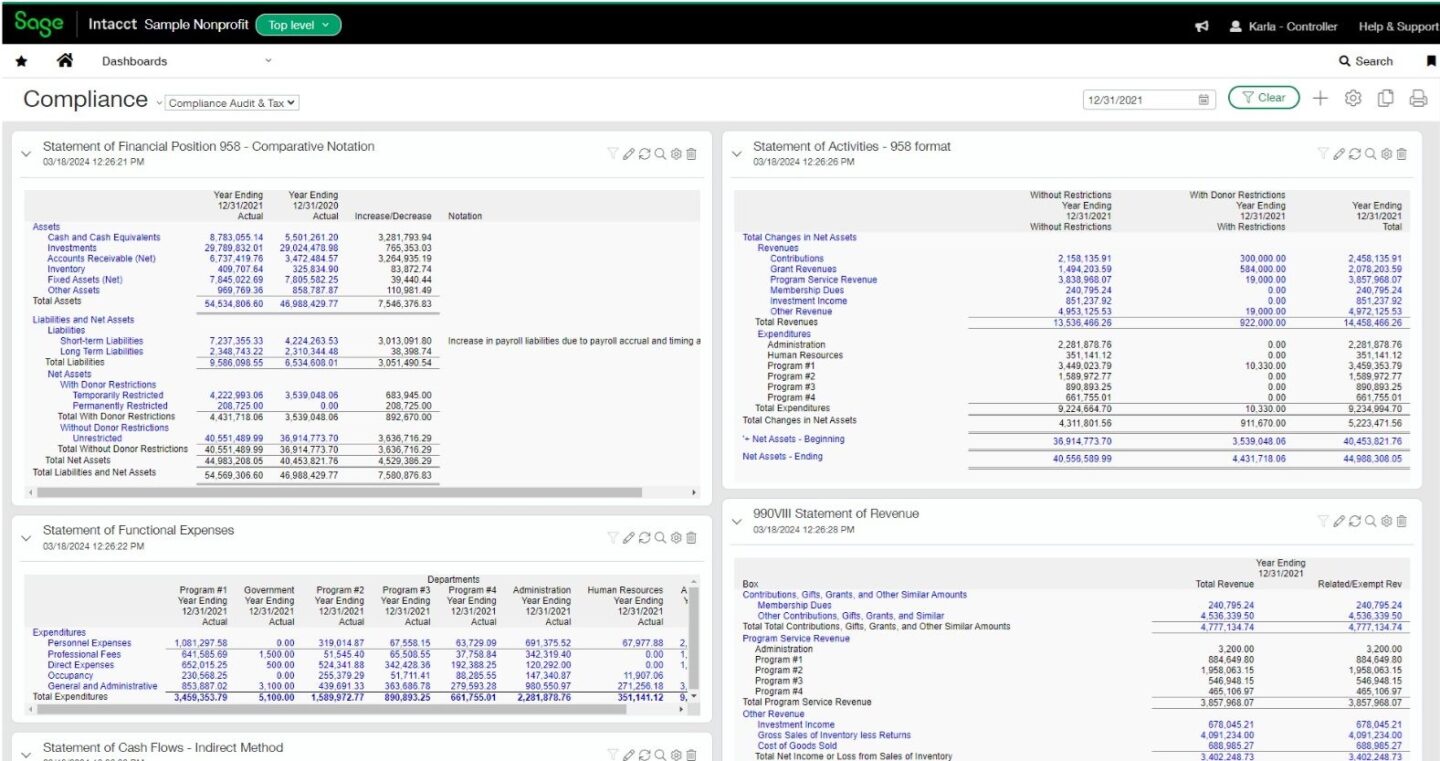
Slot Online Paling Seru Buat Ngisi Waktu Luang

Kalau kamu lagi cari hiburan ringan buat ngisi waktu kosong, game slot online bisa jadi pilihan yang simpel, cepat, dan seru. Banyak game hadir dengan tema unik, efek visual keren, dan fitur bonus yang bikin permainan makin menarik. Berikut beberapa pilihan yang sering jadi favorit pemain karena tampilannya yang asyik dan mudah dimainkan:


1. Candy-Themed Slot

Cocok buat kamu yang suka tema ceria penuh warna. Gameplay-nya simpel dan dilengkapi animasi manis yang bikin betah.


2. Adventure Slot

Biasanya ngusung tema petualangan dengan karakter seru, mulai dari penjelajah harta karun sampai petualang hutan. Fitur-fitur bonusnya biasanya bikin permainan makin menarik.


3. Mythology Slot

Buat penggemar cerita-cerita dewa, naga, atau legenda kuno. Selain visualnya epik, efek suaranya juga bikin suasana makin hidup.


4. Cute/Anime Style Slot

Desainnya lucu-lucu, cocok buat kamu yang suka vibes santai dan fun. Banyak juga mode demo yang bisa kamu coba gratis.


5. Classic Slot 3-Reel

Kalau kamu pengin nostalgia, game klasik dengan simbol buah dan angka 7 selalu jadi pilihan. Simple tapi tetap seru.


💡 Rekomendasi Cara Main Santai

  • Pilih mode demo kalau cuma mau hiburan tanpa risiko.
  • Cari tema yang kamu suka biar mainnya lebih enjoy.
  • Nikmati animasi dan gameplay-nya, nggak usah mikir target apa pun. Agen234

How retailers can prepare for Black Friday


Remember when Black Friday was just a day? Well, that’s all changed now. 

Many retailers will be preparing early Black Friday deals, giving the entire month of November the Black Friday treatment. 

This article addresses the core areas of consideration for your retail business if you’re looking to win big during this busy selling season. 

Explore where you can leverage technology to create bandwidth and make Black Friday frictionless and profitable. 

Here’s what we cover: 

Black Friday and Cyber Monday checklist

Download your free Black Friday and Cyber Monday Checklist to help your business get ready for the busy sales period.

Download your free checklist

Black Friday finances: Is it a good idea for you? 

The rise of online shopping means its easier than ever to get customers to come to you, but you’ll need to get creative with how to connect keen sales shoppers with your discounted merchandise to keep your profits up and your customers engaged. 

Taking an e-commerce approach and selling your products online (if you’re not already) is just one way to benefit from the Black Friday phenomenon. 

First thing’s first. If your business runs a fine line between profit and loss in its day-to-day operations, you need to decide if running Black Friday sales is the right move.  

Here’s some suggestions:

  • Examine your financial health, via profit and loss statements.
  • Run some projections to find out if your business model can really support not only item price cuts, but the temporary expansion of staff and expenses, such as increased marketing or advertising budgets, you might need to accommodate this potential demand.  
  • Does it make sense to hire additional customer service contractors to deal with an increase in order enquiries? If stock sells out, will you need extra warehouse staff on hand to pick and pack?
  • Are there any issues in your supply chain that would prevent items getting to the customers on time? 

Aside from these logistical and financial considerations, you should also make sure you’ve got the ability to capture the right data from this event.

Understanding your customers’ buying patterns, locations, and reach potential is an essential part of growing the business and making the following year even better. 

Getting the right financial, inventory, and supply chain software can help manage insight for you, rather than manually collating various spreadsheets of customer and stock data yourself. 

Assessing shopper behaviour for stock management on Black Friday

You will need to stock up for elevated sales, whether that’s in stores or online. That means more stock needs to be warehoused, or transported, and that comes with a cost. 

Look at your data from last year to gauge how much inventory you need to both in-store and online. Did you have any surprises in the stock you thought was going to sell well and didn’t or the reverse? 

Investing in stock insight is important for creating the capacity needed to manage high demand during peak trading season. 

You can ensure you have enough inventory for the influx in demand during Black Friday, Cyber Monday, and well into the Christmas shopping season. 

Accepting payments for Black Friday sales 

Without a secure, fast payment system, your Black Friday gains will be limited. Generational preferences and how comfortable shoppers are with payment technology will also factor greatly into your success. 

Today’s customer journeys are increasingly varied, and can be immediate or extremely complex, especially for the younger or oldest demographic.

Setting up a fluid payment system via social media is essential in our modern, connected work. Some social media platforms can take you to your purchase page immediately, while others risk dropping the customer via a series of convoluted steps.  

Journeys can range from impulse purchases on shopping or social media apps to lengthier, highly considered purchases involving multiple channels for product research and price comparison—even during Black Friday sales. 

Consider weaving accessibility into your purchase journey. Ensuring your website meets accessibility standards, and is mobile-friendly, for example, can increase customer trust in the payment system. Demand for mobile payments and digital wallets is growing, so it’s worth exploring these as part of your payment methods. 

Integrate the payment process into your omnichannel customer offering for a frictionless Black Friday experience. 

To do so, you should consider the customer’s expectations at each point in their journey and ensure your payment technology can accommodate any scenario of sale regardless of channel or preferred payment method. 

Retailers of any size will stand out by offering simplicity, convenience, and durable, well-defined value in their approach to payments. 

For online retailers, a diverse offering of payment methods is critical to customer experience. 

We know from research over the years that consumers generally can be up to four times more likely to complete a purchase if they see a wide variety of payment types presented to them at checkout. 

Managing Black Friday payments security during increased traffic 

You should also consider the security of your customers’ financial and personal data, and factor in protection against fraud. 

In 2018, the EU passed a new framework, commonly known as GDPR mandating secure storage of customer’s data. If you trade with any customers in EU countries, and hold their data, you must comply with the terms of this requirement.  

While existing businesses have been compliant since the change, if you’re starting a new business to take advantage of Black Friday sales, you should factor in additional technology costs of this into your plan and budget. 

More innovation that supports improved customer data protection is tokenisation, which allows safe storage of your unique card details providing access to the original payment information regardless of the contact point. 

Shoppers have grown more willing to use new payment technology, but they’re still concerned about the safety of their personal information. 

Research shows 62% are generally welcoming towards added authentication measures for online payment security as mandated by PSD2. 

New authentication technologies will revalidate repeat purchases or return shoppers to the website and make their experience even more frictionless. 

Hiring Black Friday staff 

Even with everything else in place, you’ll still need to ensure you have enough staff coverage to deal with stock management and preparing items for delivery. 

Insights from a business management solution can tell you how many additional staff you’ll need to hire. It can also help you with hiring, and onboarding and managing schedules. 

Adding more staff—temporary or full time—means more payroll admin of assigning employee types and calculating accurate pay and benefits for each. 

Doing this accurately will be more challenging during the busy Black Friday season, especially if it’s done manually. 

Payroll integration technology with time tracking and attendance functionality can make peak season staffing easier. 

Connecting your time and sales data is important for reconciliation purposes, eliminating data errors, and reducing payroll fraud. 

Keeping track of this data can also help with planning for other peak trading seasons. 

A business management solution equipped with automation can make this easy and error-free for any size staff. 

Final thoughts on preparing for Black Friday 2025

Black Friday is a fast-paced selling season. Even more so now than ever, if your customer doesn’t get the experience they expect, you might lose a future sales opportunity. 

Utilise new technology for business management to stay on top of cash flow and ensure whatever they buy, gets to them quickly.

With careful inventory and stock management, staffing decisions, reporting, and the right marketing approach, you’ll keep things running smoothly at the online checkout for one of the biggest shopping events of the year. 

Editor’s note: This article was first published in October 2019 and has been updated for relevance. 

Black Friday and Cyber Monday checklist

Download your free Black Friday and Cyber Monday Checklist to help your business get ready for the busy sales period.

Download your free checklist


Automotive

Agen Togel Terpercaya

Bandar Togel

Sabung Ayam Online

Berita Terkini

Artikel Terbaru

Berita Terbaru

Penerbangan

Berita Politik

Berita Politik

Software

Software Download

Download Aplikasi

Berita Terkini

News

Jasa PBN

Jasa Artikel

How to nail your Black Friday 2025 reporting


Black Friday is a day celebrated throughout many parts of the world as an opportunity to get amazing deals and boost sales, but for small business owners, it’s more than just one day of discounts.

It also represents a great opportunity to influence your financial success for months to come. When it comes to reporting, you need to do more than just track numbers, but also understand your performance and use this knowledge to make informed decisions that benefit your business long-term.

In this article, you’ll discover how to create a robust reporting strategy that not only tracks your Black Friday performance, but also informs your future planning and payroll decisions, setting you up for continued growth and success.

Why Black Friday reporting matters

Black Friday presents a unique opportunity for small businesses to boost revenue, but the aftermath can be just as important as the event itself.

Proper reporting enables you to analyse what worked and what didn’t, helping you refine your strategies for future sales events. It also allows you to manage cash flow effectively, ensuring you can meet payroll obligations while taking advantage of the post-event landscape.

By focusing on your finances, you can uncover insights that go beyond surface-level sales figures. Understanding your performance metrics, customer trends, and overall business health will help you make smart and agile decisions.

Understand how to approach Black Friday reporting from a financial perspective and make sure your business is set up to continue thriving beyond the sales rush.

Preparing for Black Friday reporting

1. Set clear objectives

Before Black Friday, you need to define what success looks like for your business. Are you aiming for a specific sales target? Do you want to increase customer acquisition or boost repeat purchases? Establishing clear objectives will help you to tailor your reporting efforts.

For instance, if your goal is to increase sales by 25%, your reporting should focus on tracking sales figures against this target. Setting objectives not only guides your reporting, but can also be helpful when it comes to allocating your resources effectively during the event.

2. Organise your data

Gathering accurate data is crucial for effective reporting. Make sure you have access to your sales, inventory, and payroll data before the event, and organise this information in a way that makes it easy to analyse and track. You might want to consider using accounting software that integrates with your point-of-sale systems, to automate and simplify your data collection process.

When you have a well-structured data set, you can monitor real-time performance on Black Friday, providing insights into which products are flying off the shelves and which ones may need a bit more of a marketing push.

Key metrics to track for Black Friday

When it comes to Black Friday reporting, not all data points are created equal. Focus on the metrics that matter most to your financial health. These would usually include:

1. Sales performance

Track total sales, average transaction value, and the number of transactions that you’re getting. You can then compare these figures to previous years and your objectives—for example, if you recorded 300 transactions with an average sale of £50, your total sales would be £15,000. This gives you a clear picture of how you performed and how you might benchmark this for future sales.

2. Profit margins

Understand your profit margins by calculating the difference between the sales you make versus your costs to help you know whether your discounts were sustainable. For example, if a product costs you £30 to produce or purchase and you sell it for £24 after applying a 20% discount, you might be making £24 in revenue, but you’re losing £6 in reality.

3. Customer acquisition costs

You should also keep an eye on how much it costs to acquire new customers during Black Friday. It’s a good idea to track marketing expenses against new customer sales, assessing your Return On Investment (ROI). For example, if you spent £1,000 on advertising and gained 50 new customers, your acquisition cost would be £20 per customer. This data can help to inform your marketing strategies moving forward and where is best to spend money for maximum results.

Post Black Friday reporting

Once the dust settles, it’s time to analyse the data you collected. This is where the real value of your reporting shines through.

1. Review performance against objectives

Take a close look at how your actual results compare to the objectives you set. Did you meet your sales target? How did your profit margins hold up? Evaluating performance will highlight areas for improvement and validate successful strategies.

Say you achieved a 30% increase in sales compared to last year, you might want to explore what factors contributed to that success—was it a targeted marketing campaign, improved inventory management, or enhanced customer engagement?

2. Analyse customer feedback

Speak to your customers when the sale is finished to gather feedback on their experiences. Surveys can provide valuable insights into what your customers liked or disliked about your Black Friday offerings, and you can then use this feedback to build out an even better promotion next time.

3. Adjust your payroll strategy

Once you’ve analysed your sales data, it’s time to consider how your payroll strategy aligns with your performance. If your sales exceeded expectations, you might want to consider hiring seasonal staff to maintain service quality. However, if sales fell short, you’ll need to carefully manage your payroll budget moving forward.

If your sales data suggests you need additional support for the holiday period, you can then plan to adjust your staffing levels accordingly. This proactive approach means that you have the right resources in place to capitalise on potential opportunities in the future.

Tips for effective Black Friday reporting

To help you nail your Black Friday reporting, here are some practical tips:

  1. Make the most of reporting tools: use accounting software that offers reporting capabilities, helping you to streamline data collection and analysis, and save time and effort.
  2. Create a reporting template: develop a consistent reporting template to help you track key metrics easily, making sure you don’t miss important data points in your analysis.
  3. Schedule time for reflection: after the event, set aside dedicated time to review your findings. This reflection period can be absolutely crucial for identifying trends and planning your next steps.
  4. Involve your team: get together with your staff to gather insights. Their experiences during Black Friday can provide valuable context to the numbers, giving you a more comprehensive understanding of your overall performance.

Final thoughts for Black Friday 2025

Black Friday can be a great opportunity for your small business, but its true value lies in how well you prepare and review your performance.

By focusing on thorough pre- and post-Black Friday reporting, you can gain valuable insights that inform smarter financial decisions, optimise future promotions, and strengthen your overall strategy.

Think of Black Friday as more than a day of sales, but as a learning experience that helps your business thrive in the long run. With the right approach, you’ll not only celebrate the successes of this peak shopping day but also build a more resilient and profitable future.

Black Friday and Cyber Monday checklist

Download your free Black Friday and Cyber Monday Checklist to help your business get ready for the busy sales period.

Download your free checklist


Automotive

Agen Togel Terpercaya

Bandar Togel

Sabung Ayam Online

Berita Terkini

Artikel Terbaru

Berita Terbaru

Penerbangan

Berita Politik

Berita Politik

Software

Software Download

Download Aplikasi

Berita Terkini

News

Jasa PBN

Jasa Artikel