Building a global team is one of the most powerful ways to scale your business. But the old way is broken. The costs and complexity of setting up local legal entities in every new country are a major barrier to growth. There’s a smarter way. An Employer of Record (EOR) lets you hire top talent anywhere in the world, without the administrative nightmare.
This streamlined approach gives you the flexibility and efficiency to build your dream team, no matter where they live. Forget the old rules. It’s time to access a global talent pool and drive your business forward.
The challenge with direct international hiring
Before we explore the benefits of a no-entity approach, it’s crucial to understand the challenges of hiring talent directly in another country, even on a temporary basis. For growing businesses, these hurdles can halt expansion before it even begins.
Complex entity registration: Setting up a legal entity in a new country is a minefield of bureaucracy and delays. The process can take months, drain resources, and distract you from your core business goals.
Navigating foreign laws: Employment laws vary drastically between countries. From contracts and termination rules to working hours and leave entitlements, staying compliant is a full-time job. A single misstep can lead to significant legal and financial penalties.
Payroll and benefits headaches: Managing payroll and benefits in a country where you have no expertise is a high-risk game. Different tax systems, National Insurance (NI) contributions and mandatory benefits create a complex web that is easy to get wrong.
These challenges aren’t just inconvenient; they’re significant risks that can expose your business to unforeseen costs and legal disputes, stifling your ability to scale with confidence.
How an Employer of Record (EOR) simplifies global expansion
An Employer of Record service is the solution to these expansion roadblocks. An EOR acts as the legal employer for your international team members, handling all HR, payroll and compliance duties on your behalf. This allows you to tap into global talent pools quickly and efficiently.
Here’s how an EOR transforms your approach to building a global team:
Compliance
An EOR gives you immediate access to local expertise. Instead of spending months researching labour laws, you can rely on your EOR partner to ensure every hire is compliant. They manage:
Compliant employment contracts: Creating locally compliant contracts that protect both your business and your employees.
Adherence to labour laws: Managing all aspects of local regulations, from minimum wage and overtime to termination procedures.
Risk mitigation: Minimising your exposure to legal disputes and penalties by ensuring every aspect of employment is handled correctly.
Streamlined and accurate payroll
Payroll errors are costly. The risk of mistakes multiplies when operating in an unfamiliar country. An EOR processes payroll accurately and on time, based on your instructions, while handling all the complexities. This includes calculating correct tax contributions, managing National Insurance contributions and ensuring compliance with local payment laws. You get the peace of mind that your team is paid correctly, every single time.
A unified employee experience
You want your entire team to feel connected, regardless of their location. Using different systems for international employees creates confusion and a disconnected culture. An all-in-one platform that integrates with an EOR service allows you to manage everyone under one roof. With a solution like Employment Hero, you can handle leave, documents, expenses and performance for your entire global workforce from a single interface. This creates a consistent and inclusive experience for all team members.
Significant cost and admin savings
Establishing and maintaining legal entities is expensive. The no-entity model, made possible by an EOR, drastically cuts overhead costs. You avoid the high fees associated with entity setup, legal consultations, and ongoing administrative burdens. An EOR centralises tasks like payroll, benefits administration and HR management, freeing up your team to focus on strategic growth initiatives instead of manual paperwork.
Access to unrestricted talent pools
Why limit your talent search to one city or country? By partnering with an EOR, you can hire the best person for the job, wherever they are. This access to diverse skills, experiences and perspectives enhances innovation and makes your business more adaptable. You can respond faster to market changes and customer needs, giving you a powerful competitive advantage.
When do you still need to set up a local entity?
While the EOR model is a game-changer for many businesses, it’s not a universal solution for every situation. Certain business activities may still require you to establish a physical and legal presence.
For example, companies involved in industries like manufacturing, physical retail or certain regulated professional services often need local facilities, storefronts or specific licenses to operate. If your business model requires a physical footprint to produce goods or serve customers directly, setting up a formal corporate entity may be unavoidable. It’s essential to evaluate your long-term strategic goals and operational needs to determine the right path for your expansion.
Hire top talent anywhere with HeroForce
In an era of digital connectivity, relying on an Employer of Record offers a compelling and powerful alternative to traditional methods of building a global team. It empowers you to grow faster, smarter and with greater confidence.
HeroForce is Employment Hero’s Employer of Record service. We enable you to hire talent in over 180 countries, simplifying your expansion while ensuring everything is done legally and ethically.
Whether you’re expanding into new markets or struggling to fill critical roles, we connect the best talent with the best employers.
Agen234 yang kamu sebutkan (seperti Mahjong Agen234) tampaknya bukan istilah resmi dari permainan Mahjong itu sendiri, melainkan nama yang sering dipakai di internet sebagai bagian dari situs judi online / agen game slot/casino yang menggunakan angka “234” sebagai bagian dari nama domain atau branding mereka. Misalnya, ada entri yang menunjukkan profil “Agen234” yang disebut sebagai situs resmi slot gacor dan casino online di platform penghubung HeyLink.me.
“Agen234” atau variasinya biasanya bukan platform resmi permainan Mahjong klasik, melainkan situs yang menawarkan game judi online, termasuk slot dengan tema Mahjong atau permainan judi lain. Agen234
Banyak situs game judi online di internet yang menggunakan nama serupa (angka + kata “Mahjong”, “Ways”, “Win”, dll). Ini bukan bagian dari permainan Mahjong tradisional yang berupa strategi ubin empat pemain dari Cina yang sudah dikenal luas.
Apa itu Mahjong yang sebenarnya?
Mahjong (atau mạt chược, 麻將) adalah permainan ubin tradisional dari Cina yang dimainkan oleh 3–4 orang dengan strategi, kecerdasan, dan sedikit keberuntungan. Game ini memiliki banyak variasi regional (Hong Kong, Riichi Jepang, Tiongkok, Taiwan, dll.), dan juga banyak versi online resmi atau aplikasi latihan.
Jika yang kamu maksud adalah: ✅ Permainan Mahjong untuk dimainkan secara online dengan teman atau pemain lain → Ada platform seperti Mahjong Soul atau Mahjongo. ❌ “Agen234” sebagai entitas permainan Mahjong klasik → Itu bukan istilah resmi permainan Mahjong, tetapi kemungkinan nama situs judi/agen game online yang menggunakan istilah tersebut dalam domain atau branding mereka.
Making Tax Digital (MTD) for Income Tax is being introduced in April 2026.
HMRC is again allowing limited exemptions, as it did with MTD for VAT seven years earlier. Some people are excluded automatically, while others can apply if they meet the required criteria. Such conditions are known as digital exclusion.
This FAQ breaks down who needs to adopt the new rules, who’s exempt, and how to apply for an exemption.
Here’s what we discuss:
Who has to follow the MTD for Income Tax rules?
MTD for Income Tax applies to individuals who currently file a Self Assessment tax return, such as sole traders and landlords.
It’s being phased in based on gross annual self-employment and property income, as follows:
From 6 April 2026 for individuals with income over £50,000 for the 2024/2025 year.
From 6 April 2027 for individuals with income over £30,000 for the 2025/2026 year.
From 6 April 2028 the government has set out plans to introduce MTD for individuals with income over £20,000.
So, if your total qualifying income (from self employment and property) is above these thresholds, you’ll need to register before the relevant start date. HMRC will have written to you, or emailed, to inform you of this.
Your Guide to MTD for Income Tax
Our free e-book is written by experts and is all you need as a sole trader or landlord to understand what MTD means for your business – and how to ensure you’re ready in time.
Download now
Can I opt out of MTD for Income Tax?
MTD for Income Tax is mandatory if you meet the criteria listed above, and HMRC says you must sign-up and follow the rules.
You must then sign-up to MTD, and use MTD-ready software.
The exceptions are if you meet one of the exclusion criteria set out by HMRC, as we discuss below. If these apply to you, you will continue to use Self Assessment.
Who is automatically exempt from MTD for Income Tax?
You’re automatically exempt if you:
Have qualifying income below the threshold for a given year, or below £20,000
File returns only as a trustee (including charitable trustees and some pension trustees)
Have income only from foster care
Do not have a National Insurance number for the relevant tax year (as at 31 January before the tax year)
Act as a personal representative for someone who has died
Are a Lloyd’s underwriter
How do I apply to opt out of MTD for Income Tax if I’m one of those exempted?
If you fall into one of the categories listed above, you should not be required to sign up to MTD. If HMRC contacts you saying you must join, contact them, or speak to your adviser, so they can correct your status.
What is digital exclusion under MTD for Income Tax?
According to HMRC, “digital exclusion” means it is not reasonable or practical for you to use MTD-compatible software.
You will need to apply for this exemption.
There are two main groups:
Religious exemption: If you’re a practising member of a religious society whose beliefs prevent you from using electronic communications or digital record-keeping.
Practical difficulty, as follows:
You have a physical or mental condition that makes digital tools difficult or impossible to use.
You live in a remote location with no reliable internet or mobile access.
Your age or digital literacy makes it genuinely unreasonable for you to maintain digital records, even with help.
How do I apply for digital exclusion from MTD for Income Tax?
You can apply by calling or writing to HMRC Self Assessment: General Enquiries.
If writing, include the title: “Making Tax Digital for Income Tax digitally excluded application”
In your application, include:
Your name, address, and National Insurance number
Details of how you currently complete your Self Assessment
Whether you use an accountant or agent (and what they do)
An explanation of why you believe you’re digitally excluded
Any supporting evidence (e.g. medical letter, proof of no internet access)
Can someone else apply on my behalf for an exemption from MTD for Income Tax?
Your accountant, or a trusted friend or family member can apply for an exemption on your behalf.
You’ll need to authorise them first by contacting HMRC in writing or over the phone.
When should I apply for digital exclusion from MTD for Income Tax?
It’s advisable to apply well before MTD applies to you:
For 2026: apply now to ensure HMRC processes your request in time.
For 2027: apply from summer 2026.
For 2028: apply from summer 2027.
HMRC aims to respond within 28 days, though it may take longer if information is missing from your application.
Bear in mind that, as each April approaches, HMRC’s phone lines will be increasingly busy not only with people calling about MTD, but also those needing help with ongoing Self Assessment completions.
What evidence will HMRC need to grant an exemption from MTD for Income Tax?
HMRC will expect a clear, reasonable explanation supported by evidence where possible, such as:
A doctor’s note confirming a medical condition.
A letter from a broadband provider or local authority confirming no network service in your area.
A description of your religious beliefs and how they prevent digital record-keeping.
Do I need to keep digital records if I’m exempt from MTD for Income Tax?
If HMRC grants you an exemption, you’ll continue using the normal Self Assessment process, filing an annual tax return in the usual way.
Therefore, the requirement to keep digital records will not apply and you can continue to keep records of any kind provided they meet HMRC’s requirements.
This isn’t to say that doing so is a good idea, however: digital record via accounting software keeping provides significant advantages, from automation and AI assistants, to simply having a better understanding of your cash flow position.
What happens if my application to be exempted from MTD for Income Tax is rejected?
If HMRC rejects your request, you (or those making the application on your behalf) have 30 days to send a written appeal.
The refusal letter you receive from HMRC will provide specific details including the address to send your appeal to.
You or those applying on your behalf should include your reasons and any new evidence that supports your case.
The letter is the start of an appeal, just like any other with HMRC, potentially moving onto an HMRC internal review and ultimately a tribunal if no mutually acceptable decision is reached.
I have a disability but HMRC says I’m not exempt from MTD for Income Tax. What next?
If HMRC doesn’t grant you an exemption, you may still be able to manage MTD using accessible accounting software.
Keyboard navigation and adjustable contrast, font, and colour settings
You might also qualify for funding through the Access to Work scheme to help cover assistive software or technology costs.
Are seasonal businesses exempt from MTD for Income Tax?
Seasonal or part-time businesses are not excluded if they meet the MTD criteria and HMRC says they must use MTD.
For example, a business that operates only during the Summer may have little or no income for the rest of the year. But MTD for Income Tax is determined based on the total gross qualifying income earned over the entire tax year.
Once your income falls below the threshold for three consecutive tax years, you can apply to HMRC to exit the MTD system. This time period delay is designed to avoid businesses with inconsistent income from constantly going in and out of the system.
If I’m excluded from MTD for VAT, am I automatically excluded from MTD for Income Tax?
If you’re digitally excluded from MTD for VAT because of digital exclusion and your circumstances haven’t changed, you should contact HMRC by phone or in writing to confirm the same exclusion for MTD for Income Tax.
If your VAT exemption was due to insolvency, however, this doesn’t extend to Income Tax.
I usually file paper returns for Self Assessment. Does that mean I’m exempt from MTD for Income Tax?
Filing paper returns in the past doesn’t automatically make you exempt.
HMRC won’t grant an exemption from MTD for Income Tax just because you prefer paper.
Does HMRC accept temporary illness as a reason for exemption from MTD for Income Tax?
If a temporary health condition (e.g. recovering from surgery) or major life event (like a recent bereavement) makes digital filing unreasonable, you can apply for an exemption. HMRC reviews all requests on a case-by-case basis.
This type of exemption is generally temporary, and HMRC may require you to start following MTD once your circumstances improve.
Am I exempted if I can’t afford MTD for Income Tax’s requirements?
Cost alone isn’t a valid reason for exemption. However, it might support your claim when combined with other factors like age or health issues.
The good news: HMRC-approved software providers are expected to offer free or low-cost versions for eligible small businesses and landlords.
As of publication of this article, there’s only one: Sage Individual is Sage’s free, easy to use cloud accounting software designed for sole traders and landlords to manage income, expenses, and MTD for Income Tax submissions in one place.
Can I apply for exemption from MTD for Income Tax if I live abroad but file UK Income Tax?
If you’re a non-resident with UK self-employment or property income that exceeds the threshold, MTD for Income Tax applies to you, just like with a UK-resident taxpayer.
You can still apply for a digital exclusion exemption if you genuinely can’t access digital tools abroad, but residency alone isn’t enough to exclude you.
Can my accountant manage MTD for Income Tax for me?
Yes, your accountant can:
Submit your quarterly updates
Prepare and file your end-of-year declaration
Sign you up for MTD for Income Tax
However:
You remain legally responsible for accuracy.
You must keep digital records of all income and expenses.
You need to authorise your accountant correctly with HMRC. You should start a dialogue immediately with them about this.
Can a family member or friend do MTD for Income Tax for me?
Yes, in the following ways:
They can register as a “trusted helper”, but they’ll have limited access and can’t file or submit on your behalf.
To give them full access, they must register as a tax agent and be authorised by you. This adds significant complexity.
You can also appoint someone as an intermediary to deal with HMRC on your behalf, but it does not grant them full access like a registered agent.
What if I don’t follow MTD for Income Tax when I should?
If you don’t follow the MTD rules when you’re required to, HMRC can issue penalties under its points-based system.
Each time you miss a quarterly update, or tax return, you’ll receive one penalty point. Once you accumulate four points, you’ll be charged a £200 fine. Furthermore, you’ll be charged interest on the amount you owe.
Additional penalties also apply if you make late payments.
HMRC offers free live and recorded webinars, along with short instructional videos, to help taxpayers understand MTD (including choosing compatible software).
HMRC also funds several community and voluntary organisations to help people who have difficulty using online services. Groups like the Good Things Foundation offer free, local support and training for individuals facing digital exclusion or barriers to accessing HMRC services.
Are there any other criteria for exemption for MTD for Income Tax?
Businesses under a deputyship, as appointed by the Court of Protection, are permanently exempt from MTD.
This builds on the Spring Statement 2025 announcement that individuals who have a lasting or enduring Power of Attorney in place are also exempt. (This is a specific exemption group defined by HMRC and it isn’t necessarily the case that all Power of Attorney cases are always exempt from the digital requirement.)
Final thoughts
MTD for Income Tax marks a major shift in how self employed taxpayers and landlords interact with HMRC, but not everyone will need to make the change.
If you think you might be excluded, apply early, keep records of your correspondence, and seek help from your accountant or HMRC’s support services. Or speak to your accountant or bookkeeper so they can act on your behalf.
By taking action now, you’ll know exactly where you stand and avoid unnecessary stress when MTD for Income Tax comes into effect.
Your Guide to MTD for Income Tax
Our free e-book is written by experts and is all you need as a sole trader or landlord to understand what MTD means for your business – and how to ensure you’re ready in time.
For many sole traders and landlords, the April 2026 start date for Making Tax Digital (MTD) is approaching fast.
Recent government announcements introduce a welcome “soft landing” period with penalty relief, designed to smooth your transition to digital recordkeeping and quarterly submissions.
This article will break down these crucial HMRC MTD for Income Tax updates, explaining how to take advantage of the MTD for Income Tax soft landing period. We also take a look at how the new penalty point system works.
Here’s what we cover:
Key provisions: What penalty delays have HMRC announced for MTD for Income Tax?
The latest updates that arrived with the 2025 Autumn Budget bring welcome clarity and flexibility, designed to make your initial steps with MTD for Income Tax significantly more manageable.
1. First-year penalty relief for quarterly updates
HMRC has confirmed that, for taxpayers mandated for MTD for Income Tax from April 2026, late submission of the first four quarterly updates will not attract penalty points, provided other conditions are met.
These cover quarterly updates due on:
7 August 2026—covering the period 6 April 2026 to 5 July 2026
7 November 2026—covering the period 6 July 2026 to 5 October 2026
7 February 2027—covering the period 6 October 2026 to 5 January 2027
7 May 2027—covering the period 6 January 2027 to 5 April 2027
The periods above will run from the 1st of each month if you’ve previously arranged with HMRC to use calendar months for your basis period, as some businesses have in order to match with their VAT stagger.
This penalty relief does not apply to your end-of-year MTD tax return for 2026/27, which is due by 31 January 2028. Penalties will apply for late submission of this final, annual declaration.
To be clear, once you’ve started MTD for Income Tax, from year two onwards penalties will apply for late submission of quarterly updates for the following dates and beyond:
7 August 2027—covering the period 6 April 2027 to 5 July 2027
7 November 2027—covering the period 6 July 2027 to 5 October 2027)
7 February 2028—covering the period 6 October 2027 to 5 January 2028)
7 May 2028—covering the period 6 January 2028 to 5 April 2028)
Furthermore, the government has not confirmed if the soft landing period will apply to those starting MTD for Income Tax in April 2027 (for the £30,000 gross qualifying income threshold), or April 2028 (for the £20,000 gross qualifying income threshold). We may learn more as those dates approach, but nothing is certain.
What this means for those starting MTD for Income Tax in April 2026: This provision offers a crucial grace period.
It’s your opportunity to learn the ropes of MTD-compatible software, refine your digital recordkeeping processes, and understand the quarterly submission routine without the immediate pressure of penalty points.
Just remember that HMRC still expects you to maintain digital records from April 2026 and submit quarterly updates.
So, think of it as an opportunity to iron out any creases in your new system.
2. Extended grace period for late payments
During your first year in the new penalty system, HMRC will, in the first year, allow up to 30 days before late payment penalties arise under the new regime, although interest on unpaid tax may still run.
What this means: This enhanced grace period provides invaluable flexibility for your cash flow management. As you adapt to potentially new ways of monitoring your tax liability, it allows you a little more time to ensure funds are available without incurring immediate penalties.
3. Deferrals and exemptions for specific groups
Recognising unique circumstances, some taxpayer groups will have their start date deferred or be permanently exempt from MTD:
One-year deferral (until April 2027): This applies to recipients of trust and estates income, individuals who use averaging adjustments, those eligible for qualifying care relief, and non-UK resident foreign entertainers or sportspeople. If you fall into one of these categories, and are theoretically required to use MTD as of April 2026, you should continue to meet your existing Self Assessment obligations as usual until April 2027.
Permanent exemptions: Businesses under a deputyship, as appointed by the Court of Protection, are now permanently exempt from MTD. This builds on the Spring Statement 2025 announcement that businesses who have a Power of Attorney are also exempt. If you fall under these criteria, you have clarity on your permanent exclusion from MTD requirements.
4. Policy and guidance updates
The journey to full MTD implementation is ongoing, so staying informed is key:
Legislation for the MTD for Income Tax updates will be introduced in the Finance Bill 2025-26.
HMRC guidance will be updated shortly to reflect the new penalty easements and deferrals.
HMRC will soon provide an update on its plans to resolve the last few restrictions preventing certain taxpayers from signing up for mandatory MTD.
Why you should embrace MTD for Income Tax’s benefits now
Some may find the idea of quarterly updates onerous, but the core design of MTD is to provide you with a much clearer, more real-time understanding of your financial position.
Embracing MTD offers significant benefits that can genuinely transform your business’s financial health and decision-making.
By regularly updating your digital records and making quarterly updates, you gain a live snapshot of your income, expenses, and crucially, your approximate tax liability. This eliminates the end-of-year scramble and the dreaded surprise tax bill.
Improved cash flow management: When you know roughly how much tax you’ll owe, you can put money aside consistently. This allows for far better financial planning, so you aren’t guesstimating your tax bill and risking a shortfall when it comes to buying a new van, investing in equipment, or simply covering personal expenses.
Accurate, up-to-date financial data also empowers you to make smarter business decisions. You can identify trends, understand your profitability throughout the year, and react promptly, rather than waiting for your accountant to crunch numbers months later.
The risks of ignoring quarterly updates for MTD for Income Tax for the first year
It’s not unnatural to think that, because there’s no penalties for late submission, you can simply ignore the first four quarterly updates, and simply file a digital tax return on 31 January 2028.
While the penalty relief offers you flexibility, Chris Downing—Director of Accountants and Bookkeeping at Sage and a former accountant—offers a warning against postponing your MTD preparations:
“Firms shouldn’t mistake the soft landing for a free pass. The compliance obligations are still in force—digital recordkeeping, timely quarterly updates, and the full MTD Tax Return by January 2028. All the soft landing does is give you space to make mistakes safely. Ignoring that opportunity simply concentrates the risk later.”
If you use the penalty easement to deliberately skip updates or do a superficial job of record-keeping, you will also cheat yourself out of vital benefits:
You lose real-time visibility of your business, undermining the core advantage MTD offers for your cash flow and business planning.
Delaying the inevitable learning and compliance merely pushes the problem down the road. You’ll still have to switch to digital records and make sense of the system eventually, likely under more pressure. By then, the penalty-free soft landing period will have ended.
Grappling with a new system at the last minute significantly increases your risk of making errors or missing deadlines. Once the soft landing period concludes, the standard penalty regime takes full effect. Why not use this current grace period to master the system and build confidence, rather than deferring the pain and inviting potential penalties?
Understanding the new penalty system for MTD for Income Tax
It’s important to have a clear grasp of the penalty points system, which will be rolled out not only for MTD users but also for all Self Assessment taxpayers from April 2027.
Under the new system, simply filing a return late no longer triggers an automatic fine.
Instead, you’ll receive one penalty point every time you miss a submission deadline. This penalty applies only to the particular tax for which you’ve made the error. For example, if you miss an update for MTD for Income Tax, you might get penalty points. If you also miss a tax return date for VAT, you might also get points—but the two systems and points tallies are entirely separate.
Once you accumulate a certain number of these points—known as your personal points threshold—HMRC will then issue a £200 financial penalty. Every subsequent late submission will then incur an additional £200 charge.
Your points threshold depends on how often you’re required to submit returns.
Businesses that file more frequently have more opportunities to make mistakes, so their threshold is higher. For example, if you file annual tax returns, you’ll receive a penalty at two points. For quarterly filers, the penalty is issued at four points, and monthly filers have a threshold of five points.
These penalty points don’t stay on your record indefinitely. They expire after a period of good compliance, provided you’ve also submitted any outstanding returns. The length of this good compliance period also varies by your filing frequency. If you file annual tax returns, you’ll need to file on time for 24 months to clear your record. Quarterly filers must file on time for 12 months, and monthly filers need to file on time for 6 months.
Overall, this new system is designed to be more forgiving of genuine, one-off mistakes, giving you a chance to improve. However, it still takes persistent lateness seriously.
Preparing for MTD: What you should do now
Your first step is to determine your MTD start date.
Confirm if your business is mandated for April 2026 or April 2027 (based on the MTD thresholds), or if you qualify for a deferral or permanent exemption. This will set your personal timeline.
Evaluate your systems. Are you still using spreadsheets or a basic accounting system to manage your income and expenses? Assess how digital-ready your current methods are and identify what changes are needed.
Explore MTD-compatible software. Begin researching available software solutions that integrate with MTD for Income Tax. Many providers offer specific tools for sole traders. Consider trialling different options to find one that fits your workflow best.
Consider voluntary sign-up: You don’t have to wait until April 2026, and can choose to voluntarily sign up for MTD now. This offers an excellent dry run opportunity. By starting early, you can become familiar with digital record-keeping and quarterly submissions, gaining valuable experience and confidence with the new system—and you’ll still benefit from the soft landing period across 2026 and 2027 (if you are in the 2026 mandation cohort and the current easements remain in place). This early start is a fantastic way to refine your processes before mandatory adoption, ensuring you’re well-prepared from day one.
Don’t hesitate to consult an accountant or tax advisor for professional advice. They can provide tailored guidance, help you choose and implement the right software, set up your new digital systems, and help you create a strategic plan for a smooth transition during the soft landing period.
Final thoughts
The MTD for Income Tax journey for April 2026 is clearly defined, but the latest government update has transformed the transition. But this MTD soft landing isn’t a delay—it’s a vital opportunity. With new flexibility around penalties and payment deadlines for 2026, sole traders and landlords now have a unique chance to prepare effectively.
By proactively preparing your digital systems, and potentially even opting for a voluntary “dry run” now, you can transform the challenge of MTD into an opportunity. Embrace this extra time to plan ahead, seek expert advice, and transition to digital record keeping with confidence. Ultimately you will benefit from a clearer, more efficient view of your business’s finances.
Your Guide to MTD for Income Tax
Our free e-book is written by experts and is all you need as a sole trader or landlord to understand what MTD means for your business – and how to ensure you’re ready in time.
Expanding your business into new markets is a powerful growth strategy. But hiring talent globally introduces a maze of new employment laws, payroll complexities and risks. Many businesses turn to partners like a Professional Employer Organisation (PEO) or an Employer of Record (EOR) like HeroForce to help navigate this.
While both services handle HR functions, they operate differently and the distinction is critical. Understanding the difference between a PEO and an EOR can be the key to unlocking seamless global growth while protecting your business from significant risk.
This guide breaks down the differences and explains why an EOR is the smarter, safer way to build your global team.
What is a Professional Employer Organisation (PEO)?
A Professional Employer Organisation (PEO) offers outsourced HR services like payroll processing, benefits administration and compliance assistance. When you partner with a PEO, you enter into a co-employment relationship.
In this model, the PEO becomes the administrative employer for your staff, while you remain the day-to-day employer responsible for managing their work and performance.
The catch? To use a PEO in a new country, your business must have its own local legal entity established there. This requirement adds significant cost, time and administrative burden to your expansion plans, often defeating the purpose of seeking a simple solution.
What is an Employer of Record (EOR)?
An Employer of Record (EOR) offers a more direct and secure path to hiring international talent. An EOR allows you to hire employees in another country without needing to set up a local entity.
The EOR acts as the legal employer for your team members in that country. They handle all aspects of the employment relationship, from contracts and payroll to taxes, benefits and adherence to local labour laws. You still manage your employees’ daily tasks, projects and performance, maintaining full operational control.
By taking on the full legal responsibility, an EOR eliminates the complexities and risks of global employment, empowering you to hire the best talent, anywhere.
Key differences: PEO vs. EOR
Understanding the key differences between PEO and EOR will help you to determine which solution is right for your business. We’ve developed a comparison table below to help to decide.
Feature
Employer of Record (EOR)
Professional Employer Organisation (PEO)
Local entity
Not required. The EOR uses its own entity.
Required. You must set up your own legal entity.
Employment model
EOR is the sole legal employer.
Co-employment model. You and the PEO share liability.
Risk and liability
EOR assumes full legal employment liability.
Liability is shared, creating a “co-employment” risk.
Best for
Global expansion and hiring talent in new countries.
Outsourcing HR for existing employees in a country where you have an entity.
Compliance
Compliance management handled by the EOR.
Compliance support, but ultimate responsibility is shared.
Speed
Hire and onboard talent in days.
Slow process due to entity setup requirements.
The co-employment risk and why it matters
The co-employment model used by PEOs is one of the biggest differentiators—and a source of significant risk. In a co-employment arrangement, both your company and the PEO are considered employers. This shared status means you also share legal liability for employment matters.
If the PEO makes a mistake with payroll, misinterprets a local law or fails to provide statutory benefits, your business can be held responsible. This exposes you to potential fines, legal disputes and reputational damage in a foreign jurisdiction.
An EOR eliminates this risk. As the sole legal employer, the EOR takes on 100% of the employment liability. They are the ones responsible for ensuring every contract is compliant, every payslip is accurate and every local regulation is met. This clear division of responsibility gives you peace of mind and lets you focus on running your business.
Why an EOR is the smarter choice for global growth
For businesses looking to scale with confidence, an EOR provides a clear advantage. It’s a model built for speed, simplicity and security.
1. Avoid the cost and complexity of entity setup
Establishing a legal entity in a new country is a monumental task. It can take months, sometimes even over a year, and cost tens of thousands of dollars in legal and administrative fees. It requires navigating unfamiliar corporate laws, tax systems and banking regulations.
An EOR bypasses this entire process. You can tap into their existing global infrastructure to hire talent immediately. This saves you an enormous amount of time and money, allowing you to be agile and responsive to market opportunities. Instead of waiting to get set up, you can have your first international employee onboarded in a matter of days.
2. Minimise risk with watertight compliance
Global employment laws are complex and constantly changing. From termination rules and leave entitlements to mandatory benefits and data privacy, staying compliant across multiple countries is a full-time job. A single misstep can lead to severe penalties.
A trusted EOR partner has teams of local experts that live and breathe the employment laws in their respective countries. They ensure every aspect of employment is handled, from drafting contracts to managing statutory contributions and navigating complex termination procedures. This reduces the compliance burden from your shoulders.
3. Hire the best talent, no matter where they are
The modern workforce is global. Restricting your hiring to your local market means missing out on a world of exceptional talent. An EOR breaks down geographical barriers, giving you the freedom to hire the perfect candidate for the role, regardless of their location.This allows you to:
Access specialised skills: Find experts in their field who may not be available in your home country.
Build a diverse team: Foster innovation and a stronger company culture with a globally diverse workforce.
Retain top performers: Keep valuable employees who need to relocate, ensuring you don’t lose institutional knowledge.
When a PEO might still make sense
While an EOR is the strong solution for global expansion, a PEO can still be useful in specific situations. If your business already has an established legal entity in a country and simply wants to outsource HR administration for your existing employees there, a PEO can be a viable option.
In this scenario, you are not looking to expand, but rather to streamline operations in a market where you are already established. However, for any business looking to enter a new market, the EOR model is unequivocally the faster, safer and more efficient choice.
Scale confidently with Employment Hero
Hiring great people is the foundation of business growth. Don’t let borders and bureaucracy stand in your way. An Employer of Record removes the barriers to global hiring, transforming a complex challenge into a simple, streamlined process.
Our HeroForce EOR service empowers you to hire top talent across the globe without the risk and administrative headache. We handle the complexities of international employment so you can build your dream team and scale your business with confidence.
Hiring great people is one of the most powerful ways to grow your business, but it’s also one of the toughest. Finding top talent in a competitive market requires speed, precision and a seamless process that doesn’t bury you in administrative tasks. We get it. That’s why we’ve completely revamped our Applicant Tracking System (ATS) to make recruitment simpler, faster and more effective.
We’re excited to announce a suite of major updates to our ATS, packed with powerful new features designed to streamline your entire hiring workflow. Say goodbye to manual data entry and disjointed systems. Say hello to a single, integrated platform that empowers you to find, manage and hire the right people with confidence.
These updates are built to solve the real-world challenges growing businesses face. Let’s explore what’s live, what’s coming soon and how it will transform your recruitment process.
Build better ads with simplified Job Creation
Launching 1 Dec 2025
Crafting a compelling job ad is an art. It needs to be informative, engaging and structured to attract and match the right talent. Our new simplified Job Creation tool streamlines this process, guiding you through each step to build effective job ads quickly.
The redesigned, 2 step workflow makes creating and posting jobs foolproof, and way faster. It starts with a natural language search – simply input exactly what you’re looking for in simple terms, and our AI will populate all the required fields and build out a suggested job description, optimised for applicant matching. Looking to use your own job description? You can paste it in and the AI will suggest amends to the description to improve clarity and applicant matching. From defining the role and responsibilities to setting salary expectations and required skills, the intuitive interface ensures nothing is missed.
Once you’re happy with your description, the AI will suggest screening questions, whilst keeping a preview of the Job Description in place.
This structured approach helps you create consistent and professional job ads every time, improving the quality of applications you receive. It takes the guesswork out of writing job descriptions, allowing you to focus on showcasing your company culture and the unique opportunity you’re offering.
Post once, reach millions with new Indeed integration
Live now
Sourcing candidates is the first, and often most time-consuming, step in recruitment. To attract a wide pool of talent, you need to post your job openings where candidates are actively looking. That’s why our biggest update is a direct integration with Indeed, the world’s #1 job site.
Gone are the days of manually posting jobs on multiple platforms. With our new integration, you can access:
Free Indeed adverts: all live jobs on careers pages are posted to Indeed as free ads
Integrated screening questions: questions set up in EH are integrated to the Indeed application process for faster shortlisting
One-click applications: Indeed candidates can apply with a single click, increasing applicant volumes
Manage applications in one place: All applications from Indeed flow directly back into your Employment Hero ATS, eliminating the need to track candidates across different systems.
This seamless connection saves you countless hours and expands your reach exponentially. It automates the most tedious part of sourcing, freeing you up to focus on what truly matters: connecting with qualified candidates.
Making it easier for candidates to find you: EH Jobs upgrades
Live now
Our own jobs board, Employment Hero Jobs, has also received significant upgrades, and is now placing more than 1300 candidates into our customers’ jobs every single month. These candidates are placed free of charge with our customers, saving thousands in job ads.
With improved search functionality, job matching and a better user interface, it’s now easier than ever for candidates to discover and apply for roles at your company. This provides another valuable channel for attracting applicants, for free and free of the clutter and ads on traditional jobs boards.
SmartMatch applicant ranking gets a power-up
Live now
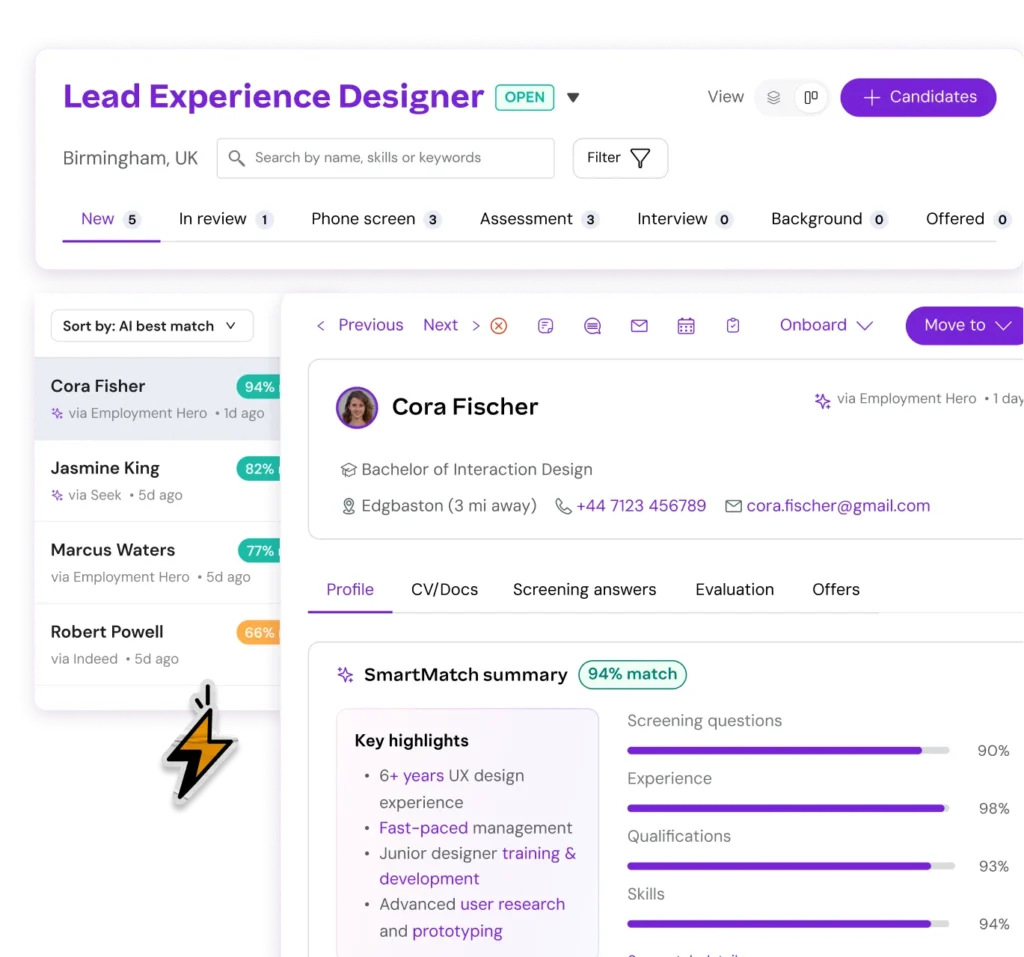
How do you quickly identify the most promising candidates from a large pool of applicants? Our SmartMatch technology does the heavy lifting for you. It automatically analyses resumes and application data, then ranks candidates based on how well their skills and experience align with your job requirements.
This powerful feature allows you to ‘Sort by best match’, to help you prioritise your efforts, ensuring you review the most qualified individuals first.
Upgraded CV parsing means more complete candidate profiles, and detailed summaries of how well individuals match your specific criteria for faster decision making.
Take control with enhanced Applicant Management
Live now
Once the applications start rolling in, speed and clarity matter. A messy or outdated interface does not just slow you down; it puts strong candidates at risk of slipping away. Our modernised Applicant Management experience gives you sharper visibility, faster actions and more confidence as you move candidates through the hiring journey.
We have redesigned the workflow to feel cleaner, smarter and more connected. Whether you are triaging dozens of applicants or refining a shortlist, everything you need sits right where you expect it.
Key updates in the new Applicant Management system include:
Quick action toolbar and action pane: Complete essential tasks without losing sight of the candidate. Notes, activity, communication, scheduling and evaluation now live side by side with the profile, so decisions happen in one place.
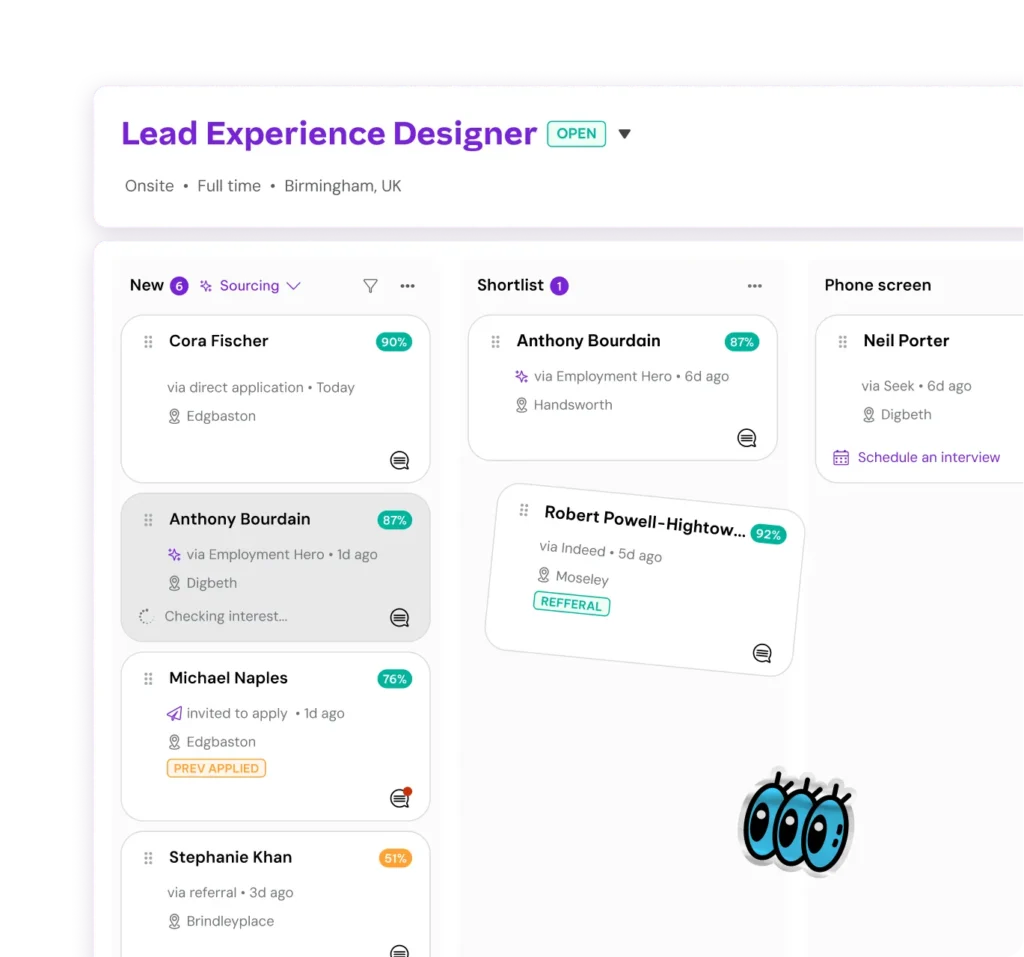
Board view: Switch to a visual overview of your entire hiring process. Every stage. Every candidate. Drag and drop moves them forward with ease, giving you instant situational awareness.
Candidate filtering: Zero in on the people who can truly work for you. Filter by SmartMatch score or screening question responses to quickly exclude dealbreakers and focus your energy where it counts.
Candidate search: Every role now includes a powerful search bar. Find applicants by name, email, skills, certifications, education, past companies, job titles or industries in seconds.
Updated stage view: The refreshed stage view makes shortlisting faster, with SmartMatch scoring and key profile highlights surfaced clearly, plus smoother navigation and quick actions for high tempo workflows.
Updated profiles: Candidate profiles are cleaner and easier to scan, with richer information parsed directly from resumes so you can understand each person at a glance.
This is not just a visual refresh; it is a practical upgrade designed to help you work faster and stay organised. High volume applicant review becomes manageable, focused and far less chaotic, giving every strong candidate the attention they deserve and giving you a hiring process that genuinely keeps up.
Automate first-round interviews with Recruitment Agent
Live now for EOS Unlimited customers
Reduce your hiring bottlenecks with our new Recruitment Agent, your new AI colleague that revolutionises the first-round interview process. Fully integrated into the Employment Hero ATS, this powerful feature automates structured video screening, taking the manual grind off your plate.
Hire faster with pre-vetted shortlists: By automating first-round screening, you cut through the noise and get to a list of interview-ready candidates sooner. Early results show a 50% reduction in screening time, and a week saved on time to hire.
Make smarter, more consistent decisions: By using standardised questions and transparent scoring rubrics for every applicant, it ensures your evaluations are objective and evidence-based. This data-backed approach makes it easier to compare candidates fairly and gives your entire hiring team the confidence to make better, more informed decisions.
Create a fair and scalable process: Every candidate receives the same fair and structured experience, regardless of whether you have 10 applicants or 1,000. This consistency reinforces your reputation as a fair and transparent employer, helping you attract top talent.
Find out more about our Recruitment Agent features.
Start hiring smarter today
The world of work is changing, and your recruitment tools should empower you to stay ahead. The relaunched Employment Hero ATS is more than just a new set of features; it’s a complete solution designed to help you build a winning team. By automating manual tasks, expanding your reach and providing clear insights, we’re giving you the power to hire more efficiently and effectively.
These updates are built to reduce your administrative burden, ensure a great candidate experience and ultimately, help you secure the talent you need to grow your business.
Ready to transform your hiring process? Explore the new features in our Applicant Tracking System and discover a better way to recruit.
Set clear expectations this holiday season with our office closure messages and out-of-office email templates designed for smooth shutdowns.
Every year, as the calendar edges toward December, workplaces quietly prepare for the great annual inbox exodus. It’s one of the few moments in modern work culture where everyone collectively agrees, even if only for a week or two, that rest is not a luxury but a necessity.
And yet, before anyone can properly disconnect, there’s one small ritual that stands between us and true holiday bliss: crafting the perfect “office closed” or out-of-office message.
That’s why we’ve curated a set of updated, easy-to-use templates to help you clearly communicate your downtime, whether your workplace leans buttoned-up, playful or somewhere in between. From general out-of-office messages to Christmas shutdown notices and public holiday reminders, these examples will help you set expectations, reduce confusion and actually switch off.
In this guide, you’ll find:
General out-of-office templates
Office closed for Christmas templates
Office closed for public holidays
Year-end vacation announcements
Tips for managing holiday shutdowns smoothly
Generic Out-of-Office Message Template
Setting an out-of-office reply isn’t just polite, it’s functional. It ensures colleagues know when you’re offline, avoids unnecessary follow-ups and prevents misunderstandings. But it’s also a boundary-setting practice that supports healthier work habits.
Formal
Hi there,
Thank you for your email. I’m currently on leave from [date] to [date] for [reason] and will have limited access to email. Please expect a delayed response.
For urgent matters, contact [colleague name + job title] at [email / phone]. Otherwise, I’ll reply once I’m back.
Kind regards,
[Name]
Informal
Hello!
I’m currently out-of-office and officially offline until [date]. I won’t be checking emails — that’s a promise I’m making for both of us.
In the meantime, here are a few fun facts to keep you entertained:
Koala fingerprints can fool human investigators.
The “code rain” in The Matrix was inspired by sushi recipes.
Earth has more trees than the Milky Way has stars.
For anything urgent, contact [name + job title] at [email / phone]. I’ll be in touch when I return.
Thanks!
[Name]
Office Closed for Christmas Message Template
If your company observes a Christmas shutdown, communicating it early helps prevent confusion and keeps customer expectations clear. Even during holidays, business doesn’t fully pause but clear messaging ensures your team can.
Formal
Hello,
As we approach the festive season, our office will be closed from [date] to [date]. Our team will be taking this time to rest and spend the holidays with family and friends.
Response times may be slower during this period. For general enquiries, visit our [Help Centre link]. For urgent matters, contact [name + job title] at [email / phone].
We’ll return on [date] and will review all messages promptly.
Wishing you a safe and joyful holiday season.
Informal
Season’s greetings!
Our team is offline from [date] to [date], enjoying festive treats and a much-needed break before the new year.
We’ll be back on [date]. For anything urgent, please reach out to [name + job title] at [email / phone], they’re keeping the lights on while we recharge.
Happy holidays!
Office Closed for Public Holidays Template
Use these for any public holiday throughout the year.
Formal
Hello,
Our office will be closed on [date] for [public holiday]. Response times may be slower during this time.
If your query is urgent, please visit our [Help Centre link] or contact us once we return.
Thank you for your understanding.
Kind regards,
[Name]
Informal
Hey there,
I’m currently offline for [public holiday] and will be back on [date].
If you need help urgently, contact [name + job title] at [email]. Otherwise, I’ll respond when I’m back.
Cheers,
[Name]
Annual Year-End Vacation Template
A longer break calls for clarity, especially when you’re stepping away from your inbox entirely.
Formal
Hello,
Thank you for your email.
I’m currently on annual leave and won’t be able to access emails until [date]. For urgent matters, please contact [name + job title] at [email / phone].
I’ll respond when I return.
Wishing you a safe and happy holiday season,
[Name]
Informal
Hello!
I’m off on my long-awaited annual holiday from [date] to [date], and won’t be checking emails during this time.
For anything urgent, my colleague [name] is available at [email].
Wishing you a wonderful festive season and a Happy New Year,
[Name]
Helping You Switch Off, Properly
With these templates in hand, setting holiday boundaries becomes much easier and far more intentional. Download the fact sheet to access our full suite of messages and practical advice for managing shutdown periods with confidence.
Managing leave doesn’t need to be complicated. With the right tools (like Employment Hero), you can streamline processes, support wellbeing and give team members the break they deserve without the administrative stress.
If you’d like an even more opinionated or columnist-style rewrite, I can do that too.
MTD for Income Tax isn’t a technical tax issue. It’s about workflow.
If you understand this and treat it like an operational project, rather than compliance event, you’ll stay calm next April.
This is what chartered accountant and long-time HMRC collaborator Rebecca Benneyworth discussed at the Bookkeepers Summit, and it’s what we discuss in this article.
Here’s what we cover:
MTD: The operational reality
Benneyworth did something unusual for an MTD keynote session: she skipped the theory entirely.
She skipped the slides about legislative history. She ignored the abstract timelines. She didn’t open with “MTD is coming” or show a single chart about digital transformation.
Instead, she went straight to the operational reality accountants and bookkeepers will face in 2026: The real-world decisions, system limits, client behaviours and workflow bottlenecks that HMRC guidance rarely spells out.
Benneyworth has spent close to a decade touring the UK with HMRC, answering hundreds of questions from firms trying to navigate MTD for Income Tax.
If treat it like an operational project, rather than compliance event, you’ll stay calm next April.
Everyone else will be queuing for HMRC support, battling mismatched authorisations, or scrambling to onboard clients who left everything until the last minute.
What Benneyworth shared wasn’t theory. It was the distilled reality of practitioner experience.
The 10 questions she gets asked most often, the hidden operational risks inside the agent services account, the new easement for jointly owned property that finally makes sense, and the three-month window between now and April that will determine whether your 2026 is manageable or miserable.
This is your road map for staying out of the chaos.
1. Who needs to join MTD for Income Tax in April 2026, and how is the income test really calculated?
The single most common point of confusion is also the easiest to fix.
Practitioners still over complicate the £50,000 threshold. They bring in salary, pensions, dividends, and investment income. These are income types HMRC doesn’t even look at for this test.
But once you strip the noise away, mandation rests on just two numbers.
The truth: only two income types matter:
Self employment income (SA103)
Property income (UK + foreign) (SA105 / SA106)
That’s it.
Benneyworth calls them mandated income types. HMRC calls them relevant income. But they are the same thing. And understanding them early shapes your entire 2026 workload.
How the test works:
You look at the 2024/25 tax return.
You total the gross income on SA103 + SA105/106—the figures HMRC can actually see.
If that combined figure is over £50,000, they are in MTD from April 2026.
If it’s below, they’re not, regardless of what their salary or dividends look like.
Once in, they’re typically in for three years unless all mandated income sources cease.
What you should do now:
Build an internal list: every client with SA103 or SA105/106 pages.
Add a column for “expected 2024/25 mandated income”.
Segment clients as: “in from April 2026”, “likely in 2027/28”, or “out”.
Train staff to answer this question the same way,
We only look at your self-employment and property income on the 24/25 tax return. That’s what determines whether you’re in.
Rebecca Benneyworth, Rebecca Benneyworth & Co
This removes most of the noise you get from clients comparing themselves to friends or reading generic online guidance.
2. What about partnerships?
Partnership is one of the most misleading words in the whole MTD for Income Tax conversation.
Clients use it casually, HMRC uses it technically, and it’s easy to mix the two.
Getting this distinction right now prevents you from incorrect scoping your 2026 work—or overlooking clients who are in scope when they think they’re not.
Where partnerships stand today:
Partnerships are not included in the 2026 MTD mandation rules.
They will come in later. Benneyworth’s informed guess: around 2030.
Until then, partners report their share of partnership income via the SA104, as now.
Property “partnerships”—many clients describe joint lets as partnerships. HMRC usually does not.
Quick filter:
Does it have a UTR (Unique Taxpayer Number)?
Do you file a partnership return (SA800)?
If yes, then it’s real partnership and therefore not relevant for MTD in 2026. If no, then it’s jointly owned property and it’s in scope for MTD if income is high enough.
What you should do:
Clearly tag each client: real partnership (SA800) vs joint property.
Don’t assume “property partnerships” are out just because the word is used casually.
Plan 2026 workloads around individuals with SA105, not partnership SA800s.
3. Can clients avoid MTD by incorporating or forming partnerships?
A few accountants and bookkeepers still hope so. Benneyworth’s view was blunt: no, and please don’t try.
Some clients still believe MTD can be sidestepped with a quick incorporation or a “paper partnership.”
The reality: these routes create more admin, more risk, and no genuine escape from future mandation.
Why it doesn’t work:
Incorporation adds more admin, more identity verification, more filings, and more risk.
Partnerships will be included in MTD in the near future.
Your client’s bookkeeping burden doesn’t vanish; it simply moves.
What to advise: push the conversation toward digital record readiness, not legal restructuring:
“If the bookkeeping is clean, MTD is easy. If it’s not, incorporation won’t save you.”
“Entity changes should be driven by commercial and tax reasons—not to dodge quarterly updates.”
4. What do I need before I can start filing quarterly updates?
Filing quarterly updates isn’t simply about software. It’s actually an authorisation and infrastructure question.
The two systems HMRC runs (Caesar and the Enterprise Tax Management Platform, or ETMP) can trip you up if your Agent Services Account isn’t correctly linked.
This is where you could lose weeks unnecessarily, so clarity here is critical.
Your two essentials before filing quarterly updates:
Authority to act for the client. This confirms you’re permitted to manage their tax affairs.
An Agent Services Account (ASA). This is a special HMRC account, linked to your old Agent Online Services login, that lets you access MTD features and client lists.
How the systems connect:
The old system (SA (Self Assessment), CIS, PAYE, etc.) runs on HMRC’s Caesar platform.
The new system (MTD, supporting-agent functionality) runs on ETMP.
Linking the logins allows ETMP to “see” your existing client list.
If you already do the client’s Self Assessment returns, you become main agent without needing new authority.
If the year end return is handled by another accountant, you request authority as a supporting agent (via a digital handshake).
Supporting agents can sign clients up and file quarterly updates without displacing the main agent.
What you should do now:
Log into your ASA and check whether your SA credentials are linked.
Sort out supporting-agent workflows where tax advisers are involved.
Flag clients with outdated DOB/NI info – this will block the digital handshake later.
5. How do I sign clients up for MTD, and in what order?
Sign-up is where the April bottleneck will happen.
Benneyworth was clear about this: “There’ll be nearly a million people trying to sign-up next April—and most of them will wait until the last minute.”
Your ability to stagger sign-ups, triage clients and test early will determine how much pressure your firm feels in 2026.
Here’s how sign-up works. Inside ASA you should:
Go to MTD for Income Tax
Select “Sign-up your client”
Enter name, DOB, NI number
HMRC creates the client’s MTD account on ETMP
From that point, you can submit quarterly updates
You shouldn’t wait. Early sign-ups give you:
Time to fix mismatches (wrong DOB, NI, name spellings).
Access to HMRC support while queues are manageable.
A chance to test year-end functionality before it becomes mandatory.
What to do now:
Build a staged sign-up schedule:
digital-ready clients first
high-risk clients next
behavioural laggards last
Create an internal sign-up checklist.
Start testing the sign-up process now with a handful of safe clients.
6. How many submissions will I be making—and how do penalty points work?
The number of submissions per client is straightforward once you map it to the existing Self Assessment structure. Where you might lose clarity is on penalty points, especially the “one point per quarter” rule that’s easy to miss.
Understanding this now allows you to build a predictable compliance calendar before clients start missing deadlines.
Good news: There’s a grace period, previously referred to as the “soft landing” in the days of MTD of VAT being introduced back in 2019.
This means no penalty points will be issued for late quarterly updates during this initial transition. This gives you and your clients valuable time to adapt without the pressure of immediate penalties.
Submissions mirror the Self Assessment “shape”, in that:
Each trade has its own quarterly update
Property income is one quarterly update
Foreign property, currently included within SA106, is its own quarterly update
So, a client with:
one trade = one quarterly update
one trade + property = two updates
three trades = three updates
It’s the same structure as SA103s today.
Penalty points is where there’s confusion:
You cannot get multiple penalty points in one quarter.
One quarter = one potential point, no matter how many submissions you miss.
It’s the pattern of non-compliance across the year that matters.
What to do now:
Map the “submission count” for every MTD client.
Identify which clients will need consolidation workflows.
Build a quarterly compliance calendar with internal cut-off dates.
Educate clients early about the penalty model. Consistency matters more than perfection.
Joint property is the area that caused the most confusion, until HMRC introduced a long-awaited easement.
This change removes the unworkable requirement for every expense to be digitally split all year.
Getting comfortable with the new income-quarterly/expenses-year-end structure will save you huge time.
The easement (co-designed by HMRC + practitioners) is as follows. During the year, each joint owner:
Records and submits their share of the income only
At year end they must:
Gather all property expenses
Allocate them between owners
Submit the final expense update in one go
This avoids the unworkable scenario where every £3 sink strainer has to be individually split and recorded digitally by each owner.
Important limits are as follows:
Applies ONLY to jointly owned property
Does NOT apply to property someone owns outright
Clients with larger portfolios should be pushed toward specialist landlord software
What to do now:
Add an “easement flag” to your practice list.
For 1–2 property owners: plan to use the easement.
For multi-property landlords: recommend specialist software early.
Educate clients clearly: “Quarterly = income only. Year-end = expenses as one combined update.”
MTD is flexible on tools, but not on process.
You can mix software, spreadsheets, and bridging, as long as digital links exist. The real challenge is avoiding a “tech long tail” where every client uses something different.
The simple rule is that you can use the following as long as digital links exist:
Cloud accounting software
Desktop software
Spreadsheets
Specialist landlord tools
Mixed stacks (e.g., one provider for quarterly, another for year-end)
Copy-paste of totals is not allowed, as per digital linking rules.
What this means for your stack:
You don’t have to standardise on a single system.
You can mix bookkeeping software, bridging tools and professional tax software.
You can test year-end functionality with multiple products during 2025.
What to do now:
Audit every client’s current software
Define 2–3 “MTD-approved stacks” your firm will support
Avoid long tail complexity where every client uses something different
Ask vendors about their MTD year-end roadmap—don’t assume it exists yet
For many bookkeepers and accountants, the year end under Making Tax Digital (MTD) is the stage that brings the most uncertainty and concern.
While the workflow itself will feel familiar to anyone used to Self Assessment, the tools and processes are evolving, so it’s natural to have questions about how everything fits together.
Understanding the intended sequence, from quarterly updates to final adjustments and client approval, will help you approach the transition with confidence and clarity.
The intended process is as follows:
Quarterly updates lead to cumulative totals for the year
Year-end adjustments could be as follows:
Journals
Capital allowances
Accruals/prepayments
Add other income (employment, pensions, dividends, etc.)
Client approval
Finalisation of the digital records to tax return submitted
There is no fifth “quarter”. Year-end is a crystallisation of the year’s data.
If you sign-up at least one client before March 2026, you get to test the year-end process in a real environment before it matters.
What to do now:
Choose one to three pilot clients.
Map your year-end workflow: which parts happen in bookkeeping software, which in tax software.
Standardise your client approval process.
Train staff so the change feels evolutionary, not revolutionary.
If there was one consistent theme in Benneyworth’s advice, it’s this: start now, in small steps.
The next 18–24 months matter more than the deadline. Your key actions should be:
Build your MTD client population list.
Segment and prioritise who you’ll move first.
Fully set up your ASA and authorisations.
Choose your software stack per client type.
Train internal staff using pilot cases.
Use 2025 to run at least one end-to-end rehearsal.
Early preparation is the single biggest predictor of a smooth 2026.
Leaving this until next April guarantees long HMRC queues, unforced errors, and a miserable first year.
Benneyworth’s final point was the most important one: the firms that spend time preparing now will find April 2026 manageable. The ones that wait will drown.
Here’s what that looks like in practice, if you start in 2026:
January 2026:
Build your MTD client list (SA103 + SA105/106 only).
Link your Agent Services Account to your old login.
Sign-up 2–3 pilot clients while HMRC queues are quiet.
Run at least one full end-to-end test with a real client.
February 2026:
Train your team using the pilot cases as templates.
Finalise your software stack and document internal workflows.
Build your quarterly compliance calendar with internal cut-offs.
Communicate the change to clients before HMRC does.
The deadline is April 2026. It’s rapidly approaching.
Benneyworth’s closing message cut through the noise: “MTD doesn’t overwhelm well-prepared firms—it only overwhelms late ones.”
Mandated income rules are clear once you strip away the distractions.
Partnerships and joint property aren’t as complicated when you separate HMRC’s definitions from everyday language.
Authorisation and ASA hygiene matter more than software choice. Early sign-ups give you room to fix mismatches before the rush.
Year end is familiar, but only if you’ve tested your tools.
By investing now, by building lists, segmenting clients, cleaning ASA records, and running real tests with pilot cases, you’ll enter April with confidence, clarity, and control.
MTD for Income Tax is a workflow project.
Treat it like one.
Start early. Test early. Scale calmly.
And make January count.
The accountant’s guide to Making Tax Digital for Income Tax
Download this free interactive guide to developing your practice approach to Making Tax Digital for Income Tax.
At the Institute of Chartered Bookkeepers (ICB) Bookkeepers Summit, CEO Amy Copeland described bookkeepers as human Application Programming Interfaces (API): the connective layer linking the messy, mismatched systems that small businesses depend on but rarely understand.
Amy said, “Bookkeepers have become the API. The thing that connects two bits of software so that data can flow. And we’re saying bookkeepers are doing that for everything that matters”
And she’s right.
“Human API” is a great description of the work bookkeepers do every day. In this article we explore the concept. Here’s what we discuss.
The human API: The invisible infrastructure small businesses run on
As bookkeepers, you’ll carry out tasks like:
Translating HMRC’s digital vision into something clients can act on.
Connecting VAT deadlines with a sole trader’s forgotten Government Gateway login.
Catching cash flow danger before the business owner even realises their supplier raised prices six months ago.
You sit at the intersection of data, behaviour, compliance, and chaos—and you make an ecosystem work that could collapse without you.
If any part of that ecosystem breaks, it lands on you first.
And when it works, it’s usually because you’ve held the pieces together long enough for everyone else to catch up.
This is what “human API” really means. It’s the real work happening every day in Britain’s small businesses.
Why “human API” matters right now
Small businesses are under pressure from every direction, and bookkeepers field almost all of it.
For example, late payments are a systemic threat.
In the UK, an estimated 38 small businesses go under every single day because cash flow dries up. Bookkeepers see those early warning signs before anyone else.
This number comes from UK Small Business Commissioner research, published alongside the government’s Small Business Plan and commissioned by the Department for Business & Trade (DBT):
The research also says:
Late payments alone costs the UK economy £11 billion a year.
Small-business owners spend, on average, 86 hours chasing debt per year. These are hours that produce nothing but stress and lost momentum.
So, who helps businesses face the consequences when the system breaks?
Not policymakers.
Not software vendors.
Not even accountants.
It’s bookkeepers.
You’re the ones who get the panicked emails when invoices go unpaid.
You’re the ones who explain why the supplier raised prices or why the tax pot is too low.
You’re the ones who quietly fix the financial admin that business owners either avoid or don’t understand.
This is why the human API metaphor is a structural reality.
And that’s why it was so significant to listen to Emma Jones, the UK Small Business Commissioner, speaking at the Bookkeepers Summit main keynote.
I simply could not have done it without my bookkeeper. She became the finance pillar of the whole business.
Emma Jones, UK Small Business Commissioner
Emma’s message was clear: bookkeepers aren’t a peripheral part of the small-business ecosystem. They are the people holding it together when cash flow breaks, when admin overwhelms owners, and when payment delays threaten survival.
At the Regional Investment Summit in October 2025, the Chancellor announced the government wants to reduce the admin burden on small businesses by 200 hours.
That only happens if bookkeepers can eliminate friction in the systems they’re forced to mediate, such as MTD ambiguity, inconsistent data, late payments, client misunderstandings, and endless reconciliations between tools that don’t communicate with each other.
In other words:
Small businesses aren’t drowning in complexity because they lack software.
They’re drowning because everything around them is fragmented.
Bookkeepers keep it flowing.
At a moment when small business confidence is fragile, late payments are rising, and digital adoption is being pushed harder than ever, your human API role makes you part of the critical infrastructure in the small-business economy.
A human API case study from the UK small business commissioner
Emma Jones further shared a story that captures the human API role in practice.
Before taking on her current post, she ran several businesses and did what many founders do: kept the books herself, cross-checking bank balances and chasing invoices between emails. It worked until growth raised the stakes and the risks became real.
A mentor gave her the advice every bookkeeper already understands: Bring in a bookkeeper before something breaks.
So, she hired one part-time. That person quietly became the financial backbone of the business.
They managed credit control, cleaned data, kept everything compliant, and eventually steered the company through two major transactions: an investment round and later, a sale to a US private equity firm.
This is the human API in action. The bookkeeper didn’t just “do the books.”
They connected the operational reality, the compliance demands, the investor expectations, the data, the decisions, and the cash flow—linking parts of the business that never speak to each other unless a human steps in.
Emma’s story makes one thing unmistakably clear: a business can go a long way without an accountant, but not without a bookkeeper acting as the human API.
5 key insights from the Bookkeepers Summit
Bookkeepers sit at the centre of how small businesses experience technology, regulation, and day-to-day financial pressure.
Across the keynotes, panels, and practitioner discussions of the Bookkeepers Summit, a consistent pattern emerged: Bookkeepers operate at a different altitude, carry a different kind of load, and shape the success or failure of digital change in overlooked ways.
The Summit didn’t just celebrate the profession. It revealed how deeply bookkeepers shape the flow of data, compliance, and decisions inside small businesses.
The following themes stood out.
1. Bookkeepers operate at a different altitude
The Bookkeepers Summit made the contrast with accountants unmistakable.
Bookkeepers operate in the day-to-day flow of a business, not in quarterly review cycles. You see the micro-signals that determine whether a small business is stable or sliding, such as:
Cash-flow tightening in real time
Supplier price creep
Client behaviour changes
Early signs of disorganisation or burnout.
These are the things that never show up in a set of monthly statements until it’s too late.
Emma Jones’ opening story captured this perfectly.
The first person who stabilises a growing business isn’t the accountant doing compliance work. It’s the bookkeeper who acts as the connective layer between the owner, operations, and finances.
Bookkeepers aren’t “junior accountants”. You do a different job entirely.
You’re inside the workflow every day.
You see numbers as they form, not after the fact.
You make judgment calls in the moment because you’re close to what’s happening—who’s paid, who hasn’t, what’s missing, what’s unusual.
That proximity is what makes bookkeepers the connective tissue of small businesses.
It also explains why your needs around technology and AI aren’t the same as those for accountants. Your value must show up in the daily flow, not in end-of-month tasks.
2. Bookkeepers are being forced into the regulatory translation role
Between HMRC’s digital ambition and the lived reality of MTD, bookkeepers are the ones bridging the gap.
Amy Copeland said it outright: bookkeepers connect HMRC’s “amazing vision” with the fact that “sometimes you still have to write to HMRC for an agent code.”
Every question clients ask about landlords, quarterly updates, digital records, penalties, or what’s changing versus staying the same, lands with bookkeepers first, not HMRC. It’s unpaid translation work, and it can be relentless.
This is part of the human API load and a unique skillset you must develop, turning regulatory noise into something a real person can act on.
3. MTD: Digital change succeeds or fails at the bookkeeping layer
In a Making Tax Digital update at the Bookkeepers Summit, HMRC’s Director of MTD Craig Ogilvie was blunt about the scale of what’s coming.
Craig called MTD for Income Tax “the biggest thing I’ve ever done”. He explained that it was bigger than the furlough scheme or Brexit systems—and said the real change isn’t just technical. It’s “societal”. Bookkeepers, agents, and accountants will have to work differently to the old Self Assessment norm.
“We’ve re-platformed our tax system and built new APIs so the software market can operate properly… But MTD is in safe hands with bookkeepers.”
Craig’s message to the room was clear:
Around 200,000 unrepresented taxpayers need support in the new system.
Clients over £50,000 income should be signed up early, not in a last-minute rush.
“Good bookkeeping has to be in place from the start of the year” if quarterly updates are going to work in practice.
In other words, MTD isn’t simply about policy. Bookkeepers play a crucial role in driving behavioural change.
For example, you can stop confusion around HMRC agent service accounts (the special logins agents use to manage client tax affairs), handling digital exemptions, and supporting clients who might otherwise delay action until problems escalate.
MTD exposes how dependent the system is on the human API layer you provide as a bookkeeper.
4. Bookkeepers already shape technology: Vendors follow you, not the other way around
Bookkeepers decide what tools survive, which workflows make sense, and ultimately, what gets adopted. You are the tester and validator, finding the first point of friction, or the first point of failure.
If a tool creates more confusion or more admin, it dies.
If a tool removes friction, it spreads fast—usually through bookkeeper networks, not via marketing campaigns.
You don’t adopt technology because it’s smart. You adopt it because it removes chaos.
Even on the Bookkeepers Summit exhibition floor, the pattern was clear: vendors chase bookkeeper workflows.
This is more evidence of the human API effect. The ecosystem moves to where bookkeepers need to remove friction.
5. Your role is expanding into leadership, strategy, and tech advisory
The bookkeeping profession is evolving faster than its training.
New pathways you’ll need to become familiar with are:
Leadership of teams
Change management
Strategy
Tech advisory and oversight.
This shows that the human API element is expanding further into a “human in the loop” intelligence layer.
Bookkeepers are no longer the last step in the chain. You’re becoming:
Early signal detectors
Workflow designers
Compliance interpreters
Trusted strategic guides for small businesses.
Bookkeepers are carrying more of the daily financial load than ever before—more clients, more real-time expectations, more admin, and more disconnected systems.
That’s why the conversation naturally turns to AI: not as a replacement for your judgment, but as the only realistic way to reduce rising operational strain without lowering your standards.
AI: Automation of chaos, not expertise
If bookkeepers are the human API, then AI has one purpose: to remove the friction created by systems that don’t talk to each other, not replace your expertise and oversight that holds everything together.
AI that promises anything else is a distraction.
Right now, you might spend too much time acting as a translator between mismatched systems.
You’re looking at HMRC portals, invoices, bank feeds, client behaviours, spreadsheet imports, late payments, mismatched data, and tools that were never designed to talk to each other.
As a human API, you carry the emotional and operational load of keeping clients’ financial lives running even when systems don’t connect.
The moment you give AI or automation even a small part of that load, the value of your judgment becomes clearer, not smaller.
Based on the Summit, three things stand out:
1. AI should give bookkeepers their 86 hours back
Many of the time-consuming issues that eat into the 86 hours chasing debt per year, and that send make 38 businesses a day go out of business, can now be automated with the right AI tools.
These include:
Late payment recovery
Invoice chasing
Client clarification loops
Email archaeology
Manual checking and re-checking
Reconciliation of errors caused by clients, not systems.
AI should automate the drudgery, not the judgment, which sits firmly with you.
AI can replace the broken middleware around bookkeeping: the duplicate imports, mismatched portals, missing documents, and manual corrections that shouldn’t exist in the first place.
If AI can compress those 86 hours into 8, that’s impact and value.
In an example of how effective this time saving could be, Accrual World implemented Sage Accounting and AutoEntry to automate data entry and document processing—saving a full day per week on manual admin.
This allowed the team to focus on higher-value advisory work and proactive client support, rather than repetitive admin.
Automation didn’t just save time. It enabled Accrual World to onboard new clients directly onto the cloud and plan workloads more effectively.
2. AI should stabilise data before it reaches humans
Bookkeepers shouldn’t be cleaning up:
Badly scanned invoices
Inconsistent dates
Duplicate transactions
Missing notes
Miscategorised expenses
Broken imports
Half-complete data pushed through APIs.
You’re forced to fix these because the digital ecosystem is fragmented.
A good AI system becomes an early warning tool:
Flagging anomalies
Correcting obvious errors
Structuring messy inputs
Aligning data across tools.
It makes the human API layer cleaner, not heavier. For example: a system that auto-flags duplicate transactions before they clog your bank feed cleanup, so you spend less time firefighting errors and more time focusing on higher-value judgment work.
3. AI should enhance, not overwrite, human judgment
Bookkeepers are expanding into leadership, change management, and tech advisory. Your value is highlighted in:
Interpreting signals
Advising small-business owners
Spotting early risk
Guiding adoption.
AI should surface patterns and predictions, but the interpretation—the part that affects real people—stays human.
You don’t need AI that does your job. You need AI that amplifies your role.
Evolution from human API to human-in-the-loop intelligence
If bookkeepers have become the human API for Britain’s small businesses, the next step isn’t automation. It’s more intelligence.
It’s not AI-focused, but a human-in-the-loop intelligence: a model where AI handles the friction and the bookkeeper handles the meaning.
Imagine opening an MTD quarterly update where 70% of the cleanup is already done.
Imagine opening a quarterly update where not only 70% of the cleanup is already done, but duplicate transactions are flagged, anomalies surfaced, missing descriptions inferred—and your job is simply to interpret what matters.
This is already happening in the sector.
ICB’s move into leadership, strategy, change management, and tech advisory is a recognition that bookkeepers now sit closer to the truth of the business than anyone else.
You see early signals: late payment stress, cash flow drift, pricing mistakes, supply chain pressure, and client behaviours that quietly erode resilience.
AI can surface patterns
AI can clean the data
AI can reduce the 86 hours of wasted admin that cripple small businesses.
But only bookkeepers can interpret those signals and turn them into better decisions.
This is where the human API becomes a force multiplier.
When bookkeepers are supported, rather than sidestepped by AI, the entire small-business ecosystem becomes strong.
That’s how you get to the government’s ambition: if every small business grows by just 1% a year, Britain adds hundreds of billions to the economy by 2030.
The path to that isn’t policy.
It isn’t product.
It’s authentic intelligence. Human first, AI-assisted, API-powered.
5 things bookkeepers should do next: your human API checklist
If bookkeepers are becoming the human API for small businesses, your next step is to make that role intentional, rather than accidental.
Here’s a simple way to start.
1. List the tasks you only do because systems don’t talk to each other
Write down the jobs that exist purely because data is fragmented—for example:
Manually importing bank statements
Rekeying invoice data from PDFs
Fixing duplicated transactions
Explaining HMRC letters because clients don’t understand them.
This is your human API load. Seeing it on one page makes the real bottlenecks obvious.
2. Identify your “86 hours” of repetitive admin
Look at the last four weeks and highlight anything that repeats more than twice:
Chasing clients for missing receipts
Cleaning supplier descriptions
Recoding miscategorised expenses.
This reveals where your human API role gets stretched. These are your first automation targets.
3. Upgrade one workflow with AI
It only takes automating one tasks to see the benefits. Choose a single task and test AI on it. You can try asking it to:
Draft the first response to client questions.
Summarise long email chains into action points.
Generate invoice chaser messages in your tone.
Clean transaction descriptions from bank feeds.
Don’t overhaul your practice. Prove improvement in one human API workflow first.
4. Define where you add judgment (your human-in-the-loop moment)
For the workflow you pick, mark the point where your expertise matters:
Sense-checking anomalies
Making a risk call
Adding the explanation clients actually understand.
This is the judgment layer that AI can’t replace. The part of the human API that becomes more valuable as AI cleans the noise.
5. Communicate the value clearly
When using AI, don’t talk about speed. Talk about:
Fewer errors
Better visibility for clients
Clearer answers
More regular check-ins.
You’re not removing yourself from the process. You’re elevating your usefulness by stripping out the friction.
Final thoughts
Bookkeepers are the infrastructure the small business economy runs on.
You spot cash flow trouble before it becomes crisis. You turn policy noise into something clients can act on. You hold together systems that were never designed to talk to each other.
AI won’t replace that role. It will only increase your value.
Because once the friction disappears, the 86 hours compress, and the data arrives clean and connected, what remains is your unique value. You show your clients how to turn information into decisions that keep their businesses alive.
The accountant’s guide to Making Tax Digital for Income Tax
Download this free interactive guide to developing your practice approach to Making Tax Digital for Income Tax.
As a business owner or HR professional, you’re probably juggling a dozen things at once. Growing your business, managing your team, and trying to stay ahead of the competition. It’s a lot to manage. So the last thing you need is to get bogged down in a sea of confusing HR acronyms. HRIS, HRMS, HCM… it’s enough to make your head spin. Especially when all you really care about is knowing what will work best for your business and make your life easier.
Choosing the right HR software is a big decision that can either supercharge your business or create a whole new set of headaches. So it’s important to get it right. But the tricky thing is, it’s not always about choosing the platform with the most features; it’s about finding the one that aligns best with your business goals.
To cut through the noise, we’ll give you a practical, UK-specific comparison between HRIS vs HRMS. We’ll break down exactly what they are, what they do, and help you decide which one is the right partner for your business goals.
What is an HRIS?
An HRIS, or Human Resource Information System, is your digital filing cabinet. Its primary job is to take all your core, administrative HR tasks and put them in one clean, organised and secure place. Think of it as the foundation of your HR operations.
At its heart, an HRIS platform is about managing your people data effectively. It’s the single source of truth for everything from employee contact details and contracts to tracking annual leave and ensuring you’re compliant with UK-specific regulations like PAYE and GDPR. It’s designed to automate the repetitive tasks that eat up your time, freeing you to focus on the bigger picture.
Key features of an HRIS
An HRIS is built to handle the essential, data-heavy side of HR. Its core capabilities are focused on efficiency and accuracy for your day-to-day operations.
Employee records management: A central, secure database for all employee information, from personal details and employment contracts to right-to-work documentation.
Payroll integration: Streamlines the payroll process by automatically feeding employee data, hours worked and leave information into your payroll system, ensuring accurate and timely payment in line with PAYE requirements.
Benefits administration: Manages employee benefits enrolment and tracking, such as pensions and private health insurance.
Absence and leave management: Automates the process of requesting, approving and tracking all forms of leave, from holidays to sick days.
Reporting and compliance: Generates standard reports and helps you manage compliance with UK employment laws, providing an essential audit trail for things like GDPR and workplace pensions.
What is an HRMS?
An HRMS, or Human Resource Management System, takes everything an HRIS does and builds on it. If an HRIS is the foundation, an HRMS is the entire house. It’s a broader, more strategic suite of tools designed not just to manage your people, but to develop and engage them.
An HRMS includes all the core administrative functions of an HRIS but adds a powerful layer of talent management features. It’s built for businesses that want to move beyond simple record-keeping and start actively nurturing their team’s performance, growth, and overall engagement. It’s about managing the entire employee lifecycle, from their first day to their last.
Key features of an HRMS
An HRMS provides a more holistic view of your workforce, with advanced functions that connect administrative HR to strategic business outcomes.
Talent management: Covers the full spectrum of attracting, hiring and retaining top talent. This includes, applicant tracking systems (ATS), recruitment tools, and succession planning.
Performance management: Facilitates performance reviews, goal setting (like OKRs), 1:1 meetings and continuous feedback, helping you build a high-performance culture.
Onboarding and offboarding: Creates structured, engaging onboarding experiences for new hires and streamlined exit processes for leavers, ensuring a positive impression at every stage.
Learning and development (L&D): Manages training programs, tracks employee development and provides access to learning materials to help your team grow their skills.
Workforce analytics: Offers more sophisticated reporting and dashboards that provide deep insights into workforce trends, from staff turnover rates to performance metrics, helping you make smarter, data-driven decisions.
HRIS vs HRMS: The key differences
We get it, they both manage people, but the difference is in the scope of that management. One is about administration, the other is about strategy.
Understanding this difference is crucial to choosing the right HR system for your business. Let’s break down the core distinctions.
Feature
HRIS (Human Resource Information System)
HRMS (Human Resource Management System)
Primary purpose
To manage and automate core administrative HR tasks.
To manage the entire employee lifecycle, from admin to strategic talent management.
Core focus
Efficiency, accuracy and compliance in HR administration.
Employee performance, engagement, development and retention.
Key functions
Payroll, benefits admin, time/attendance, employee records.
All HRIS features, PLUS onboarding, performance reviews, L&D, recruitment.
Ideal business
Small to mid-sized UK businesses who need to centralise and automate core HR.
Scaling or larger organisations focused on building culture and managing talent.
Strategic impact
Frees up HR time from administrative burdens.
Provides tools to actively improve workforce performance and engagement.
Focus and functionality
The simplest way to think about HRIS vs HRMS software is to look at their focus. An HRIS is fundamentally about managing the information related to your human resources. It excels at the quantitative aspects of HR, such as:
How many days leave has someone taken?
Is their payroll data correct?
Are our records GDPR compliant?
It’s about creating an efficient, orderly system for your essential people data.
An HRMS, on the other hand, is about managing the people themselves in a more holistic way. It incorporates the strategic and qualitative aspects of HR. It asks bigger questions, like:
How can we improve this employee’s performance?
Are our new hires feeling engaged?
Who is our next generation of leaders?
It includes the tools to act on the answers to these questions.
Business size and use case
There’s no one-size-fits-all answer, but your business size and complexity offer do play a role in deciding if HRIS vs HRMS is best for your business.
For many small to mid-sized UK businesses, an HRIS is the perfect starting point. When your main priority is to get rid of spreadsheets, automate payroll and ensure you’re compliant, an HRIS provides exactly what you need without overwhelming you with features you won’t use. It solves the immediate pain points of HR admin.
As your business grows and your focus shifts towards culture, retention and performance, the need for an HRIS and HRMS becomes clearer. If you’re a scaling business, a company with multiple sites, or an organisation that sees talent development as a competitive advantage, you’ll quickly outgrow a basic HRIS. An HRMS gives you the integrated tools to manage a more complex workforce and invest in your people strategically.
Integration and scalability
This is a critical point of difference between HRIS and HRMS. While a good HRIS will integrate with your payroll software, an HRMS is designed to be a much more connected hub. It typically offers a wider range of integrations with other business systems, from accounting software to your internal communication tools.
More importantly, an HRMS is built for scalability. The talent management features it includes, like performance reviews and learning modules, are designed to support a growing team. As you hire more people, an HRMS helps you maintain a consistent and high-quality employee experience, something that becomes increasingly difficult with disconnected systems. An all-in-one platform like Employment Hero’s HR software is built on this principle, offering a single, scalable system that grows with you.
How to choose between an HRIS and HRMS
You know the difference, but how do you make the final call? This isn’t just an HR software comparison; it’s an exercise in understanding what your business truly needs, both today and in the future.
This step-by-step breakdown will help you work out what’s the best solution for your business.
Start with your organisation’s core needs
Before you look at a single feature, look at your own business. What are your biggest people-related challenges right now?
Are you drowning in paperwork and spending too much time on manual data entry for payroll and leave requests? Your core need is administrative efficiency. An HRIS is a strong contender.
Are you struggling with high staff turnover, inconsistent performance, or a lack of clear development paths for your team? Your core need is strategic talent management. An HRMS is likely the better fit.
Be honest about your pain points. Don’t pay for a suite of strategic tools if your most pressing problem is getting your holiday tracking out of a spreadsheet.
Consider business size and complexity
As we’ve discussed, size matters. A small UK business with 15 employees has vastly different needs than a 150-person company with employees in multiple locations. So keep this in mind when considering what type of software is right for your business.
For smaller businesses, the simplicity and cost-effectiveness of a focused HRIS might be the best option. However, for larger or more complex businesses, having the robust capabilities of an HRMS to manage performance, development and engagement at scale is likely to be beneficial.
Evaluate integration and future growth potential
When considering HRIS vs HRMS, it shouldn’t just be about the current needs of your business, but also future needs. Planning ahead not only helps you remain organised and focused, but it also ensures that you’re future-proofed.
If you plan on significant growth, choosing a system that can scale with you is vital. While an HRIS might solve today’s problems, will you need to replace it in 18 months when you realise you need a proper performance management tool?
An HRMS, or a platform that combines both, offers a more future-proof solution. Consider whether you need simple automation or a system that can become the central hub for all your people operations, from payroll and benefits to talent and engagement analytics.
Align with long-term HR strategy
Ultimately, your HR software should be a tool that helps you achieve your business goals. So finding a solution that aligns with your long-term HR strategy should always be front of mind.
For example:
If your goal is to become the most efficient operator in your industry, an HRIS that automates admin and ensures compliance is perfectly aligned.
If your goal is to build an award-winning company culture and become an employer of choice, you need the tools to deliver that. An HRMS that helps you manage performance, foster learning, and engage your team is essential.
Your HR platform shouldn’t just be a system of record; it should be a partner in building the business you want.
Choosing a future-ready HR platform
The debate over HRIS vs HRMS is becoming less about choosing one or the other. Modern, all-in-one platforms are blurring the lines, offering the best of both worlds in a single, integrated solution. You shouldn’t have to choose between efficient administration and powerful strategic tools. You need both.
A future-ready platform is one that can handle your payroll and leave management flawlessly today, while also giving you the tools you need to build a world-class performance management system tomorrow. It’s a solution that grows with you, not one you’ll outgrow.
How Employment Hero Brings HRIS and HRMS Together
At Employment Hero, we don’t believe you should have to compromise. Our Employment Operating System was built to put the traditionally isolated elements of employment all into one place.
We combine the core administrative power of an HRIS—automating payroll, managing leave, and helping you stay compliant—with the strategic talent features of an HRMS. With integrated tools for recruitment, onboarding, performance reviews, learning and recognition, you have everything you need to manage the entire employee lifecycle.
Stop wrestling with disconnected systems and confusing acronyms. It’s time to choose a single, powerful platform that can handle your needs today and support your ambitions for tomorrow.
Ready to see how an all-in-one platform can transform your business?make payroll effortless. Talk to us today to find out how.