
Archives April 2026

Code red for MTD: Catching up if your practice is behind

As an accountant or bookkeeper, Making Tax Digital (MTD) for Income Tax represents something fundamental: a shift in how your work is organised, priced, and delivered throughout the year.

Conversations with practitioners over the past year—at events run by ICAEW, ICB, and others—suggest that most firms have spent time getting ready for MTD in some way. So far, so good.

Now MTD for Income Tax is live, the picture is uneven.

Perhaps you’re still absorbing the rules. Perhaps you’ve selected software and started testing. Or perhaps you’re still rethinking how your practice actually operates.

But one thing is sure: if any of these apply to you then, effectively, your practice should be in crisis mode. We’ve moved from the education phase, and into the operational phase.

In this article we look at ways to address this crisis, but you can also use the article to check your own MTD readiness against the curve.

Here’s what we discuss:

The MTD readiness model

The first quarterly update deadline falls on 7 August. While work right now should be focusing on ensuring digital recordkeeping processes are in place, this deadline means the window to prepare isn’t closed—but it needs urgent, immediate attention.

Thinking about readiness as a progression, rather than a single moment of being ready, can help clarify where your firm stands and what needs to happen before that date.

Most firms move through a progression—from understanding the rules, to putting the right technology in place, to adapting how the practice operates day to day.

The four stages below offer a way to assess where your firm currently sits. Many practices will find they sit somewhere between stages, but the model highlights the areas that may need attention.

Stage 1: Awareness

At the earliest stage, the priority is understanding the fundamentals of MTD for Income Tax—following HMRC updates and timelines, learning how digital records will work, identifying which clients will be affected, and starting internal conversations about preparation.

Some firms are still here, and that’s more understandable than it might appear—detail in the final regulations only landed in late March, leaving little time to absorb the full picture before the start date.

Following HMRC guidance isn’t a one-off task. Expect the picture to keep developing.

But the timelines have been concrete for some time: for clients above the £50,000 threshold, the first quarterly deadline falls on 7 August 2026. For those brought into scope from April 2027, the equivalent date is 7 August 2027. Most practices will have clients across both groups, which means managing two timelines simultaneously—not waiting on a single distant deadline.

But awareness is only informational. At this stage, it’s unlikely you’ve considered the deeper changes MTD for Income Tax will make to the way you work with clients, or the way you price that work.

Stage 2: Technology preparation

The next stage focuses on technology: selecting MTD-compatible accounting software, testing integrations and digital record systems, exploring tools that support quarterly submissions, and experimenting with digital bookkeeping workflows with clients.

For many firms, this stage feels like meaningful progress. Choosing the right software and building the technical foundation is important work. But as several practitioners pointed out at recent ICAEW and ICB events, technology decisions are often the easier part of the transition. The harder challenges emerge when you start adapting your processes and client relationships.

For firms that are still at this stage now MTD is live, the priority isn’t careful testing—it’s getting to operational readiness before 7 August and ensuring the digital recordkeeping rules are implemented—both for the practice, and its clients.

Stage 3: Operational change

This is where MTD for Income Tax starts to reshape how your firm works—not just what tools you use, but how the practice operates between submissions.

Instead of focusing on software, you’re now confronting the operational reality of a more continuous compliance model: designing quarterly reporting workflows, setting expectations for when and how clients provide records, onboarding clients to digital bookkeeping tools, and defining where the firm’s responsibility ends and the client’s begins.

This is also where a lot of friction appears, according to practitioners. The challenge is rarely understanding the legislation. It comes down to practical questions: How regularly will clients provide information? How will internal workflows change? How will teams manage the increased rhythm of reporting across the year?

In other words, the focus shifts from technical readiness to operational readiness. And that shift is where the economics start to change.

There’s another dimension to this that’s easy to miss. The more frequently a firm interacts with clients, the greater the opportunity to expand the practitioner’s role beyond accounting.

Quarterly touch points create opportunities for clients to ask about business decisions, technology problems, and personal financial anxieties that have nothing to do with the engagement.

Most practitioners absorb this work instinctively because there is no one else to do it. But it is rarely scoped, rarely priced, and it can quietly consume capacity that digital MTD preparation is supposed to free up.

Stage 4: Continuous responsibility

The final stage represents something bigger than operational adjustment. It’s a structural shift in how your firm carries—and is compensated for—ongoing responsibility.

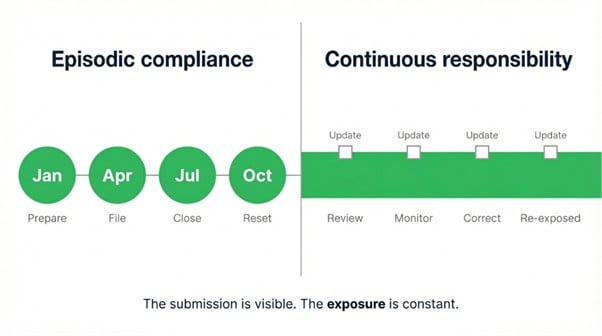
Under the traditional annual compliance model, the rhythm was familiar: you prepare clients, submit records, they review and file, you move on. Work was annual and priced accordingly. MTD’s quarterly update requirement changes that equation. You now carry responsibility for client records on a rolling basis—whether or not you’ve priced for it.

This creates what you might call a visibility gap. Clients see the quarterly submissions. What they don’t see is the ongoing monitoring, record chasing, and quality assurance that sits behind them. Firms absorb that work, and unless engagement terms and pricing reflect it, the result is margin erosion—gradual enough that it’s not obvious until it’s already built into the way you operate.

The parallel is the SaaS transition that reshaped the software industry 15–20 years ago. Annual licences gave way to recurring revenue, and the businesses that adapted their pricing and delivery models survived. Those that didn’t fell behind and became structurally unprofitable.

Firms that recognise this shift will rebuild around tiered pricing, retainer models, clear responsibility clauses, and regular review cycles tied to client behaviour. Firms that don’t will keep doing the work while slowly losing margin.

Some practices are already operating this way—particularly those that have embraced digital bookkeeping and regular client interaction. They’re doing continuous work. They just haven’t always named it or priced for it. This stage gives that reality a frame.

Where is your firm today?

Going into the April start date, some firms were located between technology preparation and operational change. MTD being live doesn’t close that gap automatically—many practices are still working through the implications of running a more continuous model, with the 7 August quarterly deadline providing the real forcing function.

The questions that keep coming up are revealing: how to get clients to maintain digital records consistently, how to manage quarterly workflows internally without overwhelming existing capacity, how to balance new workloads against current compliance commitments, and—increasingly—how to price services that are delivered more regularly throughout the year.

In most cases, the technology is ready. The operating and commercial model is where the work remains.

How your firm can move forward

MTD for Income Tax is live, so if you think you’re behind, the priority is closing the gap quickly—and in the right order.

  • Pricing and engagement terms first. If your firm hasn’t updated its commercial terms to reflect continuous responsibility, this is the most urgent conversation. Every week that passes with quarterly work being done under annual pricing is margin that won’t be recovered. Some firms are already moving to retainer-style pricing and behaviour-linked review clauses. The ones that wait will find the conversation harder to have once the work is already being done for free.
  • Set expectations with clients now. Establishing a rhythm for how and when clients provide records can’t wait for the next engagement review. For clients already in scope, that conversation needs to happen immediately. For those coming into scope in 2027, you still have time to establish the right pattern before obligation arrives.
  • Segment clients by readiness and urgency. Some clients are already using digital systems and will transition smoothly. Others will need significant support. With the 7 August deadline approaching, trying to move everyone at once is a route to bottlenecks. Prioritise clients above the £50,000 threshold first, and use what you learn to prepare for the second cohort.
  • Use the first quarterly submissions as a calibration exercise. The window for low-stakes testing has closed, but the first round of live quarterly updates will reveal process gaps before they become embedded. Treat it as a structured learning exercise.

Final thoughts: Making the real transition

Navigating MTD smoothly might not be about having the latest and greatest software. It’ll be more about recognising how MTD for Income Tax changes the economic relationship between practice and client.

Annual compliance was annual and bounded. Quarterly reporting is continuous. And continuous work, delivered without continuous pricing, is a business model problem—not a technology problem. You may understand the rules behind MTD for Income Tax. The harder question is whether your firm is ready for what those rules do to the way you operate—and how you get paid.

E-Book: MTD for Income Tax—The final countdown playbook for practices

Accountants and bookkeepers still have time to create a repeatable plan for MTD success. This e-Book explains how, via a fast-track mindset, and a 5-phase countdown to April 2026—and beyond.

Get Making Tax Digital: The Final Countdown Playbook

PakarPBN

A Private Blog Network (PBN) is a collection of websites that are controlled by a single individual or organization and used primarily to build backlinks to a “money site” in order to influence its ranking in search engines such as Google. The core idea behind a PBN is based on the importance of backlinks in Google’s ranking algorithm. Since Google views backlinks as signals of authority and trust, some website owners attempt to artificially create these signals through a controlled network of sites.

In a typical PBN setup, the owner acquires expired or aged domains that already have existing authority, backlinks, and history. These domains are rebuilt with new content and hosted separately, often using different IP addresses, hosting providers, themes, and ownership details to make them appear unrelated. Within the content published on these sites, links are strategically placed that point to the main website the owner wants to rank higher. By doing this, the owner attempts to pass link equity (also known as “link juice”) from the PBN sites to the target website.

The purpose of a PBN is to give the impression that the target website is naturally earning links from multiple independent sources. If done effectively, this can temporarily improve keyword rankings, increase organic visibility, and drive more traffic from search results.


Jasa Backlink

Download Anime Batch

What is a pro forma invoice and how to create one

Like all invoices, a pro forma invoice outlines a sale between a buyer and a seller—but there’s more to it than meets the eye. Although it resembles a regular invoice, a pro forma invoice serves a distinct purpose and can’t be used interchangeably with standard invoices. 

Understanding the key distinctions is important for managing your accounts payable and avoiding costly mistakes. This article covers everything you need to know. 

Here’s what we’ll cover: 

Pro forma invoice meaning

A pro forma invoice is an estimated invoice sent to the buyer before goods or services are delivered, outlining costs and terms, and sometimes used to request advance payment. It lists what you’re selling, the total amount, and key details about the transaction. 

Looking at invoice definitions, a regular invoice is a document showing what’s owed for goods or services you have delivered. The pro forma version is essentially a “good faith” promise between you and the buyer, so they know what to expect. 

For example, if you need payment upfront to lock in financing before you can make the goods or deliver the service, a pro forma invoice lays out all these details before any work is done. 

It’s not an actual request for payment. It confirms some details whilst letting the buyer know of any other parts that still need to be finalised. In that sense, a pro forma invoice is closer to a quote or estimate than an invoice.

Is a pro forma invoice legally binding?

Although it includes many of the same details as a final sales invoice, a pro forma invoice is not legally enforceable in the UK. You can’t use it for statutory accounting, VAT reporting, or as a binding contract. 

Your customer doesn’t have to pay what’s listed, and it won’t show up in their accounts payable or your accounts receivable.

Can a pro forma invoice be cancelled?

A pro forma invoice is just a preview of a potential transaction based on what your buyer has ordered, so cancellation isn’t necessary.

What is a pro forma invoice used for?

Pro forma invoices help both buyers and sellers understand the terms of the agreement, including pricing, items, and delivery details. It’s not a demand for payment, but can form the basis for agreeing on prices and terms.

Why do businesses use pro forma invoices?

Issuing a pro forma invoice means you’re giving your buyer a heads-up about what to expect in terms of cost, delivery, and other details, like commission. It keeps things clear and can help prevent surprises or disagreements down the line, once the goods or services are delivered. 

Pro forma invoices are often used by UK businesses for custom orders or when goods need to clear international customs. 

Pro forma invoices are good for custom orders, as they make your buyer aware of how much their requested item will cost upfront before production starts.

When should a business send a pro forma invoice?

A pro forma invoice is usually sent when an order is placed, well before shipping. 

It’s a way to confirm the details and pricing upfront and avoid having to go back and forth later. It’s especially useful if you’re dealing with international shipments.

What’s in a pro forma invoice?

A pro forma invoice is packed with information. Here are the details of what makes up this preliminary document: 

  • Detailed descriptions of the goods: including the country of origin and the correct product classification (such as the Harmonised System (HS) code or UK commodity code used by HMRC to calculate duties and taxes). 
  • Price of the products: the cost of your goods and/or services 
  • Delivery terms: where’s the package coming from, and where’s it going? When can the customer expect delivery? 
  • Validity or expiration date: how long is the stated price good for? 
  • The term “pro forma invoice”: let the buyer know it’s just a preview, not the final bill. 

Check out our entire range of free invoice templates.

Pro forma invoice example

As an example of a pro forma invoice in action, imagine you work for a veterinary group and get an order for 1,000 pet care packages. Instead of jumping straight into packing, you send a pro forma invoice with the price, delivery date, payment terms, and any discounts. 

This allows the buyer to review the details and negotiate if needed. Once everyone’s on the same page, you finalise the pro forma, start packing, and then send the actual invoice. It’s a smoother way to manage orders and avoid last-minute mix-ups.

Sample pro forma invoice template

 Of course, the format of a pro forma invoice can vary depending on the nature of your business and products or services. But we’ve outlined a basic template below for illustrative purposes: 

Seller information: 

Company Name: _________________________ 

Address: _______________________________ 

Phone: ________________________________ 

Email: ________________________________ 

Buyer information: 

Company Name: ________________________ 

Address: _______________________________ 

Phone: _________________________________ 

Email: _________________________________ 

Invoice number: _________________________ 

Invoice date: ____________________________ 

Payment due date: _______________________ 

Itemised list of goods/services: 

Item Description  Quantity  Unit Price  Total Price 
________ ________ ________ ________
________  ________ ________ ________
________ ________ ________ ________

Subtotal: ___________ 

Tax (if applicable): ___________ 

Shipping costs: ___________ 

Total amount due: ___________ 

Terms & conditions: 

Payment due by: ___________________________ 

Delivery date: _____________________________ 

Other terms: _____________________________ 

Signature: ___________________________ 

Date: ________________________________ 

What are the benefits of using a pro forma invoice? 

Using a pro forma invoice offers several key benefits for both buyers and sellers: 

  • Transparency: it’s like a clear window into the deal, showing both sides exactly what’s agreed upon. 
  • Streamlines sales process: it makes things smoother between the seller and buyer before the purchase is locked in. There will be less back and forth and more getting things done. 
  • Tool for negotiations: since it’s not a final bill, both sides can use it to tweak terms or make changes to the order. 

Disadvantages of a pro forma invoice

Whilst pro forma invoices have their perks, they’re not without their downsides: 

  • Potential for misunderstanding: customers might get confused and think it’s the actual invoice. This could lead to payment mix-ups. 
  • Absence of legal weight: these aren’t legally binding, so you can’t force your customer to pay just because you sent one. If a buyer backs out, you could lose out if you’ve already started making the products/working on the services. 
  • Possible changes in final cost: the pro forma might not match the final bill if costs or taxes change, potentially leading to arguments about what’s actually owed. 

Pro forma invoice versus invoice

Let’s look at the difference between a pro forma invoice and a regular invoice. This will also give you an idea of how to write an invoice that really works. 

  Pro forma invoice  Invoice 
Purpose  Preview of terms and costs  Final request for payment 
Legally binding  No  Yes 
Uses  Early estimate, pre-sale negotiation  Final sale confirmation, payment requested 
Flexibility  Can be adjusted before final deal  Fixed and final. No changes allowed 

Pro forma invoice versus commercial invoice

Pro forma invoices are useful in international trade, particularly when goods are being shipped before a final commercial invoice is available. They can help customs authorities and couriers estimate duties and VAT in advance.

  Pro forma invoice  Commercial invoice 
Purpose  Initial estimate, not a demand for payment  Official document for payment and customs 
Legally binding  No  Yes 
Use case  Pre-sale, negotiation, or customs estimate  Final sale, payment collection, HMRC requirements 
Detail level  Can be much less detailed  Must include detailed transaction info 

Pro forma invoice versus purchase order

A pro forma invoice is a preview of costs and terms, whilst a purchase order is a formal request from the buyer to buy something. Here’s how they differ. 

  Pro forma invoice  Purchase order 
Purpose  Estimate and terms preview  Buyer’s formal request to purchase 
Legally binding  No  Yes, once accepted by the seller 
Use  Inform buyer of costs and terms  Confirm what buyer wants to buy 
Initiator  Seller’s document  Buyer’s document 

Cloud-based invoicing software simplifies managing pro forma invoices 

Pro forma invoices can make your business life easier by keeping things transparent and organised before the sale is final. However, you need to make sure your clients or customers know that what they’re being given is not the final invoice. 

Leverage powerful cloud-based invoicing software to cut down on errors, get paid faster, and have all your invoicing needs at your fingertips, whether you’re in the office or on the move: 

  • Save time and money: issue invoices quickly, reduce errors, and cut costs. 
  • Automate invoicing: generate, send, track and manage invoices automatically. 
  • Create accurate digital invoices: avoid disputes and simplify billing. 
  • Receive payments on time: guarantee that invoices reach clients promptly with clear payment terms. 
  • Manage invoices on the go: access and manage your invoices anytime, anywhere. 

Get started today and see how automated invoicing software can streamline your business. 

Subscribe to the Sage Advice newsletter

Join more than 500,000 UK readers and get the best business admin strategies and tactics, as well as actionable advice to help your company thrive, in your inbox every month.

Subscribe now

PakarPBN

A Private Blog Network (PBN) is a collection of websites that are controlled by a single individual or organization and used primarily to build backlinks to a “money site” in order to influence its ranking in search engines such as Google. The core idea behind a PBN is based on the importance of backlinks in Google’s ranking algorithm. Since Google views backlinks as signals of authority and trust, some website owners attempt to artificially create these signals through a controlled network of sites.

In a typical PBN setup, the owner acquires expired or aged domains that already have existing authority, backlinks, and history. These domains are rebuilt with new content and hosted separately, often using different IP addresses, hosting providers, themes, and ownership details to make them appear unrelated. Within the content published on these sites, links are strategically placed that point to the main website the owner wants to rank higher. By doing this, the owner attempts to pass link equity (also known as “link juice”) from the PBN sites to the target website.

The purpose of a PBN is to give the impression that the target website is naturally earning links from multiple independent sources. If done effectively, this can temporarily improve keyword rankings, increase organic visibility, and drive more traffic from search results.

Jasa Backlink

Download Anime Batch

What is accounts payable? (definition and examples)

As a business owner or accountant, tracking what your company owes is just as important as tracking what it earns.

That’s where Accounts Payable (AP) comes in.

Whether you’re managing invoices, supporting timely payments, or optimising cash flow, understanding accounts payable is key to helping maintain supplier relationships and ensuring your organisation’s financial stability.

This guide explains what accounts payable means, how it works, and how to manage it effectively.

Here’s what we’ll cover:

Accounts payable definition

At its core, accounts payable refers to the money your business owes to suppliers, vendors, or creditors in exchange for goods or services.

These debts are typically short-term liabilities, meaning they must be paid within a set period—often 30, 60, or 90 days.

An AP system enables your accounting team to consolidate payments for each transaction.

Instead, suppliers will enable you to buy on credit, making it easier to manage cash flow and operational expenses.

The term accounts payable can also refer to the department within your company responsible for processing invoices and paying creditors.

What does accounts payable mean for an accounting department?

For an accounting team, accounts payable is more than just a list of unpaid invoices.

Here’s why AP management matters:

Tracking company liabilities

Every unpaid supplier invoice is recorded as a current liability on your balance sheet, ensuring accurate financial reporting.

Managing cash flow

A well-organised AP process helps your business balance payments and cash reserves, so you can cover expenses without financial strain.

Avoiding late fees and penalties

Paying suppliers on time not only helps reduce the risk of additional costs but also builds trust and strengthens business relationships.

Accounts payable versus bills payable

Whilst accounts payable and bills payable may sound similar; they refer to different financial obligations.

  • Accounts payable is a broader term. It includes all short-term obligations your business owes after purchasing goods or services on credit. It’s recorded as a current liability on your balance sheet and represents the total amount due to suppliers.
  • Bills payable, on the other hand, are the specific documents—like invoices or bills—that represent these individual obligations. Each bill payable is a short-term financial obligation and forms part of your overall accounts payable balance. These are typically settled within agreed timeframes.

Accounts payable examples

Accounts payable is easier to understand when viewed in practical scenarios.

Here are some common scenarios where your business might use AP:

1. Buying office supplies on credit

Imagine your business orders office supplies from a vendor with a 30-day payment term.

Instead of paying upfront, the invoice is recorded as accounts payable and settled by the due date.

2. Purchasing inventory for resale

If you run a retail business, you might buy inventory from a supplier on a 60-day payment term.

Instead of paying upfront, the invoice stays in accounts payable until the due date.

This way, the business can stock inventory and keep sales going without immediately dipping into cash reserves.

3. Hiring a cleaning service

Your company hires a cleaning service that invoices at the end of the month.

Until the payment is processed, the amount is recorded as accounts payable, reflecting the short-term liability on your balance sheet.

These examples illustrate how AP supports the management of short-term debts efficiently, allowing your business to maintain operations whilst controlling cash flow.

How to record accounts payable

Effective accounts payable management supports financial stability and supplier relationships.

Here are the simple steps to record AP in your accounts payable process:

1. Receive the invoice

Your supplier sends an invoice after delivering goods or services.

2. Verify the invoice

Your accounting team checks that the invoice matches the purchase order and delivery receipt to verify accuracy.

3. Record the payable

The invoice amount is logged as a liability in your general ledger, reflecting what your business owes.

4. Schedule the payment

A payment date is set based on agreed terms to avoid late fees and maintain healthy cash flow.

5. Process the payment

Once the invoice is paid, it’s marked as settled, and the liability is removed from your books.

A clear AP process supports structured financial management, prevents errors like duplicate payments, and strengthens supplier relationships.

Using accounts payable software can simplify the process by automating invoice matching, tracking due dates, and ensuring accurate record-keeping—helping you stay on top of payments with less manual effort.

What is the relationship between cash flow and accounts payable?

Accounts payable plays a significant role in managing your business’s cash flow.

Managing payment timing within agreed terms allows you to retain funds for other expenses like payroll, rent, or inventory purchases.

This flexibility helps you balance outgoing payments with incoming revenue and avoid unnecessary cash shortages.

However, missing payment deadlines can damage your relationships with suppliers, incur late fees, and even affect your ability to negotiate better terms in the future.

One way to stay on top of this is by tracking your AP turnover ratio—a metric that shows how quickly your business pays its suppliers.

A high ratio means settling debts quickly, whilst a lower ratio might indicate potential cash flow challenges.

Accounts payable in accounting

Accounts payable is key to your business’s financial reporting and cash flow management.

Monitoring AP enables organisations to manage liabilities, while making informed financial decisions.

Here are a few critical AP concepts to know:

Cash flow management

Staying on top of AP ensures your business has enough cash to cover expenses without liquidity issues.

Early payment discounts

Some suppliers offer discounts for early payment, which can help reduce costs and improve supplier relationships.

AP turnover ratio

This metric shows how quickly your business pays suppliers.

A higher ratio means settling debts fast, whilst a lower one might signal cash flow challenges.

Features to look for in accounts payable software

Looking to streamline your AP process and cut down on manual work?

Accounts payable software can automate invoice processing, reduce errors, and help you stay compliant.

Here are some key features to look for:

Invoice capturing

Automatically captures and processes invoice details, reducing the need for manual entry.

Approval workflows

Simplifies invoice approvals by routing them to the right people, ensuring nothing gets stuck in the pipeline.

Automated payment scheduling

This feature helps you pay suppliers on time, avoid late fees, and take advantage of early payment discounts.

Auto-matching with AI

Uses artificial intelligence to automatically match invoices to purchase orders and create draft transactions.

This speeds up reconciliation and can support more efficient period-end processes, removing the need for manual matching or document hunting.

Payment flexibility

Gives you the option to issue payments using each vendor’s preferred method, including cheques, BACS, or virtual cards, making the payment process more convenient for everyone.

Integration with accounting software

Syncs seamlessly with your financial records for better tracking and reporting.

Fraud detection and security

Helps protect your business by flagging duplicate invoices, suspicious transactions and preventing unauthorised payments.

How effective accounts payable management supports your business

Whether you’re a small business owner or an accountant, effective AP management can materially impact your company’s financial health.

With the right processes and tools, you can automate payments, set deadline reminders, and improve overall financial management.

Accounts payable FAQs

1. What financial statement is accounts payable on?

Accounts payable are listed under current liabilities on the balance sheet since they represent money your business owes to suppliers.

2. Does accounts payable go on the income statement?

No, AP does not appear on the income statement because it’s a liability, not an expense.
Expenses are recorded when incurred, whilst AP tracks what your business still needs to pay.

3. What’s the difference between accounts payable and accounts receivable?

Both accounts payable and accounts receivable track money moving in and out of your business, but they represent opposite sides of a transaction:

Accounts payable: the money your business owes to suppliers for goods or services received on credit. It’s recorded as a liability on your balance sheet until paid.

Accounts receivable: the money customers owe your business for products or services you’ve provided. It’s recorded as an asset since it represents incoming cash.

4. Is accounts payable a credit or debit?

When recorded, AP is a credit entry (increasing liabilities). When paid, it’s a debit entry (reducing liabilities).

5. Is accounts payable an asset or a liability?

Accounts payable are a current liability because they reflect outstanding payments that your business must settle within a short period.

Subscribe to the Sage Advice newsletter

Join more than 500,000 UK readers and get the best business admin strategies and tactics, as well as actionable advice to help your company thrive, in your inbox every month.

Subscribe now

PakarPBN

A Private Blog Network (PBN) is a collection of websites that are controlled by a single individual or organization and used primarily to build backlinks to a “money site” in order to influence its ranking in search engines such as Google. The core idea behind a PBN is based on the importance of backlinks in Google’s ranking algorithm. Since Google views backlinks as signals of authority and trust, some website owners attempt to artificially create these signals through a controlled network of sites.

In a typical PBN setup, the owner acquires expired or aged domains that already have existing authority, backlinks, and history. These domains are rebuilt with new content and hosted separately, often using different IP addresses, hosting providers, themes, and ownership details to make them appear unrelated. Within the content published on these sites, links are strategically placed that point to the main website the owner wants to rank higher. By doing this, the owner attempts to pass link equity (also known as “link juice”) from the PBN sites to the target website.

The purpose of a PBN is to give the impression that the target website is naturally earning links from multiple independent sources. If done effectively, this can temporarily improve keyword rankings, increase organic visibility, and drive more traffic from search results.

Jasa Backlink

Download Anime Batch

AI maturity curve for accountants/bookkeepers

Artificial intelligence is already changing how accounting and bookkeeping work gets done. If you’re like many practitioners, you’re already using AI tools daily.

Tasks get completed faster. Admin shrinks. Communication sharpens.

On the surface, that looks like progress. But there’s a second effect that deserves more attention.

As AI reduces the time required to complete core work, it creates capacity. But capacity, on its own, doesn’t create value.

If you halve the time spent on a compliance job but charge the same fixed fee, you have empty hours.

If you halve the time and charge by the hour, you’ve cut your own revenue. Neither outcome is progress.

Recent Sage research with AccountingWeb shared at the Finance, Accounting and Bookkeeping Show (FAB), found that while 71% of firms are now using external AI tools, just 7% describe the impact as transformational.

Most firms are using AI. Almost none have changed anything fundamental.

This is the capacity gap: the distance between time saved and value captured.

It’s a central economic challenge of AI adoption in accounting, and it’s forming in firms right now, often invisibly.

AI adoption tends to move through stages, from experimentation to productivity to deeper structural change.

Understanding where your firm sits on that progression matters.

But the more important question is whether you’re closing the capacity gap or widening it.

Here’s what we’ll cover:

E-Book: The accountant’s guide to MTD for Income Tax

Download this free interactive guide, written by experts, about developing your practice approach to Making Tax Digital for Income Tax.

Download here

The AI maturity model

AI adoption is often described in terms of which tools you use.

In practice, the tools matter far less than what they change about how your firm operates, delivers work, and gets paid.

The stages below offer a way to assess where your firm currently sits. You’ll likely recognise elements of more than one. The important question is which direction you’re moving in.

Stage 1: Awareness and experimentation

At this stage, AI is something individuals are exploring rather than something the firm has adopted.

You or your team are trying ChatGPT, Claude, Copilot or Gemini for emails, notes, or quick summaries.

Usage is informal, uncoordinated, and disconnected from how the firm actually delivers work.

The Sage AI labs at FAB showed there was curiosity and genuine enthusiasm.

But a recurring theme from practitioner discussions is that many people are using AI without a clear sense of how it fits into their operations. It’s happening around the business, not inside it.

The capacity gap is already forming at this stage, even if it’s hard to see.

You save time on tasks, but your firm has no plan for what happens to that time.

And it doesn’t sit empty. It gets quietly absorbed by the expanding scope of your role—supporting clients with technology questions, navigating business decisions, or handling conversations that have nothing to do with accounting.

The time AI saves disappears into work that was never part of the job description and hasn’t been priced for.

Stage 2: Assisted productivity

The next stage focuses on efficiency.

Your firm begins using AI more consistently across day-to-day work—drafting communications faster, summarising meetings, supporting basic analysis, or cutting time on repetitive admin.

The improvements are real and they compound across weeks, months and years.

This is where AI feels like success. Clients are served. Deadlines are met. Your team is producing more with less effort. Nothing appears broken.

That’s what makes this stage dangerous.

It’s easy to get stuck here. Not because you’ve failed to adopt AI, but because assisted productivity feels like enough.

There’s no obvious signal that anything needs to change. But the underlying model of your firm remains untouched. AI is improving how tasks are completed, not how work is structured, delivered, or priced.

The data backs this up.

In Sage research conducted with AccountingWeb, the most common AI use cases reported by firms are tax rules, drafting emails, summarising information, and generating reports.

These are all efficiency gains. None of them change how the firm operates or gets paid.

The same pattern shows up in outcomes. Reducing time spent on manual tasks is the most widely reported benefit. Expanding services sits near the bottom. Firms are saving time. Almost none are using it to offer something new.

The longer your firm operates here without rethinking its workflows or commercial model, the wider the capacity gap becomes.

Time is being saved across the practice, but none of it is being converted into new value.

Instead, hidden work around the edges of the profession consumes much of that capacity—the technology support, the business advice, and the client hand‑holding that you absorb because there is no one else to do it.

AI creates time. The expanding role of the modern accountant or bookkeeper takes it back. And because everything on the surface looks like progress, the problem of hidden hours doesn’t get addressed.

E-Book: The accountant’s guide to MTD for Income Tax

Download this free interactive guide, written by experts, about developing your practice approach to Making Tax Digital for Income Tax.

Download here

Women discussing Making Tax Digital

Stage 3: Workflow integration

This is where the shift becomes more substantive.

AI moves from being a personal productivity tool to shaping how work flows through your firm, embedding itself into:

  • bookkeeping, reporting, and communication workflows,
  • connected to client data and historical records,
  • applied to recurring processes,
  • and standardised across the team.

This transition can create real friction.

AI performs well in isolation, but without access to actual client data and real workflows, its usefulness degrades quickly.

Tools that aren’t connected to the systems where work happens require constant manual checking, which erodes much of the efficiency gain they were supposed to deliver.

As practitioners at FAB noted repeatedly, AI becomes significantly more useful when it operates within context rather than alongside it.

The challenge here isn’t finding better tools. It’s redesigning how work moves through your firm so that AI becomes part of the infrastructure, not an add-on.

This is also where the gap between firms can widen.

Practices that integrate AI into their workflows build scalable, consistent ways of operating.

Those that remain at the level of individual usage see uneven results, no firm-wide benefit, and a capacity gap that continues to grow unchecked.

Stage 4: Commercial transformation

At this stage, the impact of AI stops being operational and becomes economic.

AI reduces the time required to deliver core compliance work.

Tasks that once took hours can be completed significantly faster, or in some cases automatically. In theory, that creates real, measurable capacity across your firm.

In practice, that capacity often isn’t freely available.

Consider what plays out in practice. You automate significant portions of a recurring compliance job.

Work that used to take eight hours now takes three.

Bill the client by the hour? Revenue drops by more than half.

If the client pays a fixed fee, your firm has gained five hours of capacity—but only if you have somewhere productive to put them.

If neither your service model nor your pricing changes, you’re doing the same work in less time and capturing none of the value AI created. More efficient and less profitable at the same time.

This is the structural reality of AI adoption in a profession that has priced work on time and complexity for decades. AI collapses both.

It makes complex work simpler and fast work faster. AI compresses the basis on which many firms charge, and firms that adopt it most enthusiastically often compress it fastest.

To close the capacity gap, you should do a few things differently. Use freed capacity to take on more clients without increasing headcount.

Redirect time from processing to interpretation—less effort preparing data, more time helping clients understand it.

Expand into advisory and planning work that compliance deadlines previously squeezed out.

Firms reshape how services are packaged and priced, shifting away from time‑based billing towards value‑based models that reflect outcomes rather than hours.

But this is harder than it sounds.

Advisory work requires a different skill set, a different client conversation, and a different commercial model. You might not be set up for that pivot.

The capacity gap isn’t just a firm-level problem. It’s a profession-level pricing challenge, and no individual firm can solve it simply by deciding to offer more strategic services.

Firms that don’t close the gap will continue to deliver the same services in less time, and the efficiency gains will quietly compress their margins.

They’ll have adopted AI successfully by every visible measure. They just won’t have captured the value it created.

Where is your firm today?

Many firms currently sit somewhere between assisted productivity and workflow integration.

AI is being used, and in some cases, it’s delivering clear efficiency gains.

But in many practices, individuals still drive usage, while firms fail to embed it firm‑wide, connect it to the platforms where client work happens, or link it to how services are structured or priced.

The capacity gap is already forming.

Time is being saved in pockets. No one has decided what to do with it. And because productivity gains feel like progress, there’s no urgency to ask the harder question: where is that time going, and is it generating any return?

AI and MTD: a single structural squeeze

Making Tax Digital for Income Tax increases the frequency and continuity of work across the year.

Instead of annual compliance cycles, you move towards ongoing interaction with clients, with quarterly updates creating a rolling obligation that doesn’t pause between submissions.

AI changes how that work can be delivered.

It creates the capacity needed to manage more regular reporting and client support.

But it also sharpens the pricing question. When firms prepare quarterly submissions faster and partially automate routine bookkeeping, the time required to serve each client falls. But the responsibility doesn’t.

Together, they create a situation where firms are doing more work, more often, in less time, with no mechanism to capture the additional value. MTD increases the demand for continuous work.

AI compresses the economics of delivering it.

And beneath both, your role continues to expand into territory that neither system accounts for—the hours spent on client support, business guidance, and relationship management that don’t appear in any workflow or any invoice.

The capacity gap, the continuous responsibility challenge, and the invisible expansion of the practitioner’s role are not three separate problems.

They are the same structural squeeze viewed from different angles. Address one without the others and the pressure shifts rather than resolves.

Final thoughts

AI adoption is often framed as a question of which tools to use.

In practice, the tools are the easy part. The harder question is what happens to the time AI creates, and whether anyone is capturing the value.

The profession is heading towards a split.

On one side are firms that use AI to create capacity and then find ways to convert that capacity into better services, stronger client relationships, and more sustainable commercial models.

 On the other are firms that use AI to do the same work faster, charge the same fees, and see their margins erode so gradually it only becomes visible once the pressure is structural.

Most firms won’t realise which side they’re on until the numbers tell them.

Firms that benefit most financially from AI won’t be the fastest adopters. They’ll be the ones closing the capacity gap.


Subscribe to the Sage Advice newsletter

Join more than 500,000 UK readers and get the best business admin strategies and tactics, as well as actionable advice to help your company thrive, in your inbox every month.

Subscribe now

PakarPBN

A Private Blog Network (PBN) is a collection of websites that are controlled by a single individual or organization and used primarily to build backlinks to a “money site” in order to influence its ranking in search engines such as Google. The core idea behind a PBN is based on the importance of backlinks in Google’s ranking algorithm. Since Google views backlinks as signals of authority and trust, some website owners attempt to artificially create these signals through a controlled network of sites.

In a typical PBN setup, the owner acquires expired or aged domains that already have existing authority, backlinks, and history. These domains are rebuilt with new content and hosted separately, often using different IP addresses, hosting providers, themes, and ownership details to make them appear unrelated. Within the content published on these sites, links are strategically placed that point to the main website the owner wants to rank higher. By doing this, the owner attempts to pass link equity (also known as “link juice”) from the PBN sites to the target website.

The purpose of a PBN is to give the impression that the target website is naturally earning links from multiple independent sources. If done effectively, this can temporarily improve keyword rankings, increase organic visibility, and drive more traffic from search results.

Jasa Backlink

Download Anime Batch

Understanding the accounts payable process

Whether you’re running a mid-sized business or starting out as an entrepreneur, getting to grips with the accounts payable process within your expenditure and purchasing cycle is crucial. 

So, what is it, and why should you care? This guide will explain everything you need to know about the accounts payable process and why it’s important for your business’s financial health. 

Here’s what we will cover: 

What is the accounts payable process?

Accounts Payable (AP) is the money your business owes to suppliers and vendors for the goods and services you’ve received but haven’t yet paid. It shows up as a liability on your balance sheet and is critical when tracking how cash moves in and out of your business. 

The accounts payable process, also known as the “full cycle of accounts payable,” covers everything from getting a Purchase Order (PO) and invoice to actually making the payment. At a high level: 

  • You receive an invoice (and, where applicable, a purchase order) from a supplier 
  • You review the invoice against the PO to ensure accuracy 
  • You approve the invoice 
  • You authorise and send payment 

This sequence is also part of the broader P2P (Procure-to-pay) process. 

The importance of an optimised accounts payable workflow

If your accounts payable workflow is full of bottlenecks, you risk late payments, duplicate bills, extra fees, and frustrated suppliers. A smooth AP process helps avoid these problems and brings many advantages. 

It helps you:

Keep track of invoices

An automated AP system updates invoices in real-time, so you always know which payments are due.

Pay on time, every time

Automated reminders and scheduling help ensure you don’t miss deadlines and avoid penalties.

Eliminate manual work

Automation reduces the need for manual data entry and processing, minimising the risk of errors and freeing up your team from repetitive tasks.

Speed up finance operations

With streamlined workflows and automation, your finance team can process payments quickly, allowing them to focus on higher-value tasks. 

Save time for other goals

By reducing time spent on manual AP tasks, you give your team more time to tackle strategic priorities and contribute to the business’s growth and success. 

Build supplier relationships

Consistent and timely payments build trust and strengthen relationships with vendors, potentially leading to better terms, discounts, and partnerships.

Avoid late fees and penalties

An organised accounts payable process ensures that payments are never missed, helping you avoid costly late fees and penalties.

Prevent fraud

Built-in controls help detect and prevent fraudulent activities by flagging suspicious transactions and enforcing proper approvals. 

Challenges in accounts payable procedures

When your AP workflow is manual, you can run into several issues, including: 

  • Missing invoices: paper or email invoices can get lost, risking late fees, supplier disputes, and VAT reporting issues. 
  • Time-consuming oversight: Sage found that 77% of CEOs in European markets spend time each month chasing overdue invoices. In fact, 4 in 10 are doing this weekly. That’s time they’re not spending on growth or new ideas. 
  • Errors in data entry: manual AP work can lead to typos, misplaced documents, and miscalculations—all of which skew your financial data. 
  • Scaling problems: rapid growth or seasonal spikes in invoices can overwhelm a manual AP process. Automated systems handle high volumes more smoothly. 
  • Multiple payment methods: managing everything from BACS transfers to paper cheques can get messy fast. Without the right tools, you risk mistakes and delays. 

The accounts payable process steps

A end-to-end accounts payable cycle includes four key steps:

1. Invoice capture

First, collect the invoice—via email, post, or a digital invoicing system—and record it in your accounting system. Automated tools like cash flow management software can handle this step automatically.

2. Invoice approval

Then review the invoice for accuracy, including quantities, prices, and discounts. Once you’ve verified it, the invoice needs to be approved, usually by someone in your finance team or management.

3. Payment processing

With the invoice approved, it’s time to pay your supplier. Common payment methods include BACS, faster payments, cheques, and virtual cards. Make sure you match the payment to the correct invoice to avoid confusion.

4. Payment recording

Lastly, log the payment in your accounting system to keep your books accurate and make future reporting easier. Automation helps here, too, by updating records without the need for extra data entry.

Implementing best practices in the accounts payable process

You now know what the accounts payable process is and its full cycle. Now it’s time to make sure you’re doing it correctly. Here are three best practices to keep your AP process running smoothly: 

1. Cut down on cheque runs

Paper cheques can be time-consuming. Instead of issuing them every few days, try consolidating payments and running cheques fortnightly (or even monthly). Fewer cheque runs mean fewer opportunities for errors and confusion and a simpler AP workflow overall. 

2. Limit access and establish controls

Ask yourself: who can change supplier information? Limiting access to your supplier master file helps you keep tight control over critical details. Assign specific roles and permissions so only trusted team members can add or update vendor info. Everyone else can view but not edit.

3. Eliminate AP fraud

Unfortunately, fraud is a real concern—79% of organisations faced payment fraud attempts in 2024. You can protect your business by: 

  • Setting strong internal controls. 
  • Watching for fake vendor accounts. 
  • Restricting the ability to add new vendors to authorised employees. 
  • Using multi-factor authentication (MFA) to secure financial systems. 
  • Training your team to recognise red flags and report suspicious activity. 

Optimise accounts payable process with AP automation

AP automation tools let you scan invoices, match them to purchase orders, and handle VAT. It’s a game-changer for businesses looking to save time and reduce errors. In fact, by 2030, up to 30% of current work hours could be automated with AI, according to McKinsey. 

Here’s why AP automation matters: 

  • Simplifies accounts payable: AP automation software keeps your cash flow in check and ensures invoices are paid on time. By automating the AP process, you reduce human error and minimise costs, freeing up time and resources for other important tasks. 
  • Boosts productivity: manual AP processing can be a huge drain on your team’s time and energy. Tracking every supplier agreement and processing hundreds of invoices a day can be overwhelming. Automation handles all of the work, eliminating thousands of hours of manual data entry. 
  • Improves cash flow control: with automated AP software, you get real-time visibility into your cash flow. No more confusion, simply clear, up-to-date reporting that helps you manage your finances better. 
  • Streamlines approval process: manual approval processes often lead to late fees, missed invoices, and overworked teams. AP automation software streamlines the entire approval process, from routing invoices for review to notifying stakeholders. It also includes built-in permissions to prevent fraud and unauthorised purchases. 

Next steps to streamline and strengthen your accounts payable workflow

With the right approach, you can sidestep common pitfalls, streamline your workflow, and make sure your finances stay in tip-top shape. 

Sage’s accounts payable automation software solutions are designed to make your life easier. From invoice handling to real-time reporting, you can improve your AP through its automation and easy integrations.

Accounts payable process FAQs 

How do you record accounts payable transactions? 

Recording accounts payable is pretty simple once you get the hang of it. Every time you get an invoice or a bill, you note it down in your accounts payable ledger. You’ll want to log the details like the date, amount, and who it’s from. When you actually pay it, update your records to show it’s been settled. 

How can automation improve the accounts payable process? 

Automation can make your accounts payable process and procedures easier. Instead of drowning in paperwork and risking human errors, automation software takes care of the tedious tasks for you. It scans invoices, matches them with purchase orders, and even supports VAT treatment and tax reporting requirements. This means you save time, reduce mistakes, and avoid the hassle of manual checks. 

Subscribe to the Sage Advice newsletter

Join more than 500,000 UK readers and get the best business admin strategies and tactics, as well as actionable advice to help your company thrive, in your inbox every month.

Subscribe now

PakarPBN

A Private Blog Network (PBN) is a collection of websites that are controlled by a single individual or organization and used primarily to build backlinks to a “money site” in order to influence its ranking in search engines such as Google. The core idea behind a PBN is based on the importance of backlinks in Google’s ranking algorithm. Since Google views backlinks as signals of authority and trust, some website owners attempt to artificially create these signals through a controlled network of sites.

In a typical PBN setup, the owner acquires expired or aged domains that already have existing authority, backlinks, and history. These domains are rebuilt with new content and hosted separately, often using different IP addresses, hosting providers, themes, and ownership details to make them appear unrelated. Within the content published on these sites, links are strategically placed that point to the main website the owner wants to rank higher. By doing this, the owner attempts to pass link equity (also known as “link juice”) from the PBN sites to the target website.

The purpose of a PBN is to give the impression that the target website is naturally earning links from multiple independent sources. If done effectively, this can temporarily improve keyword rankings, increase organic visibility, and drive more traffic from search results.
Jasa Backlink

Download Anime Batch

AI Is accelerating familiar attacks: What’s changing, and how leaders should respond

Artificial intelligence is not creating a completely new class of cyber threat. What it’s doing is making familiar attacks faster to launch, easier to tailor, and harder to stop in time.

That distinction matters.

For years, organisations have dealt with phishing, social engineering, account compromise, vulnerability exploitation, and ransomware. None of that’s new. What has changed is the pace. Tasks that once took attackers hours or days can now be completed in minutes, sometimes at scale, and often with very little effort.

That shift is easy to underestimate. The real issue is not that attackers have suddenly become more inventive. It’s that they no longer need to be slow.

For leadership teams, this changes the security conversation. The challenge is no longer just whether an organisation has the right controls on paper. It’s whether the business can detect, decide, and respond quickly enough when routine weaknesses are exploited at machine speed.

That’s what we discuss in this article, as follows:

The threat is familiar but the tempo is not

AI helps attackers automate parts of the attack chain that used to require time, patience, and manual work.

That can include researching a company’s structure, identifying senior employees, generating convincing phishing emails, analysing public data for useful context, scanning for weaknesses, and testing different approaches before choosing the one most likely to succeed.

The underlying tactics are well established. The difference now is execution.

A phishing email no longer has to be generic, badly written, or sent in bulk to be dangerous. It can be targeted, credible, and written in the tone a recipient expects. Reconnaissance no longer depends on someone manually piecing together information over several hours. Public data, company websites, social media, and digital footprints can be analysed far more quickly.

This is where the pressure builds for defenders. When attackers can move faster, security teams have less time to notice what is happening, understand the risk, and contain it before damage spreads.

Why many organisations are still exposed

A lot of security programmes were built for a slower operating environment.

They rely on periodic reviews, annual training, delayed patching cycles, fragmented ownership, and incident response processes that look fine in a policy document but have never really been tested under pressure. That may have been tolerable when attack preparation was slower and campaigns took more time to develop.

It’s far less tolerable now.

AI has not made every attacker more advanced, but it has made many attacks more efficient. That creates strain in places where businesses are often weakest: decision-making, coordination, and speed of execution.

Three issues tend to show up quickly.

1. Governance falls behind reality

Organisations adopt new tools, new workflows, and new ways of sharing information faster than they update policy, oversight, or risk ownership. That creates exposure, especially when leaders do not have a clear view of how AI is being used across the business.

2. Basic weaknesses stay open for too long

Unpatched systems, weak authentication, excessive access rights, and poor email discipline remain common. These are not new failures, but they become more dangerous when attackers can identify and exploit them faster.

3. Response is often too slow

In many businesses, the attacker can now move faster than the internal chain of escalation. By the time the right people are informed, the problem may already have spread.

That’s why this is not only a technical issue. It’s a leadership issue. Security resilience depends on whether the organisation is set up to act quickly, not simply whether it has bought the latest tool.

What leaders need to understand now

There are three realities worth keeping in view.

  1. AI lowers the cost of attack. Capabilities that once required time, specialist skill, or a larger criminal operation are becoming more accessible. That broadens the field of adversaries.
  2. Volume will increase. When parts of the attack process can be automated, criminals can run more campaigns, test more variations, and look for easier wins.
  3. Prepared organisations have an advantage. When attacks accelerate, the businesses that perform best are usually not the ones with the longest list of tools. They are the ones with clear ownership, strong basics, and a rehearsed response.

That last point is important. Leaders do not need to panic, and they do not need to treat every development in AI as a reason to rebuild their security strategy from scratch. They do need to recognise that speed now matters more than ever, and that slow decisions create risk.

A practical 30-, 60-, 90-day response plan for SMBs

For small and mid-sized businesses, the response does not need to begin with complexity. In most cases, the biggest gains come from tightening the basics, clarifying ownership, and improving response discipline.

Within 30 days:Reduce the obvious exposure

Most cyber incidents affecting SMBs still start with familiar weaknesses. An employee account is compromised. A phishing email is opened. A device is unpatched. Access rights are broader than they should be. AI does not change those fundamentals. It simply helps attackers move through them faster.

In the first 30 days, leaders should focus on the controls that reduce the most common forms of exposure.

Priorities should include:

  • Enabling multi-factor authentication for email, remote access, and finance systems
  • Applying software updates across operating systems and key business applications
  • Checking that backups are in place, protected, and can actually be restored
  • Reviewing administrative privileges and removing unnecessary access.

These are not sophisticated measures, but they remain some of the most effective. For many organisations, they also deliver the fastest reduction in risk.

Within 60 days: Improve staff awareness and reporting

Employees remain one of the most common entry points for attackers, particularly in phishing and social engineering campaigns. AI is making those attacks more convincing. Messages are more fluent, more tailored, and less likely to contain the errors that people once relied on as warning signs.

That means awareness training needs to be practical, not performative.

Within 60 days, organisations should make sure employees know what suspicious requests look like, when to stop and question them, and how to report concerns quickly.

Priorities should include:

  • Short, practical awareness training based on realistic examples
  • A clear route for reporting suspicious emails, links, or requests
  • Reinforcement from managers that fast reporting matters
  • A no-blame culture that encourages people to speak up early, even if they may have made a mistake.

That last point is often underestimated. In many incidents, early reporting is the difference between a contained problem and a serious disruption.

Within 90 days: Be ready to respond at speed

Even well-run organisations will not prevent every incident. The question is how quickly they can contain one.

By 90 days, leadership should make sure there is a simple response structure in place. It does not need to be over-engineered, but it does need to be clear.

That should include:

  • Naming the person responsible for coordinating incident response
  • Identifying the systems and data that matter most to business continuity
  • Keeping contact details for internal decision-makers, IT providers, insurers, and legal advisers easy to access
  • Running a tabletop exercise based on a realistic phishing or ransomware scenario.

This kind of preparation is not about theatre. It’s about reducing hesitation. When an incident happens, teams need enough clarity to act without wasting valuable time deciding who owns what.

Final thoughts: The real takeaway

AI is not redefining cyber risk from the ground up. It’s accelerating the threats businesses already face, and exposing the cost of being slow.

For small and mid-sized businesses, that’s a useful message because it keeps the response grounded. The priority is not to chase every new headline. It’s to strengthen the fundamentals, close common gaps, improve reporting, and rehearse response.

Organisations that do those things well will be in a far better position to deal with the reality of AI-assisted attacks. Not because they can predict every threat, but because they can react faster when it matters.

In the current environment, that’s what resilience increasingly looks like.

Explore Sage trust and security

Trust is the foundation of good security and our customer relations. Learn how we safeguard your security, value your privacy, and uphold the highest standards of data ethics.

Learn more

PakarPBN

A Private Blog Network (PBN) is a collection of websites that are controlled by a single individual or organization and used primarily to build backlinks to a “money site” in order to influence its ranking in search engines such as Google. The core idea behind a PBN is based on the importance of backlinks in Google’s ranking algorithm. Since Google views backlinks as signals of authority and trust, some website owners attempt to artificially create these signals through a controlled network of sites.

In a typical PBN setup, the owner acquires expired or aged domains that already have existing authority, backlinks, and history. These domains are rebuilt with new content and hosted separately, often using different IP addresses, hosting providers, themes, and ownership details to make them appear unrelated. Within the content published on these sites, links are strategically placed that point to the main website the owner wants to rank higher. By doing this, the owner attempts to pass link equity (also known as “link juice”) from the PBN sites to the target website.

The purpose of a PBN is to give the impression that the target website is naturally earning links from multiple independent sources. If done effectively, this can temporarily improve keyword rankings, increase organic visibility, and drive more traffic from search results.

Jasa Backlink

Download Anime Batch

Help! MTD for Income Tax has started! What do I need to do?

If you’re reading this, the chances are you’re a sole trader or landlord who has just been told—or has just realised—that Making Tax Digital for Income Tax now applies to you.

First things first: don’t panic. You have time, the rules are more manageable than you might think, and you are far from alone in navigating this change.

We’ve covered MTD for Income Tax extensively here on Sage Advice. Here are just some of our articles that provide background:

However, read on for the best MTD for Income Tax crash course you’re going to find. We’ll even tell you how you can get free software to use. Here’s what we cover:

What MTD for Income Tax actually means for you

MTD for Income Tax officially began on 1 April 2026 for self-employed individuals and landlords with combined gross income above £50,000—and who use the calendar month for their taxes.

However, most use the start date of 6 April 2026.

At its core, MTD for Income Tax introduces three obligations that replace the traditional annual Self Assessment process:

  • Digital record-keeping: You must keep digital records of your business income and expenses using MTD-compatible software. That means using accounting software. Handing shoeboxes of receipts and manual spreadsheets to your accountant or bookkeeper won’t cut it anymore.
  • Quarterly updates: Four times a year, you’ll send HMRC a summary of your income and expenses through your software. You must send a quarterly update for each business you run: if you’re a landlord and also a sole trader, that means two updates each time (so eight per year). If you’re a carpenter but also run an online store, again, that’s two updates each time. Think of quarterly updates as progress reports. They are definitely not full tax returns. Furthermore, if you already use three-line accounts to provide summaries of your income and expenditure, you can do so here, too (see below).
  • A digital tax return (also known final declaration): After the end of the tax year, you’ll submit a single digital tax return through your software. This brings together all of your income—including anything outside MTD, such as dividends or interest—and confirms your tax position for the year. Just like your Self Assessment tax return, this must be submitted by 31 January.

Crucially, MTD for Income Tax does not change how much tax you pay, how your expenses are calculated, or when your payments are due. The rules of Income Tax remain exactly the same.

What changes is how you report your income, and how often.

MTD for Income Tax: What to do now, and what comes later

One of the biggest sources of anxiety around MTD for Income Tax is the feeling that everything needs to happen at once.

It doesn’t.

Here’s a practical timeline of what needs to happen and when. Don’t try to think about all of the below deadlines at once. Focus on the deadline in front of you.

Right now (April–May 2026): Get set up

Your immediate priority is to choose MTD-compatible software if you haven’t already (more on that below).

Then you must sign-up to MTD for Income Tax. It isn’t automatic even if HMRC has written to you to tell you need to use MTD! Nor is it already taken care of if you’re already using MTD for VAT. MTD for Income Tax is entirely separate.

Finally, you must configure the software to use MTD and connect to HMRC.

This sounds complicated but it’s actually straightforward.

If you haven’t already signed up for MTD for Income Tax with HMRC, do that now—you can do it through your Government Gateway account, or your accountant can do it on your behalf.

Speak to your software vendor about switching on the MTD for Income Tax features of the software. Again, this is usually straightforward.

Start recording your income and expenses digitally from 6 April 2026 onwards (or 1 April if you use the calendar month for your accounting). Every sale, every purchase, every invoice, receipt—capture it in your software as you go.

Ideally, you’ll also want to set up a bank feed so that transactions flow into your accounting software automatically, too. This makes life significantly easier, and every bank in the UK offers it.

7 August 2026: First quarterly update

This is your first real deadline.

Your first update covers the period of 6 April to 5 July 2026 and must be submitted by 7 August 2026.

The update is simply a summary of the income and expenses you’ve recorded in your software for that period.

If your records are up to date because you’ve been keeping digital records in your accounting software, submitting is typically just a review and a click (or tap).

7 November 2026: Second quarterly update

This covers the second quarter of the tax year (6 July to 5 October 2026).

By now, you should have a rhythm going. If you spotted any errors in your first update, corrections will roll through with this one.

And that’s an important point. There’s no legal requirement to get each quarterly update 100% correct. You can correct the next time around, if you need to.

It’s also worth noting that, for the first year of MTD for Income Tax covering 2026 to 2027, HMRC is laying off penalties if you miss the submission deadline.

This isn’t an excuse to ignore them. But it might take a load off your mind as you get used to MTD for Income Tax.

31 January 2027: Your 2025/26 Self Assessment is due

Don’t overlook this.

Even though MTD has started, your 2025/26 tax year (which ended on 5 April 2026) still requires a traditional Self Assessment return.

For most people switching to MTD for Income Tax, this will be the final Self Assessment return they submit.

If you’re filing online, the deadline is 31 January 2027 as usual. We’ll cover this in more detail later in this article.

7 February 2027: Third quarterly update

The third update you need to provide covers 6 October 2026 to 5 January 2027.

7 May 2027: Fourth quarterly update

The fourth quarterly update you need to provide covers 6 January to 5 April 2027.

Once this is submitted, you’ve completed your first full cycle of quarterly reporting.

Of course, your second year of MTD has just begun in April 2027 for the 2027-28 tax year, and your first quarterly update for that is due in August 2027.

But for your first year of MTD, there’s just one last thing…

31 January 2028: Your first MTD tax return

This is where you confirm your full-year figures for the 2026/27 tax year, claim any reliefs and allowances, and finalise your tax position.

Sound familiar? Yes, it’s very similar to your Self Assessment tax return. But there’s a difference.

It’s submitted through your MTD software. You can’t fill in a paper return and post it to HMRC. Nor do you need to use their website to submit it. It’s all done within your accounting software.

And it’s due by 31 January 2028.

Digital record-keeping: the essentials and the good practice

Let’s separate what you must do from what you should do.

The bare minimum for data entry compliance

You need to keep digital records of your self-employment and/or property income and expenses in MTD-compatible software.

HMRC requires that these records are created and stored digitally—not written on paper and typed up later. The records must include the amounts, dates, and categories of each transaction.

You’re allowed to type transactions into your software manually if that’s your preference. Many people do. A simple cloud-based accounting app that’s recognised by HMRC will meet the legal requirement.

But it’s important to know there are some rules around what’s called digital linking.

Put simply, once the MTD for Income Tax data has been entered into software, you must transfer it digitally. You can’t write down and rekey the data, for example.

What might surprise you is that copying and pasting from one place to another is also not prohibited.

Instead, there must be some method of digitally transferring the data, such as a feature built into the software.

As you might be realising, this makes the use of spreadsheets for storing any data relating to MTD for Income Tax a difficult proposition. It’s against the MTD rules to copy the key MTD accounting data out of a spreadsheet and into your accounting software. This is pretty serious. If HMRC finds out, you could face penalties.

Good practice for data entry

While manual entry is compliant, provided you follow the digital linking rules afterwards, it’s also the area where most errors and delays occur.

Good practice means reducing the amount of manual data entry you do. There are two main ways to achieve this.

First, connect a bank feed. Most accounting apps allow you to link your business bank account so that transactions are imported automatically. You then categorise them—or let the software’s suggestions do it for you—rather than typing them from scratch. This alone saves a massive amount of time and reduces the risk of mistakes.

Second, use a data capture tool. Tools such as AutoEntry allow you to photograph or scan a receipt, invoice, or bank statement, and the data is extracted automatically and posted into your accounting software.

AutoEntry uses AI-powered optical character recognition and learns from your previous entries, so it gets smarter over time. If you deal with a lot of paper receipts or supplier invoices, this is a game-changer. It turns a pile of paperwork into clean, categorised records without you having to type a thing.

Buying something from a wholesaler? When you get to your vehicle, snap the receipt using AutoEntry. That’s it. Job done. The data’s in your accounting. Received an invoice or bill? Snap it using AutoEntry. Job done, again.

Three-line accounts: The MTD simplification you might not know about

If you’re feeling overwhelmed by the thought of categorising every expense into the right box every three months, there’s an important simplification that applies to many sole traders and landlords: three-line accounts.

Under the MTD rules (and also Self Assessment), if your annual turnover from a particular self-employment or property business is below the VAT registration threshold (currently £90,000), you can choose to submit simplified quarterly updates.

Instead of breaking your expenses down into detailed categories—such as travel, premises, advertising, and so on—you can simply report three figures: your total income, your total expenses, and your net profit.

That’s it. Three lines, hence the name.

This is a significant relief for anyone whose business is relatively straightforward. If you’re a sole trader with turnover between £50,000 and £90,000 (or a landlord with rental income in that range), three-line accounts mean your quarterly updates become extremely simple.

You don’t need to agonise over whether a cost should sit in “Office, property and equipment” or “Other allowable business expenses.” You just need a running total of what came in and what went out.

It’s worth noting that you still need to keep proper digital records of your individual transactions—the three-line simplification applies to what you report to HMRC in your quarterly updates, not to the underlying record-keeping.

So your accounting software will still track individual invoices and receipts. But when it comes time to press “submit,” the quarterly update itself only needs to contain those three summary figures.

At year end, your digital tax return will still need the full breakdown of expenses by category (just as the current Self Assessment return does). But by then, your software will have been categorising transactions throughout the year, so the detailed figures should already be there.

MTD quarterly updates: What they are (and what they’re not)

There’s a common misunderstanding that quarterly updates are the same as filing four tax returns a year.

They are not. A quarterly update is simply a summary of the income and expenses you’ve already recorded in your software for that three-month period.

HMRC will then estimate how much tax it thinks you owe.

It’s not a demand for payment, and it doesn’t require you to claim reliefs or make adjustments. There are no inaccuracy penalties attached to quarterly updates either—HMRC treats them as a summary of your transactions, not a tax return.

If you’re keeping your records up to date as you go—even just spending ten minutes a week reviewing what’s come in through your bank feed—then submitting a quarterly update should take no more than a few minutes. Your software compiles the figures; you review and submit.

The quarterly periods follow the tax year by default: Q1 runs from 6 April to 5 July, Q2 from 6 July to 5 October, Q3 from 6 October to 5 January, and Q4 from 6 January to 5 April. Each update is due by the 7th of the month after the quarter ends.

If you have more than one source of qualifying income—say you’re self-employed and you also rent out a property—you’ll need to send separate quarterly updates for each income source. However, you only submit one digital tax return at year end for all your income combined.

Build a light weekly habit rather than leaving everything to the end of the quarter. Forward invoices or upload receipts as they come in, and once a month check that your bank transactions are matched and categorised. That way, when the quarterly deadline arrives, you’re reviewing, not rebuilding.

Tip: You don’t have to wait to submit an update. You can do so as frequently as you wish. This is very good practice, because of that tax bill estimate HMRC will provide. You’ll get excellent insight into cash flow.

Working with an accountant or bookkeeper under MTD

If you already work with an accountant or bookkeeper, you might be wondering how MTD changes that relationship.

The short answer is: it doesn’t have to change much at all, but it’s worth having a conversation about how you’d like things to work going forward.

Option 1: Let your accountant handle everything

Your accountant can manage the entire MTD process on your behalf—keeping your digital records, submitting your quarterly updates, and filing your digital tax return at year end. Many accountants are setting up exactly this kind of service for their clients.

The main thing to be aware of is that this changes the rhythm of your working relationship.

Under Self Assessment, you might have gathered your records once a year and handed everything over in a single batch.

Under MTD, your accountant will need information from you every quarter. That means staying in touch at least four times a year, sharing receipts and invoices promptly, and responding to any queries your accountant has about your transactions.

The annual “box of receipts in January” approach simply won’t work anymore.

This is likely to affect fees, too. If your accountant was previously doing one piece of work a year, they’re now doing at least five (four quarterly updates plus a tax return). It’s worth discussing how their pricing will reflect the increased contact, and whether there are things you can do to keep costs down—such as maintaining your own records in software your accountant can access.

Option 2: Split the work

A very popular approach—and one that often works well for both sides—is to split the responsibilities.

You handle the day-to-day record-keeping and quarterly updates, while your accountant takes care of the year-end digital tax return with all its adjustments, reliefs, and calculations.

This makes a lot of practical sense. The quarterly updates are straightforward: if your records are up to date in your software, submitting a quarterly update is usually a matter of reviewing the summary and clicking a button. There’s no tax calculation involved, no reliefs to claim, and no accounting adjustments to make. Most people find they can handle this themselves without difficulty.

The digital tax return, on the other hand, is where the complexity sits. This is where your accountant’s expertise really earns its keep—making sure capital allowances are claimed correctly, that your personal allowance and any reliefs are applied, that other income sources like dividends and savings interest are reported accurately, and that the final tax calculation is right.

By letting your accountant handle this piece, you get professional oversight where it matters most, while keeping the routine quarterly work (and its costs) in your own hands.

Because you and your accountant can work from the same software and the same set of records, this shared approach is far easier to manage than it would have been under the old paper-based system. Your accountant can log into your accounting software, see exactly what you’ve recorded, and pick up the year-end work without needing you to hand anything over.

Have an early conversation with your accountant about who will do what.

The most cost-effective setup for many people is to keep their own records and submit quarterly updates themselves (it really is just a click or tap), and leave the digital tax return to their accountant.

Whatever you agree, make sure you’re both using software that allows shared access to the same records.

If you don’t currently have an accountant

MTD is perfectly manageable without one, especially if your affairs are straightforward. The software does the heavy lifting. But if your tax situation is at all complex—multiple income sources, capital allowances, or anything beyond the basics—this could be a good time to consider engaging an accountant, even if only for that year-end tax return.

Choosing MTD-compatible software

You’ll need software that is recognised by HMRC as compatible with MTD for Income Tax. HMRC maintains a software finder tool at GOV.UK which lets you filter by your specific needs and get a personalised list of options.

There are broadly two types of software.

  1. Full-service software handles everything in one place: digital record-keeping, quarterly updates, and your digital tax return. This is a basic description of cloud accounting software, as sold by software vendors like Sage.
  2. Bridging software connects to records you keep elsewhere (such as a spreadsheet) and submits them to HMRC, though you’ll still need to ensure those records meet the digital record-keeping requirements.

For most people, accounting software is the simpler and safer option. It keeps everything in one ecosystem and reduces the chance of something falling through the gaps.

When evaluating software, consider the following:

  • Does it handle your specific income types (self-employment, property, or both)?
  • Does it handle multiple income streams (for example, if you run two or more sole trader businesses)?
  • Can it connect to your bank for automatic transaction imports?
  • Does it support receipt capture, either built-in or via an add-on like AutoEntry?
  • Is it cloud-based so you can access your records from anywhere?
  • Does it provide in-year tax estimates so you can see roughly what you’ll owe?
  • If you have an accountant, can they access the same records so you can work together seamlessly?
  • Perhaps most important, will it grow with your business? Some apps like Sage Accounting have simple plans for starting out, but then you can add in useful extra features like multicurrency support and payroll later—all without having to learn new software, or migrate your data.

A free MTD for Income Tax option for sole traders

If you’re a non-VAT-registered sole trader with fairly straightforward accounting needs, Sage offers Sage Sole Trader—a free, HMRC-recognised, MTD-ready accounting app.

It covers digital record-keeping, receipt scanning, bank feeds, Self Assessment preparation, and quarterly MTD submissions.

There is no billing and no time limit on the free plan. It’s designed to be simple enough to use without any accounting expertise, making it a strong starting point for anyone who wants to get compliant without spending anything.

Don’t overthink the software decision. Pick something that’s HMRC-recognised, suits your income type, and feels intuitive to you. You can always upgrade later. The most important thing is to get started.

Don’t forget your 2025/26 Self Assessment return!

This is a detail that catches people off guard. MTD for Income Tax applies from the 2026/27 tax year. But the 2025/26 tax year has only just ended (on 5 April 2026), and that year still needs to be reported in the traditional Self Assessment way.

If you file a paper return, the deadline is 31 October 2026. If you file online, the deadline is 31 January 2027.

The online Self Assessment filing window opens on 6 April 2026, so you can get it done early if you prefer—and doing so is a smart idea, because it means you won’t be juggling your first MTD quarterly updates at the same time as finishing your old-style tax return.

This is expected to be the last year you file a traditional Self Assessment return for your self-employment or property income. From 2026/27 onwards, the digital tax return through your MTD software replaces it.

If at all possible, file your 2025/26 Self Assessment as early as you can after 6 April 2026. Getting it out of the way before your first quarterly update (due 7 August) means you avoid overlap and can focus entirely on the new MTD process. Plus, you get to know exactly how much how much tax you owe, so there’s no need to keep guessing.

Payments on account for MTD, and other Income Tax rules

One of the most common questions about MTD is whether it changes when or how you pay your tax.

The answer is straightforward: no, it doesn’t.

If HMRC requires you to make payments on account—which applies when your Self Assessment bill is above a certain threshold—those payments continue exactly as before. You’ll still make two payments on account each year, on 31 January and 31 July, each set at 50% of your previous year’s tax liability. A balancing payment (or refund) follows once your actual liability is calculated.

The quarterly updates you send under MTD are reporting updates, not payment demands. You do not pay tax when you submit a quarterly update.

Similarly, none of the underlying rules of Income Tax are changing. The way you calculate your profits, claim expenses, apply capital allowances, and use personal allowances is all exactly the same.

MTD is about digitising the way you keep records and report to HMRC, not rewriting the tax code.

One genuinely useful side effect of MTD is that because your records are more up to date, your software can give you a running estimate of your tax liability throughout the year. Use this to budget for your payments on account—no more January surprises.

The soft landing: HMRC’s first-year leniency

HMRC has confirmed a “soft landing” for the first year of MTD for Income Tax.

During the 2026/27 tax year, no penalty points will be issued for late quarterly updates. This means that even if you miss one (or all four) of your quarterly deadlines in this first year, you won’t receive penalty points.

However, there are important caveats. The soft landing does not apply to your digital tax return. If you submit your 2026/27 digital tax return late (after 31 January 2028), penalty points may apply under the standard rules.

The soft landing also does not protect against late payment penalties, which operate on a separate regime.

From the 2027/28 tax year onwards, the points-based penalty system kicks in fully. Each late quarterly update earns a penalty point. Once you accumulate four points, you receive a £200 fine. Points can only be cleared after 12 months of on-time submissions and once all returns due in the previous 24 months have been filed.

Don’t treat the soft landing as an excuse to ignore deadlines. Use it as what it is: breathing room to get your processes right. Aim to hit every deadline from the start, but take comfort in knowing that a slip in this first year won’t cost you financially.

Final thoughts and next steps

MTD for Income Tax is a significant change in how you interact with HMRC, but it is not a change in how much tax you owe or how your business operates.

Once the initial setup is done, the ongoing workload is genuinely modest—especially if you adopt good habits early.

Here is what we’d suggest you do in the coming weeks and months:

  • Today: Choose your MTD-compatible software. If you’re a non-VAT-registered sole trader, Sage Sole Trader is free and ready to go. Sign up, connect your bank account, and familiarise yourself with the interface. If you’re already using accounting software, check to see if it’s MTD-compatible—and switch on the feature.
  • This week: Sign up for MTD with HMRC if you haven’t already. Start recording your income and expenses digitally from 6 April onwards (or 1 April if you use the calendar month for accounting). If you have an accountant or bookkeeper, now is the time to have a conversation about how you’ll work together under MTD. Will they handle everything, or will you take on the quarterly updates yourself and leave the digital tax return to them? Agreeing this early avoids confusion later.
  • The run up to August’s first update deadline (7th): Get into a rhythm of keeping your records current. A few minutes a week categorising bank transactions is all it takes. If your turnover is below £90,000, check whether you can use three-line accounts for your quarterly updates—it simplifies things considerably. Your first quarterly update is due on 7 August 2026.
  • Before January 2027: File your 2025/26 Self Assessment return. Ideally, do this as early as possible so you’re not managing old and new obligations at the same time.

And above all, remember that MTD is designed to make tax simpler in the long run. Better records mean fewer mistakes. More regular reporting means fewer surprises. And digital tools mean less time buried in admin and more time doing what you actually love.

You’ve got this.

Frequently asked questions

Does MTD for Income Tax change how much tax I pay?

No. MTD changes how you report your income and how often, but the underlying rules of Income Tax remain exactly the same. Your expenses, allowances, and payment deadlines are all unaffected.

Do I need to submit four full tax returns a year?

No. Quarterly updates are simply summaries of the income and expenses you’ve already recorded in your software. There’s no reliefs to claim at that point, and no penalties for inaccuracies.

Can I still use a spreadsheet to keep my records?

It requires care and attention to the digital linking rules. Once MTD data has been entered into software it must be transferred digitally—and a quick of the rules is that you can’t copy figures from a spreadsheet and paste or type them into your accounting software. For most people, dedicated accounting software is just the simpler and safer option because everything is in one place. No copying and pasting required. Of course, there’s no reason why you can’t continue to use spreadsheets for non-MTD data, like stock control or payroll, and so forth. In other words, there no prohibition against spreadsheets in the MTD rules.

What happens if I miss a quarterly deadline in the first year (2026-27)?

HMRC has confirmed a soft landing for 2026/27, meaning no penalty points will be issued for late quarterly updates that year. However, this does not apply to your digital tax return, and late payment penalties still apply as normal.

Do I need to sign up for MTD for Income Tax separately?

Yes. Sign-up is not automatic, even if HMRC has written to you, and it’s separate from MTD for VAT. You can sign up through your Government Gateway account, or your accountant can do it on your behalf.

Do I still need to file a Self Assessment return?

Yes, but only one more. The 2025/26 tax year still requires a traditional Self Assessment return, due by 31 January 2027 if filing online. For most people, this will be the last one—from 2026/27 onwards, a digital tax return through your MTD software replaces it.

What if I have more than one source of income?

You’ll need to submit separate quarterly updates for each income source—for example, one for self-employment and one for rental income. If you have two sources of sole trader income, then that’s two quarterly updates every three months. However, you only submit a single digital tax return at year end, covering all your income combined.

Does MTD change my relationship with my accountant?

It changes the rhythm. Assuming they handle MTD for you, rather than handing over records once a year, you’ll need to share information every quarter. Many people choose to handle the quarterly updates themselves and leave the more complex year-end digital tax return to their accountant.

What are EOPS in MTD for Income Tax? I keep reading about them, but why is nobody discussing them?

EOPS were “end of period statements”—an old and now abandoned requirement MTD for Income Tax. You can ignore any mention of EOPS. It’s simply that some online sources (including some AI chatbots) haven’t been updated and are showing old information.

What’s a final declaration for MTD for Income Tax?

This is just another way of referring to the digital tax return you must submit according to MTD’s rules, by 31 January following the end of the tax year.

What’s “crystallisation” in MTD for Income Tax?

For sole traders and landlords, this is just another way of referring to the digital tax return you must submit according to MTD’s rules, by 31 January following the end of the tax year. You may hear accountants and bookkeepers using the term and it simply means bringing everything together (crystallising) in order to complete the tax return. This could include things like savings or pension interest on top of the income and expenditure you’ve been reporting throughout the year via quarterly updates.

PakarPBN

A Private Blog Network (PBN) is a collection of websites that are controlled by a single individual or organization and used primarily to build backlinks to a “money site” in order to influence its ranking in search engines such as Google. The core idea behind a PBN is based on the importance of backlinks in Google’s ranking algorithm. Since Google views backlinks as signals of authority and trust, some website owners attempt to artificially create these signals through a controlled network of sites.

In a typical PBN setup, the owner acquires expired or aged domains that already have existing authority, backlinks, and history. These domains are rebuilt with new content and hosted separately, often using different IP addresses, hosting providers, themes, and ownership details to make them appear unrelated. Within the content published on these sites, links are strategically placed that point to the main website the owner wants to rank higher. By doing this, the owner attempts to pass link equity (also known as “link juice”) from the PBN sites to the target website.

The purpose of a PBN is to give the impression that the target website is naturally earning links from multiple independent sources. If done effectively, this can temporarily improve keyword rankings, increase organic visibility, and drive more traffic from search results.

Jasa Backlink

Download Anime Batch

Help! MTD for Income Tax has started! A practice plan for the year ahead

You know what MTD for Income Tax is. You know it’s happening. The question from this point onwards is: will your practice actually be able to handle it?

MTD is a permanent rewiring of how your practice operates. The firms that thrive will be those that treat this as an operational challenge, not just a regulatory one.

In this article, we’ll walk through how to build a plan—practically, honestly, and with the inevitable AI conversation front and centre.

Needless to say, we’ve covered MTD for Income Tax a lot here on Sage Advice. Here’s some other jumping off points if you need to learn more:

But here’s what we discuss in this article:

The MTD capacity problem you’re probably underestimating

Here’s a number that still catches people off guard: under MTD for Income Tax, each client now generates roughly five data gathering touch points a year, compared to the single annual Self Assessment cycle you’re used to.

Multiply that across your client book and the picture becomes stark, especially for mid-larger-sized firms:

Practice size (MTD clients) Old annual cycle (touch points) Minimum new MTD requirement (touch points)
Smaller (100 clients) 100 500
Medium (250 clients) 250 1,250
Larger (750 clients) 750 3,750

This is “more everything”: more data cleansing, more client calls or emails, and more chasing for missing paperwork.

If your team is already at 80% capacity, these numbers simply won’t fit into a standard 37.5-hour week.

But the raw arithmetic is only part of it.

The real capacity drain comes from what sits underneath: the data cleansing that never quite stops, the client queries that spike every quarter, the education conversations with sole traders who are still confused about what’s changing and why.

And then there’s the emotional weight. As we’ve already explored here on Sage Advice, managing anxious or frustrated clients takes a toll that doesn’t show up on any timesheet.

Most practices overestimate how much productive time their teams actually have.

Once you subtract CPD commitments, internal meetings, admin, sickness, holidays, and the inevitable corridor conversations, a 37.5-hour week might deliver 25 to 28 genuinely billable hours—and that’s being generous.

If you haven’t mapped this out honestly, now is the time.

Practical step: Map your net capacity

List every team member. Subtract non-client hours—CPD, meetings, admin, breaks. What’s left is your real capacity. Then overlay your MTD client list against it. If the numbers don’t add up, you need to act before the first quarterly deadline on 7 August, not after.

Rescoping your tech stack: The audit

If your current tech stack was built for “once-a-year” compliance, it will break under the weight of quarterly reporting.

To bridge the capacity gap, you must move from reactive tools to proactive agents.

Before the first deadline hits, run your current software through this four-step audit:

  1. The chasing test: Does your software automatically identify missing records and nudge the client via WhatsApp, email, or app notifications? If your team is still manually emailing clients for receipts four times a year, your tech has failed.
  2. The cleansing test: Does the software use AI to flag anomalies or errors before you see them, or are you still the one spotting the duplicates?
  3. The interoperability test: Do your client’s digital records flow seamlessly into your submission software without manual exports or “bridging” gymnastics?
  4. The theatre check: Beware of “AI Theatre”—tools that look impressive but just relocate the work from one screen to another. If you are still spending hours reviewing, reformatting, and correcting “automated” drafts, that tool isn’t saving time; it’s just changing the nature of your exhaustion.

MTD needs AI that removes work, not moves it

The goal for any modern practice is exception-led workflows.

This means technology—like the Sage MTD Agent—handles the routine, rules-based tasks automatically and only alerts a human when a professional judgment call is required.

What “exception-led” looks like in practice:

  • Automated segmentation: The AI identifies which clients are MTD-ready and which are lagging, then assigns tasks to your team.
  • Configurable control: You decide the level of automation. High-confidence tasks (like standard expense matching) happen in the background; ambiguous data is routed for your review.
  • Drafting & pre-submission: The agent pulls data, checks NI numbers and HMRC authorizations, and drafts the quarterly report for a final “human-in-the-loop” sign-off.

The Sage MTD Agent: Exception-led AI in practice

This is where the Sage MTD Agent fits in—and it’s worth understanding what it does differently.

The MTD Agent isn’t a chatbot or a bolt-on feature. It’s an agentic AI tool built into every Sage for Accountants plan that handles the end-to-end MTD workflow: preparation, quarterly updates and submissions.

Critically, it operates on the principle of configurable control. You decide how far automation goes. High-confidence tasks are handled automatically; anything ambiguous gets routed for your review.

In practical terms, that looks like this:

  • Automated client segmentation: The agent identifies which clients are MTD-ready and which need preparation, then adds tasks to a shared list that can be assigned and set to recur.
  • Document chasing: If records are missing, the agent contacts clients via email, WhatsApp or in-app notification, with you choosing the tone and timing.
  • Quarterly submission reports: Data is pulled from digital records and drafted for your review before HMRC filing.
  • Error detection: The agent reviews submitted data, flags anomalies and can suggest or apply corrections.
  • Authorisation checks: Verifying NI numbers, business structures and HMRC agent authority before anything is submitted.

The key phrase here is “exception-led.” The agent does the repeatable, rules-based work. You handle the exceptions, the judgement calls, and the client relationships.

That’s AI removing work, not moving it.

The next wave is coming: April 2027 and the £30,000 threshold

April 2026 is about the first cohort—sole traders and landlords with gross income above £50,000.

You’re likely deep into preparations for them already. But the second wave deserves equal attention right now.

From April 2027, the threshold drops to £30,000. That’s a significant expansion of the client base that’ll need MTD-compliant workflows, and many of these clients will be less digitally mature, less accustomed to quarterly reporting, and more reliant on you to guide them through the transition.

This means the coming year isn’t just about servicing your current MTD clients. It’s about identifying and preparing the next cohort. The sooner you start those conversations, the smoother the transition will be. Clients who discover they’re in scope six weeks before a deadline are clients who will take up disproportionate amounts of your time in panic mode.

Action for the next 90 days

Segment your client list by income band. Identify every client earning between £30,000 and £50,000. Begin outreach now—explain what’s coming, what they’ll need to do differently, and what it means for your working relationship. Early education here saves crisis management later. And don’t forget the £20,000 threshold arriving in April 2028—start flagging those clients, too.

Behaviour change: yours and your clients’

MTD requires new habits from everyone.

For your clients, this means moving from an annual shoebox-of-receipts mindset to ongoing, real-time record-keeping.

That’s a genuinely difficult behavioural shift for many sole traders, and it won’t happen just because HMRC says so.

It happens because you help them build the habit: setting up digital tools, showing them how receipt capture works on their phone via apps like AutoEntry, running through the first couple of quarterly cycles with them until it feels routine.

For your practice, the shift is equally significant.

You’re moving from a model where much of the client relationship was concentrated into a few intense months approaching January, to one where contact is distributed throughout the year. That changes how you schedule staff, how you manage workflows, and how you think about client communication.

The practices that will handle this best are the ones that standardise relentlessly. Create a repeatable onboarding process for MTD clients. Build templated communications for each quarterly touch point. Establish clear internal workflows so every team member knows exactly what happens at each stage of the cycle.

Building your 12-month action plan

Theory is fine. But you need a timeline. Here’s a practical framework for the year ahead, whether you’re a sole practitioner or managing a team.

Now through to Q2 2026: Stabilise the first wave

  • Complete onboarding for all clients above £50,000. Ensure digital recordkeeping is active, authorisations are in place, and the first quarterly submission process has been tested.
  • Run a capacity audit. Map net hours against your MTD client load. Identify bottlenecks before they become crises.
  • Deploy AI where it counts. If you haven’t already adopted the Sage MTD Agent or similar tools, now is the time. Don’t wait for the workload to become unmanageable.

Q3–Q4 2026: Prepare the second wave

  • Begin outreach to clients earning between £30,000 and £50,000. Explain the April 2027 deadline. Help them set up digital recordkeeping now, so the transition is gradual rather than a scramble.
  • Review your first round of quarterly submissions. What worked? Where did time leak? Refine your processes based on real data, not assumptions.
  • Assess team well-being. The emotional labour of managing anxious clients is cumulative. Build in check-ins, spread high-intensity client relationships across the team, and make sure no one person is absorbing a disproportionate share.

Q1 2027: Scale and optimise

  • The £30,000 cohort is now in scope. Your workflows, templates, and AI tools should be tried and tested by this point, making onboarding faster and smoother than the first wave.
  • Look ahead to April 2028 and the planned £20,000 threshold. Start the identification and outreach cycle again.
  • Use the data you’ve gathered—from AI insights, quarterly cycles and client interactions—to evaluate which clients are genuinely profitable, which need repricing, and where you can grow.

Final thoughts: Growth is what happens when you get capacity right

It’s easy to frame MTD as purely defensive: something you have to survive. But practices that build the right operational foundations and adopt AI that genuinely saves time will find themselves with something unexpected—headroom and growth.

Headroom to take on new clients. Headroom to offer advisory services rather than just compliance. Headroom to invest in your team’s development.

Headroom to grow.

That’s the real opportunity here. MTD is forcing a modernisation that many practices would have needed to undertake anyway. The firms that lean into it—with honest capacity planning, proactive client communication, and AI that actually does what it promises—won’t just keep up. They’ll move ahead.

Frequently asked questions

How much extra work does MTD actually create for my practice?

Each client now generates roughly five data-gathering touch points a year instead of one. For a practice with 250 MTD clients, that’s a jump from 250 to 1,250 interactions annually—and that’s before accounting for data cleansing, client queries, and education conversations.

My team is already at capacity. How do I cope with quarterly reporting?

Start by mapping your real net capacity — total hours minus CPD, meetings, admin, and holidays. Most practices find a 37.5-hour week delivers only 25 to 28 genuinely billable hours. Once you know your true capacity, you can identify where AI tools or workflow changes are needed before the first deadline hits.

What should I look for when reviewing my MTD tech stack?

Test every tool against four questions: does it automatically chase missing client records? Does it flag errors before they reach you? Do client records flow into your submission software without manual intervention? And critically—is it genuinely saving time, or just moving the work from one screen to another?

Do I need to start preparing clients who aren’t yet in scope?

Yes, and urgently. The threshold drops to £30,000 in April 2027. Clients who discover they’re in scope six weeks before a deadline will consume disproportionate amounts of your time. Begin outreach to anyone earning between £30,000 and £50,000 now.

What does good AI actually look like in an MTD workflow?

Good AI is exception-led. By that we mean it handles routine, rules-based tasks automatically and only routes work to a human when professional judgement is needed—when an exception occurs, in other words. If you’re still spending hours correcting or reformatting what automated tools produce, the tool is moving work rather than removing it.

E-Book: MTD for Income Tax—The final countdown playbook for practices

Accountants and bookkeepers still have time to create a repeatable plan for MTD success. This e-Book explains how, via a fast-track mindset, and a 5-phase countdown to April 2026—and beyond.

Get Making Tax Digital: The Final Countdown Playbook

PakarPBN

A Private Blog Network (PBN) is a collection of websites that are controlled by a single individual or organization and used primarily to build backlinks to a “money site” in order to influence its ranking in search engines such as Google. The core idea behind a PBN is based on the importance of backlinks in Google’s ranking algorithm. Since Google views backlinks as signals of authority and trust, some website owners attempt to artificially create these signals through a controlled network of sites.

In a typical PBN setup, the owner acquires expired or aged domains that already have existing authority, backlinks, and history. These domains are rebuilt with new content and hosted separately, often using different IP addresses, hosting providers, themes, and ownership details to make them appear unrelated. Within the content published on these sites, links are strategically placed that point to the main website the owner wants to rank higher. By doing this, the owner attempts to pass link equity (also known as “link juice”) from the PBN sites to the target website.

The purpose of a PBN is to give the impression that the target website is naturally earning links from multiple independent sources. If done effectively, this can temporarily improve keyword rankings, increase organic visibility, and drive more traffic from search results.

Jasa Backlink

Download Anime Batch