
Archives 2025

Best Time and Attendance Software in the UK


Are you still wrestling with paper timesheets, chasing team members for their hours and spending days on payroll admin? For business owners and HR managers, it’s a frustrating and inefficient process that drains time and opens the door to costly errors. Managing your team’s hours shouldn’t be a barrier to growth. It’s time to stop drowning in admin and embrace a smarter way to work.

This is where the best time and attendance software comes into play. It doesn’t just track hours; it gives you back control. From automating processes, supporting compliance with UK law and providing the insights you need to run your business more effectively. 

We’ll cut through the noise, showing you what to look for, how to choose the right system and which providers are leading the pack in the UK.

What is a time and attendance system?

At its core, the best time and attendance software is a tool that automates the tracking of employee working hours. It records when your team members start and finish their shifts, log breaks and accrue overtime. But modern systems do so much more than just clock-watching.

These powerful tools are essential for accurate, real-time record-keeping. They integrate directly with your payroll systems to eliminate manual data entry, ensuring everyone is paid correctly and on time. More importantly, they help you maintain compliance with UK labour laws, like the Working Time Regulations, by automatically tracking rest breaks and working hours. It’s a foundational piece of your compliance puzzle, just like a clear working hours policy.

So, how do these systems actually work their magic?

Understanding time and attendance software

Think of the best time and attendance software as your single source of truth for workforce management. These systems capture data through various methods, from biometric scanners and physical clock-in stations to mobile apps that use geofencing. This data is then fed into a central, cloud-based platform.

Once captured, the software streamlines everything. It automates timesheet creation, flags exceptions like late arrivals or missed breaks and generates powerful reports. This gives you unparalleled visibility into labour costs, productivity trends and attendance patterns. By automating these tasks, you slash admin time, dramatically reduce payroll errors and empower your managers with the data they need to make smarter decisions. 

Selection criteria

Choosing the right software can feel overwhelming, but it boils down to a few key factors. As a UK employer, here’s what you should be looking for:

  • Integrations: Does it seamlessly connect with your existing HR and payroll systems? A lack of integration creates more manual work, defeating the purpose of the software.
  • Compliance: Is the system built with UK Working Time Regulations in mind? It should help you effortlessly manage rest breaks, weekly hour limits and minimum wage calculations.
  • Ease of use: If your team won’t use it, it’s worthless. The software should be intuitive for both employees and managers, with a clean interface and simple processes.
  • Scalability: Will the system grow with your business? Choose a provider that can support your team whether you have 10 employees or 1,000.
  • Pricing: Look beyond the headline price. Understand the pricing model—is it per user, per month? Are there hidden fees for setup or support?

Trends in time and attendance software

The world of work is changing and HR software is evolving with it. The rise of hybrid and remote work has accelerated the demand for more flexible and intelligent solutions. Mobile clock-ins with geofencing are no longer a novelty; they’re a necessity for managing a distributed workforce.

We’re also seeing the rise of AI-driven scheduling, which can predict staffing needs based on historical data and real-time analytics that give managers instant insights into labour costs and productivity. The best systems are moving away from simple tracking and towards becoming strategic workforce management platforms.

This strategic power is most evident when it comes to payroll.

Track timesheets and payroll

Manual timesheets are a recipe for disaster. They lead to guesswork, inaccurate records and hours of painful data entry. The best time and attendance software automates this entire process. Employees clock in and out digitally and their hours are automatically converted into pre-filled, manager-approved timesheets.

This data then syncs directly with your payroll system. This seamless integration eliminates human error and ensures every employee is paid accurately for every hour worked. It also provides an ironclad audit trail for your payroll compliance, effortlessly tracking overtime, breaks and adherence to National Minimum Wage laws. It gives both you and your HR manager total payroll compliance confidence.

With so much at stake, how do you find the perfect fit?

How to choose the right time and attendance system

The best time and attendance software is the one that fits the way your business actually works. A construction company managing rotating site teams will need something very different to a retail business with weekend staff or a remote-first digital agency. That’s why it’s important to start with clarity, not with a long list of features.

Here’s a simple framework to guide your decision.

1. Define your workforce setup
Do your employees work in fixed shifts, flexible hours or across multiple locations? Do you need mobile clock-ins, geofencing or biometric verification? Understanding your team structure will instantly narrow your options.

2. Prioritise compliance
UK employers must follow strict Working Time Regulations. Choose software that automatically tracks breaks, overtime and wage compliance,  so you’re never caught off guard during an audit.

3. Look for seamless payroll integration
Manual data transfers between systems are a major source of payroll errors. Ensure your labour management platform connects directly to your payroll,  ideally with real-time data syncing.

4. Test the employee experience
If clocking in isn’t fast and intuitive, your team won’t use it properly. Always test the experience from both a manager and an employee perspective before committing.

5. Make sure it can scale with your business

Pick a platform that can support you not just today, but as you grow. Whether you add locations, adopt hybrid work or expand headcount, your system shouldn’t slow you down.

Once you’ve mapped out these needs, it becomes much easier to compare providers and confidently choose the system that will deliver the best long-term value.

The best time and attendance systems in the UK

With so many options available, it can be really hard to decide what the best time and attendance software for your business is. So, to help you get started, we’ve reviewed some of the top options available for UK businesses.

Best time and attendance system overall

Employment Hero

Employment Hero isn’t just a HR management tool; it’s an Employment Operating System (OS) that takes the traditional isolated elements of employment and puts them all in one place. 

The time and attendance features are seamlessly integrated with rostering, leave management and UK payroll, creating a single, automated workflow.

Employees can clock in and out via a mobile app (with geofencing) and timesheets are automatically created for manager approval. Its powerful award interpretation engine helps ensure compliance with UK pay rules and the direct integration with payroll eliminates manual data entry.

Best for: Businesses of all sizes looking for a powerful, integrated solution to automate workforce management from end to end.

Best free time and attendance system

Clockify

Clockify is a simple and effective time tracking system designed for freelancers and small businesses. Its free plan includes reliable time tracking and basic reporting, allowing users to log hours across different projects or tasks.

The intuitive interface makes it easy to navigate, and users can generate project-based time reports to improve visibility and accountability. Paid plans unlock advanced features like scheduling, geofencing, and deeper integrations with payroll and accounting tools.

Best for: Small UK businesses or startups needing a straightforward, budget-friendly way to track work hours.

Best comprehensive time and attendance system

Deputy

Deputy is a comprehensive workforce management platform built for businesses with shift-based teams across industries such as hospitality, retail, and healthcare. Its intuitive tools simplify scheduling, time tracking, and attendance monitoring, helping managers stay organised and compliant.

Deputy connects with popular payroll systems, ensuring seamless data transfer, while forecasting and reporting features help track labour costs and optimise staffing levels.

Best for: UK businesses that rely heavily on shift work and need a proven solution for managing complex schedules.

Best time and attendance system for a low budget

Open Time Clock

Open Time Clock is a cloud-based time tracking solution designed for cost-conscious organisations. It offers essential clock-in/clock-out functionality, web and mobile access, and basic reporting tools to help keep attendance records accurate and accessible.

With support for unlimited users on its free plan, Open Time Clock provides flexibility for small teams. Upgraded plans include options for GPS tracking, exportable timesheets, and enhanced data management.

Best for: UK small businesses or charities that need a no-frills, reliable way to track time on a tight budget.

Best time and attendance system for integrations

TSheets

TSheets, backed by QuickBooks, is a flexible time tracking system known for its strong integration capabilities. It connects easily with QuickBooks, Xero, Sage, and a wide range of project management platforms, allowing businesses to centralise time data across multiple systems.

Its mobile app makes it simple for employees to track time anywhere, while automatic syncing with payroll and invoicing software reduces administrative workload and improves accuracy.

Best for: UK organisations that want flexible, dependable connections with their broader tech stack—ideal for streamlining payroll, billing and job tracking without manual export and upload steps.

Supercharge your time and attendance with Employment Hero

The best time and attendance software shouldn’t just track hours,  it should move your entire business forward. And Employment Hero does exactly that. Our Employment Operating System goes beyond basic clock-ins to connect time tracking with rostering, leave management, UK payroll and powerful compliance automation,  all in one seamless platform.

Whether you’re managing a remote, hybrid or shift-based workforce, Employment Hero gives you the tools to work smarter, stay compliant and save hours on admin every single week. No more manual data entry. No more guesswork. Just accurate timesheets, confident payroll and total visibility over your workforce at all times.

If you’re ready to take the stress out of labour management and unlock a faster, more scalable way to work,  we’re here to help. 


Automotive

Agen Togel Terpercaya

Bandar Togel

Sabung Ayam Online

Berita Terkini

Artikel Terbaru

Berita Terbaru

Penerbangan

Berita Politik

Berita Politik

Software

Software Download

Download Aplikasi

Berita Terkini

News

Jasa PBN

Jasa Artikel

Black Friday 2025 (UK): 11 expert tips to sell more


Shoppers arrive on Black Friday primed to buy, with guards down. Sometimes they know what they want to buy. Often they don’t. They just want bargains.

Use that energy to sell through heroes, clear dead stock, and grow a list you can profit from in the coming Xmas period. Deliver on not only giving them good value, but also the feeling that they’ve achieved what they wanted, and come out of it on top.

This guide shows retailers of every kind, from Vinted resellers to high street shops to market traders, how to plan the day for maximum outcomes – and convert buyers into long-term customers.

Here’s what we discuss:

Why Black Friday is different

Black Friday began in the US, yet UK customers now expect a long weekend of deals.

Consumers move fast, price-check less, spend in bursts, and have cash to burn. That gives you a short window to present simple offers, remove friction, and follow up with attention to detail.

They shop with intent while also aiming to have an enjoyable and fulfilling experience. They’re looking for gifts, but anticipate quick wins — and a bit of self-treating.

Decision friction drops when choices are simple, when quantities and timescales look limited, and shipping cut-offs are clear.

Build your plan around that mindset: tight offers, fast comms, smooth checkout, and tidy fulfilment.

This isn’t the first time we’ve covered Black Friday here on Sage Advice, so take a look at what we’ve covered in the past around keeping your business running smoothly through the holidays then adapt the checklists to your store, stall, or marketplace profile.

11 proven ways to win on Black Friday

Here’s our list of tricks, tips and hints that will maximise your Black Friday experience, as well as that of your customers.

1. Start early

Warm your audience, beginning one to two weeks out.

If the day is close, run a short countdown.

Pair teasers on Instagram and TikTok with a clear reason to join your email or waitlist for early access, using the same offer structure you will reveal on Friday.

If you sell on Vinted, pin a pre-Black Friday post that outlines your launch time and delivery cut-offs, then point shoppers to your Wardrobe Spotlight or bundles to boost visibility and basket value.

For emails that get opened and clicked, stick to a single offer and one call to action.

2. Prioritise where your buyers already shop

Match inventory to sell by channel to category.

Fashion and footwear resell well on Vinted and Depop.

Handmade gifts do well on Etsy and Instagram.

Collectibles move on eBay.

Local gifts can perform at markets with click-and-collect.

On marketplaces, use native features like promoted placements and timed price edits to surface in search, and keep listings short, specific, and benefit-led.

This guide to inventory turnover gives you the formulas and levers to improve cash flow.

3. Make your offers simple

Customers scan while shopping, especially during this time.

They should grasp the deal in seconds.

Offer ideas that convert in the UK include:

  • Bundle and save: “Gift set of three candles for £39, save £12.”
  • Mystery “brown box”: Move returned items or slow-selling inventory at fixed price points.
  • BOGOF (buy one, get one free): Great for accessories and small beauty. (Remember that people love to get treats for themselves while buying gifts for others!)
  • Deal stacking: Tie a headline discount to a bundle and a free add-on above a spend threshold.

Take care to guard your profit. Pressure-test price floors before you publish, using plain-English tools for margin, markup, and net profit so you know which discounts still pay.

4. Give VIPs a head start

Reward your email and SMS audience with early access and a slightly better deal.

Send “doors open” two to 12 hours early with a private link or hidden collection.

At markets, use a printed code word for VIP pricing and hand it out across the month before with earlier purchases.

Keep your list building and direct marketing lawful and simple. (Use the ICO’s small-business guidance to set consent, soft opt-in, and other applicable rules.)

5. Turn the rush into long-term relationships

Use the day to grow your audience and set up a December bounce-back.

Add a one-click opt-in at checkout for “December drops,” and include a small card in every parcel or bag with a QR code and a code that expires in seven days.

When you plan the follow-up, this overview of Christmas operations and planning doubles as a checklist for post-purchase care and staff scheduling.

6. Run a real-time flash channel

Speed wins on Black Friday.

A live channel lets you drop one-hour deals, sell end-of-line units, and build urgency.

Discord or WhatsApp broadcasts work well for “first to see” drops with expiring codes.

If you promote buy now, pay later in those flashes, give shoppers clear, balanced information.

7. Offer smooth payments and fast checkout

Shoppers prefer short, mobile-first checkout flows.

Split-payment options like Klarna or Clearpay can lift average order value when used responsibly.

If you trade in person, test card readers, power banks, and hotspots.

To keep cash tight while orders spike, double-check your numbers with Sage Advice margin and markup guides before you green-light deeper discounts.

8. Move the stock you no longer want

This is your opportunity to turn returns, odd sizes, and seasonal outliers into cash.

Keep grading honest, and shoot quick photos that show any minor flaws.

If you dispatch goods, link your FAQ to the last posting dates so buyers set realistic expectations: Royal Mail publishes the official Christmas deadlines each year, as does Evri and Yodel.

If you list on Vinted, remind buyers in your description that platform protections differ for consumer-to-consumer transactions, then still over-deliver on clarity to drive positive reviews.

9. Prepare operations like a pro

Lock your stock count by Wednesday, pull promo units to avoid oversells, and pre-pack fast movers.

Print labels in batches, show cut-offs on product pages, and assign roles if you have a team.

If you want a single reference to manage the week, read our previous guidance before you pick, pack, and staff.

10. Plan the follow-up before you launch

Draft a post-purchase sequence now:

  • Day 0: Order confirmation with shipping info and how to reach support.
  • Day 2: Care tips, size guides, and a prompt to follow your live channel.
  • Day 7: Bounce-back offer that expires in 72 hours.

Run a “weekend clear-out” on Sunday or Cyber Monday to move last units.

On Monday, track the basics and make one improvement per metric before your December push.

If you need a primer to pick the right KPIs and act on them, use this article on performance metrics.

11. Use words that sell

Shoppers skim across a sea of offers on Black Friday, so your words and images must work instantly.

Write headlines to include product, price, and deadline. Use short bullets on benefits. Keep everything short, punchy and to-the-point.

Promise exact shipping only if you can meet it. If you want to sharpen titles and bullets across your catalogue, our e-commerce planning guide gives you a structure you can apply across product pages and social captions.

Quick wins by selling model

Here’s some specific tips for however you choose to sell:

  • Online store: Simplify your menu to “New,” “Gifts under £25/£50,” and “Best sellers,” and add a sticky banner with cut-offs and support hours.
  • Vinted/Depop: Batch list 20–50 items with consistent photography and fast replies to offers. Use Wardrobe Spotlight and bundle discounts so buyers can build baskets without friction.
  • Bricks and mortar: Move best deals to the first table, add large price cards, and offer simple gift-wrap at the till.
  • Market traders: Split your table into clear price bands and keep a backup plan for rain. Bring a spare reader and cables, and post a same-day WhatsApp broadcast to regulars with your top three offers.

Metrics that matter on Monday

Track revenue by channel, average order value, conversion rate, list growth, response time, returns requested, and top five products by profit.

If you need a quick tune-up on pricing decisions before December, double-check your numbers so you are not discounting past your floor.

Final thoughts: Start now, win big

Black Friday rewards clear offers, fast decisions, and tidy operations.

You do not need dozens of deals. Pick a few strong bundles, set simple rules, and meet buyers where they already shop.

Lock the basics now: Stock counted, cut-offs posted, payment options tested, post-purchase emails scheduled.

Review revenue by channel, average order value, conversion, and list growth on Monday. Choose one improvement per metric and ship it before your next campaign.

Treat the day as a launchpad for December. Welcome new buyers, thank VIPs, and invite everyone to your early access list. Sell well on the day, then turn those first wins into loyal customers.

Business plan template for shops and retail companies

Want to create a business plan for your shop or retail company but not sure how to do it? Download our free and easy-to-use business plan template and you can get started.

Download your free business plan template

989 readers have downloaded this guide


Automotive

Agen Togel Terpercaya

Bandar Togel

Sabung Ayam Online

Berita Terkini

Artikel Terbaru

Berita Terbaru

Penerbangan

Berita Politik

Berita Politik

Software

Software Download

Download Aplikasi

Berita Terkini

News

Jasa PBN

Jasa Artikel

Veterans mean business: How ex-military entrepreneurs build success after service


Veteran and entrepreneur Stephen James likes to say, “there’s nothing more entrepreneurial than a soldier trying to get out of trouble.”

The line gets a laugh, but it makes a serious point. After serving six years in the Intelligence Corps, Stephen built three thriving businesses—living proof of his own observation.

The same ingenuity that once got him out of tight corners now defines his edge in business—whether that’s secure communications at Hermes Digital UK, emergency education with Invicta National Academy, or helping schools connect through Social Media for Schools Ltd. Each venture showcases the same strategic spirit he honed in the British Army.

“Soldiers are some of the most self-sufficient, disciplined people I’ve ever met,” he continues with conviction. “Given purpose, direction, and a little bit of assistance, that’s all it takes for them to make a real success of themselves.”

He speaks as a soldier, but to a wider truth. Members of the Army, Air Force, and Navy alike leave the forces adaptable, poised under pressure, collaborative, resourceful, and resilient.

They know the ache of long nights when exhaustion bites, but the task isn’t done, and how to dig deeper, side by side, until it is. That hard-won endurance becomes the backbone of any company they create. Different uniforms, but the same discipline etched into each.

Habits forged in service make them formidable in business—a legacy echoed in the 340,000 veteran-founded companies shaping the UK economy today.

Here’s what we cover:

A soft landing for veterans starting their own businesses

This year, Stephen’s belief in the entrepreneurial nature of veterans inspired him—along with CEO at Hermes Digital, and fellow veteran, Stephen “Morgs” Morgan—to create British Veteran Owned (BVO), a community that connects and supports veteran-founded businesses.

Morgs explains that even with all the skills needed to become a successful businessperson, the transition out of uniform and into ownership is still tricky. A familiar feeling for entrepreneurs everywhere—the fraught firsts that shape the uncertain road ahead.

After seventeen years in the Intelligence Corps, with tough tours in Afghanistan, Iraq, and North Africa, he reflects that his own hardest moment came not in the field, but the day he left.

“Probably the most stressful period of my military career, was, what next?”

What next? It’s the kind of question that marks a turning point in any life: the closing of one chapter and the uncomfortable start of another.

British Veteran Owned offers a ‘soft landing’ for Vets whose ‘next’ involves starting their own business. Stephen’s principle that ingenuity needs only a little assistance to flourish anchors their mission today.

“Veterans want to help” Stephen puts it simply. “What makes the difference is purpose: a reason to get up in the morning, to go to work, to do something they love. With that, everything else follows.”

Leaving the structure of the armed forces can feel like stepping off a cliff edge. Many veterans look instinctively for the same camaraderie and guidance that once held them steady. That’s where BVO shows its strength, true to the duty they’ve never left behind.

As Stephen describes it: “We run BVO at a cost to ourselves, it’s a labour of love really, but if there’s a chance to channel trade to a veteran, we’ll take it.” 

How veteran success multiplies

That labour of love is already bearing results. With more than 800 veterans already signed up across 400 businesses, their vision to build a supportive network that carries service forward is already demonstrating its power.

“If you see this logo on a company’s website, on a plumber’s van, or on a carpenter’s toolbox,” Stephen says, “you know that person has had a life before business. You know they’ve got integrity, courage, and that they’ll put service before self. If we need insurance, we’ll look first to our own list. That way, veteran success multiplies.”

Practical support that helps veteran businesses grow

Behind this badge of recognition sits practical support: advice on finance, insurance, marketing, and growth. Membership is free, built on an ethos that those who succeed will mentor those just starting out.

An advisory board lends seasoned expertise, while workshops tackle the often-overlooked essentials like cash flow and procurement. BVO commits to promoting members’ services, so veterans aren’t shut out of opportunity.

Though they’re non-profit, for them it’s not charity; it’s a system of solidarity that keeps their whole network strong.

There’s a deeper lesson in that ethos. Service doesn’t end—and it doesn’t have to be military to matter either.

Service as a business value: lessons every entrepreneur can use

This is a truth any founder can connect with: the idea that your business is a continuation of what you stand for.

When growth is tied to contribution, when mentoring is a given, lifting others as they climb, resilience multiplies. That is the veterans’ code carried into commerce: service as the backbone, purpose as the driver.

It’s why their companies endure—and why their model speaks to any leader who wants their legacy to be measured not only in what they built, but in how many others they carried forward.

Morgs puts it plainly. “Asking for help isn’t always the easiest thing to do. For ex-servicemen especially. That’s why community matters. We’ve all been there before. We’ve all lived the same story. We’ve all had those periods of imposter syndrome.”

It’s a shared vulnerability—but not a weakness, it’s the grit to keep moving forward. Stephen is clear: “Veterans don’t want pity. They want purpose.”

The veterans’ code: Purpose, mentorship, and resilience

For them, it’s about breaking down the quiet barriers that make starting a company feel so daunting. Stephen recalls his own first steps: “Do I open a bank account first? Register with Companies House? Hire people? Call the taxman?” He laughs at the mistakes he made, and insists they shouldn’t be repeated in silence.

BVO exist to make the transition softer, the climb higher, and to turn veteran entrepreneurship into a new form of service to society that strengthens the social fabric, not just the bottom line. It’s a model of entrepreneurship that gives back as much as it grows.

At its heart, BVO also redefines service itself. The story doesn’t stop when the insignia comes off—it carries on through entrepreneurship. Service instead becomes creating jobs, building trust, and contributing to society in new ways, and Sage has become part of their kit.

Morgs lays out the relentless barrage of admin they faced before Sage with a wince:

“Spreadsheets, receipts, manual invoices. You’re talking days and days every month. It just ate up time.”

Spreadsheets were scattered troops that couldn’t keep up with the pace of their growth. Sage solutions could—with Accounting, Payroll, HR, and Copilot, all marching in formation.

“Sage Copilot is literally like having a business administrative partner at your fingertips,” Stephen shares with the steadiness of someone who knows the value of backup. “It reminds me there are things I don’t know, gives me insights, makes links I might have missed. It’s brilliant.”

Saving time and money

For Morgs, the difference is clear as a bugle call: “Sage has saved us four to five days every month. It’s been absolutely instrumental in streamlining our processes.”

Those days gained aren’t just hours off the clock—they’re resources redeployed into growth, connection, and purpose. Technology here doesn’t replace the human at the helm; but it frees them to lead the charge, while freeing up finances for the directive they’re driving.

As Morgs points out, “Sage HR alone saves BVO around £15–18k a year”—tangible money for any venture, which they channel into supporting members with advertising, sponsorships, and other practical help.

How admin accountability builds trust with donors

Transparency matters too. “People who donate often want to know where it’s going. With Sage Accounting, one click shows exactly when it was donated, where it’s been spent, and how it’s been allocated—all in a format anyone can understand.”

That ease of use is critical for founders without a technical background. “I’m not IT literate at all,” Morgs admits. “But Sage is intuitive. You log in, and everything’s where you expect it to be.”

It’s just as straightforward for outside accountants: “The flexibility to let an accountant go straight into our system using their own login portal is really important for us,” Stephen stresses.

He values how the software teaches as it goes. “What Sage does is put a process in place, with help always there. If I want to know what something means, I can click and find the answer. Or I’ll go into the Sage community, where someone else has had the same problem and shared a solution. That kind of community learning is really handy.”

For Morgs, it’s a reminder that whether it’s veterans helping veterans through BVO, or peers sharing advice through Sage, progress happens in community.

In Stephen’s empowered words: “All we veterans want is a fair crack, a clear purpose, and the opportunity to be successful. That’s what British Veteran Owned provides, with the help of Sage.”

So convinced they are of the benefit, BVO now offers every member six months of free Sage software.

It’s a practical extension of their philosophy: proof that service continues through tools and support that make the road less lonely, the venture steadier, and the campaign sustainable.

Sage Copilot. Your dedicated AI-powered productivity assistant

Step into a new business era with Sage Copilot, built on over 40 years of experience supporting British businesses like yours. Get work done faster with real insights, fewer errors and less admin.

Explore Sage Copilot


Automotive

Agen Togel Terpercaya

Bandar Togel

Sabung Ayam Online

Berita Terkini

Artikel Terbaru

Berita Terbaru

Penerbangan

Berita Politik

Berita Politik

Software

Software Download

Download Aplikasi

Berita Terkini

News

Jasa PBN

Jasa Artikel

Don’t panic! A sole trader’s guide to MTD for Income Tax (April 2026 deadline)


As Douglas Adams might’ve said: don’t panic about Making Tax Digital (MTD) for Income Tax.

But don’t ignore it either.

From April 2026, if you’re a sole trader earning over £50,000, the way you file tax through Self Assessment will change.

You’ll need to file it online, keep digital records, and send quarterly digital updates under Making Tax Digital (MTD) for Income Tax.

It’s the biggest Income Tax shake-up in 30 years, but it’s not a new tax. It’s just a smarter way of reporting it.

The good news? You still have time to get ready.

This quick guide explains what’s changing, how to avoid last-minute chaos, and how to stay calm and compliant.

Here’s what we discuss:

What is MTD for Income Tax? (The short version)

Right now: You keep records however you like and file one big tax return in January.

From April 2026: If your gross income is over £50,000 from sole trade or property income, you must:

  1. Keep your records digitally.
  2. Send quarterly updates (at least 4 times a year, although more frequently gives you better insight into your cash flow and tax liability).
  3. Sign a final digital tax return at year-end.

That’s it! Here are more details on how it affects Self Assessment and how you can make the best of it.

If you need comprehensive details on the history of MTD for Income Tax, here is the complete guide.

Mostly harmless? The myths around MTD

At the Accountex North event in Manchester during September 2025, a lot of the conversation was about MTD confusion.

Many sole traders are hearing rumours that simply aren’t true.

Let’s set the record straight by addressing some assertions.

“I’ll have to pay tax four times a year.”

Myth.

Your tax payment dates stay the same: 31 January and 31 July (with the latter date relevant only if you’re paying on account).

What changes is how often you update HMRC, not how frequently you pay.

You or your accountant/bookkeeper will send short quarterly summaries of income and expenses through software, not four full tax returns.

“I can wait until HMRC forces me to sign up.”

Myth.

You’ll need to take action yourself – HMRC won’t automatically do everything for you.

Waiting means you’ll lose control, facing possible penalties, and getting caught in the last-minute rush when support lines are at their busiest.

In short: don’t wait to be forced. Start on your own terms. It’s the simplest way to stay ahead and avoid the last-minute panic.

“It’ll be impossible to manage – too much work.”

Myth.

In fact, the opposite is true.

Accountant Rebecca Benneyworth told the audience at Accountex North: “By keeping things digital all year, my clients know their tax position – there’s no panic in January.”

Quarterly updates are short and cumulative, so by the time January rolls around, your return is 90% complete.

Doing a little, often, saves a lot.

“Software choice is limited or expensive.”

Myth.

Perhaps that was once true. No longer. Sage Accounting Individual is free of charge, for example.

Also speaking at Accountex, Craig Ogilvie, Director of Making Tax Digital at HMRC, confirmed that the software market has exploded: “You’ve got choice – different products, different price points, even free and bridging options.”

Whether you use full accounting software, a simple bookkeeping app, or a low-cost bridging tool, there’s something that fits how you already work.

“I can’t change how I account once I start.”

Myth.

You absolutely can.

When asked if switching from cash to accruals accounting would be possible, Ogilvie replied: “You can change it after you submit your fourth quarterly update.”

So, you’re not locked in. Flexibility is built in.

“It’ll break everything I already do for VAT.”

Myth.

It’s designed to align.

HMRC confirmed that MTD for Income Tax follows the same digital approach as VAT.

So, if you already file VAT digitally, you’re halfway there.

Think of it as one joined-up digital system, not a second set of hoops to jump through.

“It’s just another burden from HMRC.”

Myth.

HMRC’s goal is long-term simplification.

As Jonathan Athow, Director General, Customer Strategy and Tax Design at HMRC, put it when speaking at Accountex: “Keeping records closer to real time helps people get their tax right.”

The aim isn’t extra admin. It’s fewer mistakes, better forecasting, and less last-minute stress.

Why acting now makes life easier (and ignoring HMRC doesn’t)

It makes sense to get started now, not in 2026. Waiting until HMRC forces you to switch risks stress, errors, and last-minute chaos.

Here’s what changes – and why it actually makes life easier:

  • Same tax, fewer surprises. You’ll still pay tax on the same income by the same 31 January deadline – but you’ll have real-time visibility instead of a year-end scramble.
  • Short, simple updates. Quarterly submissions are quick summaries of income and expenses based on your bank statements, not full tax returns. Each update gives you an up-to-date tax estimate from HMRC.
  • Avoid the January panic. By keeping records digitally throughout the year in software, your tax return is essentially done already – no more shoe box of receipts.
  • Cleaner books and better cash flow. Digital records mean fewer mistakes, faster invoicing, and a clear picture of what to set aside each month. More control, less stress.

Early adopters are spreading the learning curve over months, not days – freeing up time to focus on business rather than compliance.

What experts are saying about MTD for Income Tax

Here’s some select quotes from expert voices speaking about MTD for Income Tax at the Accountex North event.

Don’t sit back and wait to be forced. Act now, or you’ll risk being overwhelmed.

Amy Copeland, CEO, Institute of Certified Bookkeepers (ICB)

It’s a no-brainer. The irony is MTD actually takes work away from you.

Jonathan Dowden, Product marketing director, Sage

Clients find tax forecasts really useful – it stops those awful surprises.

Rebecca Benneyworth FCA, Rebecca Benneyworth & Co

We’ve been preparing clients for MTD for years. Digital bookkeeping isn’t something to fear. It’s protection and clarity.

Laura MaCarthy, Your Virtual Digital Bookkeeping Team

The bottom line? Start now, and MTD becomes routine – not a rush. You’ll have fewer mistakes, less stress, and more time to run your business.

What’s changing now and what comes next?

MTD for Income Tax is simply a new, digital way to record and report what you already do.

The rollout is phased:

  • April 2026: £50,000+ gross income (sole traders and landlords)
  • April 2027: £30,000+ gross income
  • April 2028: £20,000+ gross income.

What you’ll need to do:

  • Keep your records digitally using MTD-compatible software.
  • Send updates at least quarterly (7 Aug, 7 Nov, 7 Feb, 7 May).
  • Submit your final return through the same software.

What stays the same:

  • Tax rules: You’re reporting the same income and expenses, and the same accounting record details.
  • Payment deadlines: Still 31 January and, if you pay on account, 31 July.
  • If you earn under £20,000, things won’t change for now, but you can still sign-up to MTD voluntarily and benefit from it.

HMRC’s done this before. Making Tax Digital for VAT was launched back in 2019, and hundreds of thousands of businesses now file smoothly through digital tools. This next phase extends that same simplicity to Income Tax.

A quick MTD action plan: Your rehearsal year, no panic required

If you’re a sole trader, here’s how to get ahead of Making Tax Digital right now – no jargon, no panic.

  1. Pick your software: Choose an HMRC-approved tool. Sage Accounting Individual is one option, but there are other free or low-cost alternatives.

You have choice. MTD doesn’t mean one product.

Jonathan Athow, Director General for Customer Strategy and Tax Design, HMRC

  1. Start logging income and expenses: Treat it like practice. Enter a few recent transactions and see how simple it is.
  2. Connect your bank: Link your business account so transactions flow in automatically. Categorise them as you go – modern apps even learn your patterns and speed things up.
  3. Submit a dummy quarterly update: Join the HMRC pilot in 2025 or send test updates.

Testing is open and there are no penalties – we want people to get used to it.

Jonathan Athow

  1. Review your real-time tax estimates: Each update gives you a live forecast – helping you plan cash flow and avoid January surprises.
  2. Get support if you need it: Bookkeepers and accountants can help. The ICB alone has over 3,200 certified practices ready to assist.

Think of 2025/2026 as your rehearsal year. You’ll iron out any kinks, build good habits, and by April 2026, you’ll be ready to file for real – calm, confident, and digital.

HMRC’s vision: Why digital is inevitable

MTD for Income Tax isn’t a one-off compliance task. It’s part of HMRC’s long-term plan to modernise tax for everyone.

By 2030, HMRC wants 90% of all interactions to be digital (up from 76% today).

That means fewer phone calls and paper forms – and more taxpayers managing everything through apps and software.

Our digital services have around 80% customer satisfaction – higher than most other channels.

Jonathan Athow

Digital tax is more efficient. It reduces errors, saves money, and gives people more confidence that their returns are right.

Keeping records closer to real time helps people get their tax right.

Jonathan Athow

MTD for Income Tax is only the beginning. Expect to see more automation, pre-filled returns, and connected tools that simplify taxes year after year.

For sole traders, the message is clear: digital isn’t optional. It’s inevitable.

Start now and you won’t just be ready for April 2026. You’ll be future-proofing your business for whatever comes next.

Final thoughts: Lead, don’t lag

As a sole trader, you always have loads on your plate, such as admin, marketing, invoicing, and delivery. Don’t add MTD at the last minute.

If you become an early mover, you will:

  • Spread the learning curve over months, not days.
  • Get support while it’s available, before demand spikes.
  • Run smoother businesses with better visibility.
  • Stay in control rather than being forced into change.

“Do you want to be ahead of the game and in control – or drowning in January with a shoebox of receipts?”

Amy Copeland

You don’t have to love Making Tax Digital. You just need to be ready.

Start now: pick your software, connect your bank account, log your first expense.

By April 2026, you’ll wonder what the fuss was about.

Get your software ready, stay digital, and above all: Don’t panic.

Join the HMRC MTD for Income Tax Public Beta with Sage

Get a head start with Making Tax Digital (MTD) for Income Tax. Master the new digital tax system with early access, expert support, and exclusive insights from Sage.

Get started now


Automotive

Agen Togel Terpercaya

Bandar Togel

Sabung Ayam Online

Berita Terkini

Artikel Terbaru

Berita Terbaru

Penerbangan

Berita Politik

Berita Politik

Software

Software Download

Download Aplikasi

Berita Terkini

News

Jasa PBN

Jasa Artikel

Main Slot Gacor Hari Ini, Dapatkan Bonus Melimpah!

Hai, para pecinta permainan slot Hotel303! Apakah hari ini adalah hari keberuntunganmu? Jika kamu mencari mesin slot yang sedang gacor dan peluang mendapatkan bonus melimpah, maka artikel ini wajib kamu baca. Slot gacor hari ini menawarkan peluang besar untuk meraih kemenangan dan bonus yang melimpah, membuat pengalaman bermainmu semakin menyenangkan dan menguntungkan.

Dalam panduan ini, kita akan bahas cara menemukan mesin slot gacor hari ini, tips mendapatkan bonus melimpah, serta strategi jitu agar kemenanganmu semakin maksimal. Yuk, simak dan manfaatkan kesempatan emas ini!

Mengapa Memilih Slot Gacor Hari Ini?

Mesin slot gacor hari ini biasanya menunjukkan performa yang sangat baik, sering memberikan kemenangan, bonus, dan fitur menarik yang memudahkan pemain meraih jackpot. Saat mesin sedang gacor, peluang mendapatkan bonus melimpah dan kemenangan besar sangat terbuka lebar.

Alasan utama memilih slot gacor hari ini:

  • Peluang mendapatkan bonus free spin dan fitur bonus lainnya meningkat
  • Lebih sering memberikan kemenangan beruntun
  • Mesin yang sedang gacor biasanya stabil dan terpercaya
  • Membuat pengalaman bermain lebih menyenangkan dan menguntungkan

Cara Menemukan Slot Gacor Hari Ini

Berikut beberapa tips untuk menemukan mesin slot gacor hari ini:

  • Amati pola kemenangan: Perhatikan mesin yang sering memberikan kemenangan dalam sesi bermainmu.
  • Cari mesin yang aktif bonus: Mesin yang sering memunculkan fitur bonus, free spin, atau jackpot progresif biasanya sedang gacor.
  • Ikuti komunitas atau forum pemain: Mereka biasanya berbagi info mesin mana yang sedang gacor hari ini.
  • Gunakan mode demo: Coba mesin secara gratis untuk melihat performa dan peluangnya sebelum bermain dengan uang asli.
  • Perhatikan waktu bermain: Mesin biasanya lebih gacor saat malam hari atau saat promosi besar berlangsung.

Tips Mendapatkan Bonus Melimpah Saat Main Slot Gacor

Supaya bonus melimpah dan kemenangan besar semakin mudah didapat, berikut beberapa strategi yang bisa kamu terapkan:

  • Manfaatkan bonus dan promosi: Selalu gunakan bonus deposit, free spin, dan promo lainnya yang disediakan situs slot.
  • Main di mesin yang aktif fitur bonus: Pilih mesin yang sering memunculkan simbol scatter, wild, dan bonus game.
  • Kelola modal dengan bijak: Tentukan batas kemenangan dan kerugian, dan patuhi agar permainan tetap aman dan menyenangkan.
  • Main dengan fokus dan disiplin: Jangan terburu-buru, bermainlah sesuai strategi dan jangan tergoda taruhan besar saat peluang belum pasti.
  • Gunakan fitur autoplay dengan bijak: Fitur ini membantu memudahkan bermain tanpa harus klik terus-menerus, namun tetap pantau pergerakan mesin.

Kesimpulan: Raih Bonus Melimpah dari Slot Gacor Hari Ini!

Hari ini adalah waktu yang tepat untuk bermain slot gacor dan meraih bonus melimpah. Dengan memilih mesin yang sedang menunjukkan performa terbaik dan menerapkan tips di atas, peluangmu untuk mendapatkan kemenangan besar dan bonus melimpah semakin besar.

Ingat, keberuntungan berpihak kepada mereka yang bersabar dan bermain dengan strategi. Jadi, segera kunjungi mesin favoritmu, manfaatkan bonus yang tersedia, dan raih kemenangan besar hari ini juga!

Selamat bermain dan semoga keberuntungan selalu menyertai setiap langkahmu!

MTD for Income Tax: How to switch from Self Assessment


If you’re a sole trader or private landlord then, right now, you’ll probably use the Self Assessment system to provide HMRC with yearly tax returns.

The big news is that, as of April 2026, this will change for millions of tax payers.

If your gross income is over £50,000, you’ll be required to switch to using Making Tax Digital (MTD) for Income Tax.

If your gross income is over £30,000 you’ll be required to switch to MTD for Income Tax as of April 2027. And if it’s over £20,000, you’ll be required to switch to MTD for Income Tax as of April 2028.

There are new requirements with MTD for Income Tax compared to Self Assessment.

That’s what this article is about. Consider it a translation guide, explaining how you do things now – and how you’ll have to do them in April 2026 (or 2027, or 2028).

Here’s what we discuss:

A brief introduction to MTD

Making Tax Digital is the government’s programme to digitalise taxes.

Its first wave started back in 2019, when MTD for VAT was introduced. Now it’s the turn of Income Tax, but only as it relates to those running a business – in other words, sole traders and private landlords.

We cover MTD in depth elsewhere on Sage Advice, but a quick summary is as follows:

  • Digital records: MTD-ready software must be used to record income and expenditure relating to your business. For most, this means using cloud accounting software.
  • Quarterly updates: You need to use MTD-ready software to provide your business income and expenditure updates to HMRC at least every three months, although it’s good to do so more frequently. Once you provide an update, HMRC will estimate how much tax you’ll owe based on what you’ve told them.
  • Digital tax return: By 31 January following the end of the tax year the previous April, you’ll have to use MTD-ready software to create and sign a digital tax return, detailing all your income and expenditure. This might also include details of a host of other income sources like savings interest, if you need to declare them.

All this might sound overwhelming but, don’t worry, that’s what this article is about. Let’s run through how you do things today – and how MTD will change it.

Plus, don’t forget that good accounting software makes it all as easy as possible, and the goal is to make it even more straightforward than it is under Self Assessment.

1. Accounting software for Self Assessment and MTD

Example: You’re a self-employed electrician who has always logged fuel receipts and tool costs in a Microsoft Excel spreadsheet. Maybe you use a desktop accounting package that you’ve relied upon for years.

How you do it now

Almost anything goes. It doesn’t even have to be digital. HMRC doesn’t mind, provided you keep the data required for your income and expenditure accounting records accurately and for the required five years following the end of the tax year.

Excel spreadsheets or an old bookkeeping desktop software package are also fine, so long as you can accurately record your figures and key necessary data into HMRC’s Self Assessment form before 31 January (or complete a paper tax return and post it off by 31 October).

Some people even use book-based ledgers and record income/expenditure by hand.

How it’ll work under MTD

You must keep your income and expenditure records digitally in software that’s compatible with MTD for Income Tax, as listed by HMRC. This is software that is able to link to HMRC’s systems so you can submit the necessary data.

Once you’ve signed-up to MTD with HMRC, you’ll need to configure the software to use MTD for your accounting. If you’re already using Self Assessment, you’ll need to change the settings so MTD is used.

In most cases, being ready for MTD means using cloud accounting software, like Sage Accounting. You may already be using this, in which case you’re already on the way to being prepared.

Cloud accounting is considered the gold standard because, amongst many other things, it means it’s easy to keep your records stay up to date, as well as secure, and it’s simple to share them with HMRC or your accountant.

If you just can’t scrap the spreadsheets, you can keep using them under MTD. But it’s problematic, to say the least. When it comes to quarterly updates and the digital tax return you’ve two choices:

  • Transferring the MTD accounting data to MTD-ready accounting software in a way that’s compliant with digital linking. It is not legally allowed to copy/cut and paste the data. All data transfer must be automated in line with HMRC’s digital linking rules. This is very difficult to achieve if you’re not an IT expert.
  • Using bridging software. This is an add-on for your spreadsheet that connects to HMRC’s systems to let you submit quarterly updates, and the digital tax return. You tell the bridging software which cells contain the all-important data. As you might guess, this can be somewhat challenging to setup and is prone to breaking should you accidentally overwrite a spreadsheet cell, for example.

A bridging tool doesn’t make you instantly MTD-compliant. You’ll still be responsible for keeping correct digital records and making sure your systems are digitally linked. Get any of this wrong and you’re breaking the law. HMRC could impose penalties.

That’s why many suggest bridging software as just a short-term fix, while you prepare to move onto full MTD-compatible accounting software.

Next steps and notes

  • If you’re already using cloud accounting software, speak to your software vendor support to see if (or when) it’ll be ready for MTD.
  • Sage Accounting is already MTD-ready, including the free Sage Accounting Individual plan.
  • If you’re using desktop software it’ll probably require an upgrade, which may cost money. Could this be a good time to make the leap to cloud accounting software, which is likely to always up-to-date with the latest compliant requirements?
  • Ask your accountant to recommend a provider, or use HMRC’s Find Software tool to help you find the right MTD software.
  • Trial at least one MTD-compatible software package prior to signing up to MTD for Income Tax.

2. Registering for Self Assessment and MTD

Example: You’re starting-up a hairdressing business. You’re not on the payroll of an employer any longer, and must now find a way to tell HMRC about the income and expenses from your business. It’s your duty to do so, and you should never assume HMRC knows automatically.

How you do it now

Under Self Assessment, any new sole trader or landlord business must register by October following the end of your first tax year in April.

The process of signing-up for Self Assessment is straightforward, but can be protracted.

You must register online with HMRC for Self Assessment, get a UTR (Unique Taxpayer Reference), and you’re set.

You must do this by 5 October following the end of the tax year for which you need to complete a tax return.

You must then log into HMRC’s website to file your return by the end of January, or in future years send a paper version by the end of October. HMRC usually reminds you about this requirement via letter, not long after the tax year ends in April.

How it’ll work under MTD

Perhaps surprisingly, nothing changes.

This is because those new to running a business can’t register immediately for MTD for Income Tax. Instead, you must complete at least one year using the Self Assessment system. This is how HMRC will discover if your income is above the threshold for MTD.

HMRC will then write to you explaining you’ll need to move to using MTD for Income Tax from the start of the next tax year.

You’ll need to sign up for MTD through the gov.uk website. You won’t get automatically transferred across if you’re already using Self Assessment.

Next steps and notes

  • If you’re new to running a sole trader or landlord business, follow HMRC’s guidelines for registering for Self Assessment, even if you’re sure your income will be above the MTD inclusion threshold.
  • If you’re already using Self Assessment and HMRC has written to you about MTD, ensure you’re registered for MTD before the 6 April 2026 deadline.
  • If you use an accountant or bookkeeper, they can handle the registration for MTD on your behalf, but you’ll still need to authorise them in the MTD-ready software you use.
  • If you’re already using Self Assessment, you can sign up for MTD voluntarily, no matter what your gross income. In other words, you don’t have to wait until HMRC demands you do so.

3. Taxes under Self Assessment and MTD

Example: As a freelance designer, you’re registered for Self Assessment and are therefore classed as a sole trader. Every year you file a Self Assessment tax return with HMRC. This is your only yearly touchpoint with HMRC (and often your only touchpoint with your accountant, if you use one).

How you do it now

Around January you usually gather all your receipts and invoices, and either complete your own Self Assessment form, or pass all the paperwork to your accountant for them to create your tax return.

Or if you use accounting software, you can click/tap to create a Self Assessment tax return, and both sign and submit it.

You also pay any outstanding tax liability, including any payment on account for the current year.

How it’ll work under MTD

You’ll no longer need to complete a Self Assessment tax return under the MTD for Income Tax rules (although you’ll still need to complete a final one by 31 January for the tax year that ended before you started using MTD).

Instead, under the MTD for Income Tax rules you’ll need to use MTD-ready software to provide HMRC with at least quarterly updates. These updates should reflect your income and expenditure for that previous quarter year (although HMRC realises that sometimes you might have to make adjustments when things change unexpectedly, so 100% accuracy isn’t demanded until the final digital tax return).

You can provide updates more frequently than quarterly if you wish, and this can be good for keeping track of how much tax you owe. As such, it also helps keep on top of your cash flow.

Accounting software will remind you when the quarterly updates are due and, of course, all the data will already be right there in the software. So, all you’ll have to do is review and click/tap to submit.

Then, by 31 January following the end of the tax year, you’ll need to create and sign a digital tax return, again using MTD-ready software. If you’re using cloud accounting, this will be mostly automated and you just have to add in any extra sources of income, then review what’s there, and click/tap to sign and submit.

Notably, your accountant or bookkeeper can create and submit quarterly updates on your behalf. They can create the digital tax return, too – but you’ll need to review, digitally sign, and submit it.

Next steps and notes

  • Read up about MTD at HMRC’s website, and speak to your accountant and/or bookkeeper.
  • If you run two different businesses, like hairdressing and an Etsy business selling hand-made items, each one must have its own separate quarterly updates. But you only ever need a single digital tax return.
  • Rental income requires its own quarterly updates alongside self-employed income. However, if you’re a landlord with more than one UK rental property, you can group them all together as a single “property business” for MTD.
  • Foreign property income again requires its own separate quarterly updates, however.

4. Receipts and expenses under Self Assessment and MTD

Example: As a landlord letting out your former family home following inheritance, you buy goods or services for repairs, and consumables like light bulbs. You keep receipts and bills so you can claim them as expenses (and therefore deduct them from your tax bill), as well as track their depreciation.

Sometimes these bills and receipts are digital, such as PDF receipts sent to you, or even just emails. Sometimes they’re printed out, such as till receipts, or printed A4 documents that are sent along with goods you receive.

How you do it now

If you’re like many sole traders and landlords, you might not have the most meticulous system for receipts. They may end up in a folder, a shoebox, or the scrunched up against the windscreen of your van if you operate a trade.

During January, and to meet the 31 January Self Assessment tax return deadline, you or your accountant/bookkeeper sort them out in one big effort.

How it’ll work under MTD

That “shoebox method” won’t cut it anymore.

Under MTD, you must keep digital records of your expenses, with the data from receipts captured and stored electronically.

The good news is you don’t need to type the data manually.

Most MTD-compatible software includes a mobile app that lets you snap a photo of a receipt. Or you can use more powerful data entry software, like AutoEntry, that has a whole range of extra features like being able to send data to your accountant or bookkeeper.

The system reads the date, supplier and amount (using Optical Character Recognition, or OCR) and files it against the right expense category for you. The use of AI means this can be very accurate.

Similarly, using software like AutoEntry, you can forward any receipt/bill email you receive to a special email account and have the data automatically extracted and input into your accounting software.

And you’ll no longer have to gather this data (or have you accountant/bookkeeper do so) just once a year.

Under MTD, you’ll need to do this at least every three months to meet the quarterly update guidelines.

Once you get into the habit, and make good use of MTD-ready software that’s designed to make life as easy as possible, you won’t face that panic of sorting a year’s worth of crumpled receipts.

What’s more, if HMRC ever queries your records, you’ll have neat, digital, date-stamped copies instead of faded paper slips – or nothing at all to show them because you’ve misplaced things.

Next steps and notes

  • Try to get into a new habit: As you buy from wholesalers or retailers, photograph the receipt at checkout using your accounting or data entry automation app. By the time you’re back in the van, your software has logged it as “supplies” and filed it neatly.
  • Investigate the receipt scanning tool built into your cloud accounting app. Doesn’t have that functionality? No problem. Experiment with expense apps that link directly to your accounting software, and that let you easily share data with your accountant or bookkeeper.
  • If you use an accountant or bookkeeper, speak to them about ways you can ensure receipt/expenses data gets to them in a timely manner. If could be something as simple as sending them WhatsApp messages, for example.

5. Invoices and income under Self Assessment and MTD

Example: You operate an office cleaning business comprising yourself, a vacuum cleaner, and a bag of cleaning items. You might have many clients, and each month invoice each for payment for the cleaning work.

How you do it now

If you don’t use accounting software, you may hand write invoices on a duplicate pad, or create simple Word/Excel invoices and post or email them.

Once the invoice is paid, typically via bank transfer, it’s necessary to reconcile it against the invoice so it’s clear which has been paid.  

Sometimes you have to chase up the invoice if it isn’t paid in time. It can be difficult getting that level of visibility if you use a duplicate pad, or if you simply print out invoices. Sometimes invoices go unpaid for months until you realise.

Ideally monthly but at least once a year all these reconciled invoices are added up and thereby let you calculate your income.

How it’ll work under MTD

As mentioned above, MTD means you must keep digital records. This means the invoice data must be within the MTD-ready software ASAP, and definitely before the quarterly update is due to be submitted.

How you ensure the data is digital is up to you.

The easiest method is to use MTD-ready accounting software to issue every invoice. Doing so means the accounting data is automatically digital. What’s more, reconciliation is an easy matter of using the reconciliation feature of the accounting software. Even better: If invoices haven’t been paid then the software will prompt you on a regular basis to chase them.

You could continue to write out or print invoices from Word. But you will need to manually enter the necessary data into your accounting software ASAP. Given the extra work this creates, it just makes sense to use accounting software. Why make life difficult?

Digital invoicing helps eliminate mistakes from manual retyping.

And the software creates professional-looking invoices, with no need to fuss with document templates.

You can email invoices with a Pay Now button, or a QR code, that lets the individual click to pay instantly. This means there can be no more excuses along the lines of not being able to work out the best way to pay!

Your income is automatically logged, making quarterly submission straightforward.

Next steps and notes

  • Try issuing a few invoices via accounting software even before MTD requires it.
  • Test how customers respond to email-based invoices with online payment options (you shoudl find many pay faster).
  • Phase out manual invoicing methods. Writing by hand should be left behind in the 19th century, and printing out from a PC should be left in the 20th century!

6. Working with accountants under Self Assessment and MTD

Example: You have an accountant for your retail business who, you proudly explain, “handles all the accounting side of things” for you.

How you do it now

It’s not uncommon to drop a year’s worth of paperwork on your accountant’s desk at some point in January, and let them crunch through it against the deadline.

They then work everything out and email a tax return for you to sign and submit.

How it’ll work under MTD

You’ll need to collaborate more frequently with your accountant (or bookkeeper). This will have to be at least every three months because of the quarterly updates requirements of MTD.

Then, in January, you’ll need to get in touch to explain any additional sources of income that need to be added to your digital tax return. However, by that point, the accountant should’ve ensured all income and expenditure data relating to your business(es) is already present and correct in your accounting.

Accountants and bookkeepers can submit quarterly updates for you, but only if they have your data in time. A good approach would be to contact them a few weeks before each quarterly deadline, so they can review, tidy, and file accurately.

Quarterly updates are just the minimum. Some software providers like Sage encourage monthly updates, so both you and your accountant always know roughly how much tax is due. This is invaluable for cash flow planning.

Next steps and notes

  • Ask your accountant today how they’re preparing their clients for MTD. In technical terms they will need to be an agent acting on your behalf, and will need to configure their MTD-ready software (and you will need to configure yours).
  • Set expectations about how often they’ll need your records, and how you’ll get them to them. For example, data entry automation tools can ensure an automated process for expenses and bills.
  • Use the next couple of months, while deadlines are quiet, to test a new schedule with them.

Final thoughts

The move from Self Assessment to MTD for Income Tax is a culture change. For many it will mean a move from annual admin to (at least) quarterly habits.

The upside is clear to see: Less stress at year-end, cleaner records through the year, and a clearer picture of what your tax bill looks like. Even better, you have 24/7 insight into cash flow, making for better planning and the ability to anticipate problems.

If your income tips you into the first MTD wave (over £50,000), April 2026 is not far away. Start making small steps now (e.g. speaking to your accountant, setting up your business bank feed) and when the deadline comes, you’ll already be working the MTD way almost without noticing.

Your Guide to MTD for Income Tax

Our free e-book is written by experts and is all you need as a sole trader or landlord to understand what MTD means for your business – and how to ensure you’re ready in time.

Download now


Automotive

Agen Togel Terpercaya

Bandar Togel

Sabung Ayam Online

Berita Terkini

Artikel Terbaru

Berita Terbaru

Penerbangan

Berita Politik

Berita Politik

Software

Software Download

Download Aplikasi

Berita Terkini

News

Jasa PBN

Jasa Artikel

Slot Demo Buat Pemula yang Mau Belajar Tanpa Rugi

Pas banget! 🎰 Slot demo memang dibuat untuk pemula yang mau belajar main slot tanpa risiko kehilangan uang. Ini cara paling aman untuk mengenal permainan, strategi, dan fitur-fitur bonus.

Berikut panduan lengkapnya:


🔹 Apa Itu Slot Demo?

  • Slot demo adalah versi gratis dari game slot online.
  • Kamu main pakai saldo virtual, jadi semua kemenangan atau kekalahan tidak nyata.
  • Cocok untuk pemula belajar mekanisme game dan mengenal berbagai fitur.

🔹 Keuntungan Main Slot Demo

  1. Tanpa Modal – Tidak perlu deposit, main sepenuh hati tanpa risiko.
  2. Belajar Fitur Game – Free Spin, Wild, Scatter, Bonus Round, Multiplier, dan lain-lain.
  3. Eksperimen Strategi – Bisa coba berbagai taruhan, pola putaran, atau manajemen bankroll virtual.
  4. Cocok untuk Pemula – Bisa pelan-pelan memahami cara kerja slot dan volatilitas tiap game.
  5. Seru dan Menghibur – Bisa main lama tanpa tekanan, seperti simulasi mini-game.

🔹 Cara Memulai

  1. Pilih Situs atau Provider Terpercaya
    • Contoh: Pragmatic Play, PG Soft, Habanero, NetEnt.
    • Cari opsi “Demo Play” atau “Coba Gratis”.
  2. Pilih Game Slot Favorit
    • Untuk pemula, pilih game dengan fitur sederhana dulu, misal: Sweet Bonanza, Gates of Olympus, atau Starlight Princess.
  3. Mainkan Dengan Saldo Virtual
    • Atur taruhan, putar gulungan, dan amati pola kemenangan.
  4. Pelajari Fitur Bonus
    • Catat kapan Free Spin atau fitur spesial muncul.
    • Latihan ini penting sebelum mencoba versi uang asli.
  5. Nikmati Tanpa Tekanan

Income statement template (download for Excel)


The income statement is one of the core financial statements used in business and finance to assess the profitability of a company over a specific period.

It’s useful for anyone running a business or planning personal finances.

In this guide, we show you how to complete an income statement with a template for you to download.

We also highlight the differences to consider such as multi-step or single-step, GAAP or IFRS and Operating Revenue or Non-Operating Revenue.

Here’s what we’ll cover:

What is an income statement?

An income statement shows the revenue and expenses of a company and calculates if the company made a profit or loss in a specific period.

An income statement is also known either as a profit and loss statement (P&L) or as a profit and loss account.

The income statement is part of a set of financial statements including the balance sheet and cash flow statement. While the income statement shows profitability over time, it does not reflect actual cash movements, these are captured in the cash flow statement.

Unlike a balance sheet which shows a snapshot of a company’s financial position at a single point in time, an income statement shows activity over a period of time, usually a month, a quarter, or a year.

It’s a dynamic view of the financial activities and the results of those activities during the covered period.

The statement usually compares periods of time either month on month (MoM), or year on year (YoY).


Income Statement Template

Download this free income statement template.

Download now


Why produce an income statement?

It’s important for companies to produce financial statements on a regular basis.

Not just for regulatory compliance, but also to keep track of their financial position and financial performance. Cash flow is tracked separately in the cash flow statement.

This information helps a company to make economically informed choices for their strategy.

It provides an overview of the company’s financial performance over time, helping stakeholders assess operational efficiency and profitability. It does not reflect the company’s overall value, which is typically assessed through the balance sheet and valuation metrics.

An income statement can help to show:

  • If sales are improving and the impact this has on profitability
  • If the cost of goods are increasing out of line with sales
  • If expense cuts have affected profitability
  • Areas for spending cuts
  • Areas for growth
  • If profits are improving

An income statement is useful for both internal financial planning and external stakeholders:

  • Management can track revenue and expenses, providing a clear picture of what drives profits and where costs can be managed better.
  • Investors are able to assess profitability, trends in expenses and the efficiency of company operations over time.
  • Lenders can determine a company’s ability to generate enough profit to cover new and existing debt obligations.

What’s included in an income statement

An income statement comprises sections that cover:

  • Revenue
  • Expenses
  • Gains
  • Losses

The structure of the statement and lines of information included depends on the type of income statement and the type of company.

For example, multi-step or single-step, and service-based or goods-based companies.

The following key components are contained in most income statements:

Revenue

Revenue, or sales/income received is the first section on the statement and represents how much money the company earned from its primary business activity (goods or services).

The amount shown here is before any costs or expenses are deducted.

On a single-step income statement, other revenue can also be listed here, such as interest from investments under the Non-Operating Revenue line.

On a multi-step, these would be shown after Operating Income (EBIT).

Under IFRS, items cannot be described as ‘extraordinary’ or ‘exceptional’. GAAP eliminated the term ‘extraordinary items’ in 2015, but still permits disclosure of ‘unusual or infrequent items’. These are typically listed under Below-The-Line items.

Cost of Goods Sold (COGS)

Cost of Goods is shown as a stand-alone section in the multi-step income statement, but not in a single-step statement.

COGS includes all direct costs that relate to the production of goods, such as materials and direct labour.

For a service-based company, COGS would cover items such as external contractors related to the service.

Gross profit

Gross Profit is determined by a basic calculation of subtracting COGS from revenue.

GP shows how much a company earns from its core business operation before operating expenses are factored in.

Gross Profit can reflect how efficient a company is at managing its production costs

Operating expenses

Expenses related to all business costs that are not COGS and not directly applied to the production of the goods or services.

Operating expenses are costs necessary for general operations of the business, such as salaries of non-production staff, marketing expenses, and rent.

Depreciation & amortisation expense

Depreciation relates to the decrease in value of tangible assets in the company, such as buildings, machinery and equipment that over time will lose value due to wear and tear and age.

This expense is calculated using various methods (like straight-line, declining balance, or units of production) that spread the cost of the asset over the expected duration of its useful life.

The purpose of depreciation is to match the cost of an asset to the revenue it generates.

Amortisation relates to spreading the cost of intangible assets such as patents, copyrights, software, or goodwill.

For example, a patent that is valid for ten years would be amortised by dividing the cost of the patent by ten.

Each part of that cost would be charged over the ten-year period.

Depreciation and amortisation are essential to show an accurate financial view of a company by considering the cost of long-term assets.

These expenses are also tax deductible and reduce the taxable income of the company.

Operating income (EBIT)

Operating income, or Earnings Before Interest and Taxes (EBIT) is calculated by subtracting operating expenses from gross profit.

This number shows how much Gross Profit is consumed by Operating Expenses and reflects on the efficiency of the management team in running the company profitably.

Non-operating revenues, expenses, gains, losses

This line covers income from activities that are not part of a company’s primary business operations.

Non-operating revenues might include income from investments, rental income, or gains from the sale of assets not used in the main line of business.

Non-operating expenses cover costs such as interest paid on debt, losses from lawsuits, or losses on the disposal of assets.

Gains and losses would come from events such as the sale of investment securities or real estate, foreign exchange differences, or restructuring costs.

These items are listed on the income statement to show a distinction between the core business activities and incidental activity.

This allows stakeholders to understand the company’s operational efficiency and financial health from its regular business versus other sources.

Earnings Before Tax (EBT)

EBT or Pre-Tax Income relates to the income from the company’s main and other operations minus all expenses and before taxes are deducted.

This is calculated by subtracting all operating expenses, interest expenses, and other relevant costs from total revenue.

EBT is a starting point for calculating corporation tax and calculating net income.

It’s also a useful number to compare the profitability of companies in situations such as where tax rates differ.

Income from continuing operations

This line shows the profit after tax and the net income from the company’s regular business activity.

Income From Continuing Operations excludes profits or losses from discontinued operations and other non-recurring events.

Under IFRS, items cannot be described as ‘extraordinary’ or ‘exceptional.’

Under GAAP, the term ‘extraordinary items’ was eliminated in 2015, but companies may disclose ‘unusual or infrequent items.’

The figure shows the profitability and sustainability of the company’s primary business activities.

Below-the-line

Below-The-Line items relate to any extraordinary costs for a business that are not a part of the core activities of the business.

This section is highlighted on 3 rows:

  • Income from discontinued operations includes any goods or services that were discontinued during the accounting period and will cease to provide income moving forward.
  • Effect of accounting changes relates to any changes in accounting policy or tax laws during the period.

Below-The-Line items are shown as a separate line to avoid skewing the perception of the company’s operational effectiveness and to show stakeholders earnings derived from core business operations.

Net income

The bottom line of the income statement is net income, calculated by taking the operating income and adding/subtracting any other income/expenses.

Taxes are then deducted to arrive at the net income, which represents the total profit or loss the company recorded during the period.


One thing to remember is that an income statement doesn’t show the difference between cash and non-cash items that have been received in the company or bought by the company.

Some items might have been paid for on credit and the cash is yet to be received or paid.

This means that the statement is not a reflection of how much money was actually received or how much cash is in the bank.

Cash movements are shown in the cash flow statement.


Differences in income statements to consider

Income statement or statement of comprehensive income?

A statement of comprehensive income can be presented as one single document, or as two separate statements that combine the income statement and a comprehensive income statement in consecutive statements.

If presented as one statement, this is a single continuous statement of income.

If presented as two separate statements, this includes an income statement and a separate statement of comprehensive income.

Under IFRS (IAS 1), an entity can present either a single statement of comprehensive income or two separate statements: an income statement and a statement of comprehensive income.

Together, these are referred to as the ‘statement of profit or loss and other comprehensive income.’

The statement of comprehensive income includes other revenue and expenses that have yet to be realised to provide a fuller picture of a company’s total financial performance.

The purpose of this extended statement is to provide a more in-depth view of a company’s financial performance, including unrealised gains and losses that are not captured in the income statement alone.

Under IFRS, presenting a statement of comprehensive income is mandatory.

Nature or function?

In the income statement, the Operating Expenses can be categorised as either ‘nature’ or ‘function’.

Each method gives a different perspective and can be more useful in certain types of financial analysis or for certain types of businesses.

The choice between these two methods depends on the company’s reporting goals, the nature of its operations, and sometimes regulatory requirements.

  • Function relates to cost of sales, distribution costs and admin expenses. It provides insight into operational efficiency by showing how expenses relate to specific operational areas.
  • Nature relates to raw materials, wages and depreciation. It offers clarity about the actual economic elements impacting financial results.

IFRS IAS1 requires that an entity disclose the nature of expenses when the function of expense classification is used.

Single-step or Multi-step income statement?

An income statement can be presented in two ways, either single-step or multi-step.

Both of these statements provide the net income, but are slightly different in the layout and detail provided.

Single-step income statements are more straightforward, showing revenue and expenses with a simple one-step equation.

These types of income statements are usually used by smaller businesses.

A multi-step income statement provides a more detailed view by breaking down the operating revenues and expenses from the non-operating ones and highlighting several key components of financial performance such as gross profit, operating income, and net income.

The multi-step format is preferred by larger companies or those with more complex business operations such as manufacturing or distribution companies.

Read more: What is financial reporting?


Income Statement Template

Download this free income statement template.

Download now


Income statement templates

How to use the income statement template

In the template spreadsheet, there are two tabs. Select a multi-step or a single-step income statement based on your business size and needs.

In the sheet, only input figures into the grey boxes where indicated. All other boxes have formula calculations and will automatically calculate for you.

Multi-step income statement

Select a reporting period

At the top of the statement, input the year, quarter, or month period to compare.

Copy and paste the column for additional periods.

Input revenue

Input all revenue and sales.

You can prepare a statement just for one area or product.

Returns, Refunds and Allowances are input as a negative number.

Cost of goods sold

On the multi-step income statement, input the COGS divided into purchases, materials, labour and overhead related to the direct production of goods.

Gross profit

Gross profit is calculated by subtracting total cost of goods from total net revenue

Operating expenses

Operating expenses input all expenses into the relevant categories. You can add extra rows or rename rows as needed.

Operating income EBIT

Operating income EBIT is calculated from gross profit minus total operating expenses

Non-operating revenues and expenses

Non-operating revenues and expenses, input income from investments, rental income, or gains from the sale of assets not used in the main line of business, interest paid on debt, losses from lawsuits, or losses on the disposal of assets, events such as the sale of investment securities or real estate, foreign exchange differences, or restructuring costs.

Income Before Taxes (EBT)

Income Before Taxes (EBT) is calculated by subtracting Non-operating revenues and expenses and interest expense from Operating income EBIT.

Income from continuing operations

Income from continuing operations is calculated by subtracting corporation tax from Income Before Taxes.

Below-the-line items

Below-the-line items, input in the following fields:

  • Income from discontinued operations input any goods or services that were discontinued during the accounting period and will cease to provide income moving forward.
  • Effect of accounting changes input any changes in accounting policy or tax laws during the period.
  • Unusual or infrequent items input any other irregular items such as paying a penalty to exit a contract.

Net income

Net income is calculated by adding together all Income from Continuing Operations and all Below-The-Line items.

Single-step income statement

Select a reporting period

At the top of the statement, input the year, quarter, or month period to compare.

Copy and paste the column for additional periods.

Input revenue

Input all revenue and sales into the appropriate row and delete as necessary for sales, services, or interest.

Returns, refunds and allowances are input as a negative number.

Total Net Revenue

Total Net Revenue is calculated as a sum that adds all revenue and subtracts returns, refunds and allowances.

Operating expenses

Operating expenses input all expenses into the relevant categories. You can add extra rows or rename rows as needed.

Net Income before Taxes

Net Income Before Taxes is calculated by subtracting Total Operating Expenses from Total Net Revenue.

Income from continuing operations

Income from continuing operations is calculated by subtracting corporation tax from Income Before Taxes.

Below-the-line items

Below-the-line items, input in the following fields:

  • Income from discontinued operations input any goods or services that were discontinued during the accounting period and will cease to provide income moving forward.
  • Effect of accounting changes input any changes in accounting policy or tax laws during the period.
  • Unusual or infrequent items input any other irregular items such as paying a penalty to exit a contract.

Net income

Net income is calculated by adding together all Income from Continuing Operations and all Below-The-Line items.

FAQs

Do all businesses have to produce an income statement?

Even in cases where it is not legally required, maintaining an income statement is considered a best practice for effective business management.

Almost all businesses are expected to produce an income statement, though the specific requirements can vary depending on the size of the business and its legal structure.

Publicly traded companies

Public companies are legally required to produce an income statement, along with other financial statements such as the balance sheet and cash flow statement.

In the UK, public limited companies (PLCs) must file annual accounts with Companies House, including a profit and loss account and balance sheet.

Learn more about how to create a cash flow statement with a free template for you to download.

UK companies must prepare financial statements in accordance with UK GAAP or IFRS, depending on their size and listing status.

These are regulated by HMRC and the Financial Reporting Council (FRC).

Private companies

Private companies are also expected to produce income statements, especially if they are of a certain size or have external stakeholders such as investors, lenders, or significant creditors.

While the requirements might not be as stringent as for public companies, producing regular income statements is crucial for managing finances, making informed business decisions, and obtaining financing.

Small businesses and sole proprietorships

For smaller businesses or sole proprietorships, the legal requirements for producing an income statement can be less formal.

However, having an income statement is still important for the owner to understand the business’s financial performance, plan for taxes, and support any financing applications.

Non-profits

Non-profit organisations also need to produce an income statement, often referred to as a statement of activities.

This statement shows how funds are sourced and used during the reporting period, which is crucial for accountability to donors, members, and regulatory bodies.

In the UK, these are often referred to as charities or not-for-profit organisations and must comply with Charity Commission reporting standards.

Startups

Startups, while not immediately required from a regulatory perspective to produce formal income statements, often need to prepare these financial statements to secure funding from investors or banks and to monitor their burn rate and path to profitability.

Income statement or balance sheet?

An income statement represents a period of time, for example, a financial quarter or year.

A balance sheet is a snapshot of a fixed point in time.

An income statement and a balance sheet are 2 fundamental financial statements used in business, but they serve different purposes and present different types of financial information.

Income statement

An income statement measures a company’s financial performance over a specific period—usually a quarter or a year.

It focuses on the company’s revenues, expenses, and profits or losses during the reporting period.

The primary purpose of the income statement is to showcase how the revenues are transformed into net income (or net loss) by deducting all expenses from the total revenue.

This includes operating expenses, cost of goods sold, taxes, and other expenses.

It provides a dynamic view of the business operations, indicating how well the company can generate profit from its operations.

Balance sheet

In contrast, the balance sheet provides a snapshot of a company’s financial condition at a particular point in time, detailing what the company owns (assets) and owes (liabilities), along with the equity held by shareholders.

The balance sheet is structured around the fundamental equation:

Assets = Liabilities + Shareholders’ Equity.

It provides critical information on a company’s liquidity, solvency, and capital structure and is vital for assessing the company’s financial stability and capability to handle its obligations.

Together, the income statement and balance sheet provide a comprehensive view of a company’s financial health, each from a different perspective but both are essential for a complete financial analysis.

What Is the difference between operating revenue and non-operating revenue?

Operating revenue relates to monies received for the company’s core activity, such as the sale of products or services.

Non-operating revenue refers to other sources of income such as interest income from capital held in a bank or income from rental of business property.

The differences between US GAAP and IFRS

IFRS and GAAP standards for income statement presentation are similar.

However, they have some important differences, including:

Layout

Neither GAAP nor IFRS requires a specific layout for income statements.

However, companies using IFRS must include a list of minimum line items.

Expenses classification

IFRS allows companies to classify expenses based on function or nature.

If they opt for function, they must disclose the nature of expenses in the income statement notes. GAAP doesn’t have specific requirements.

Unusual or exceptional items classification

IFRS doesn’t have a definition for unusual or exceptional items and doesn’t allow companies to present or disclose items using these terms.

In contrast, GAAP defines unusual transactions as those that are highly abnormal and unrelated to the company’s typical activities.

GAAP allows companies to present these items separately or disclose them in the notes.

Discontinued operations

IFRS allows this classification for components that are already disposed of or held for sale if the component constitutes a major line of business, is part of a plan to dispose of a major line of business, or is a subsidiary acquired for resale purposes.

GAAP allows this classification for components that are either disposed of or held for sale and that will have a significant impact on the company’s operations and financial performance.


Sage financial reporting software can help with your reporting and the management and growth of your business.

Sage Intacct has 150 built-in financial reports enabling you to easily create custom reports and leaving you with more time to focus on your business.


Automotive

Agen Togel Terpercaya

Bandar Togel

Sabung Ayam Online

Berita Terkini

Artikel Terbaru

Berita Terbaru

Penerbangan

Berita Politik

Berita Politik

Software

Software Download

Download Aplikasi

Berita Terkini

News

Jasa PBN

Jasa Artikel
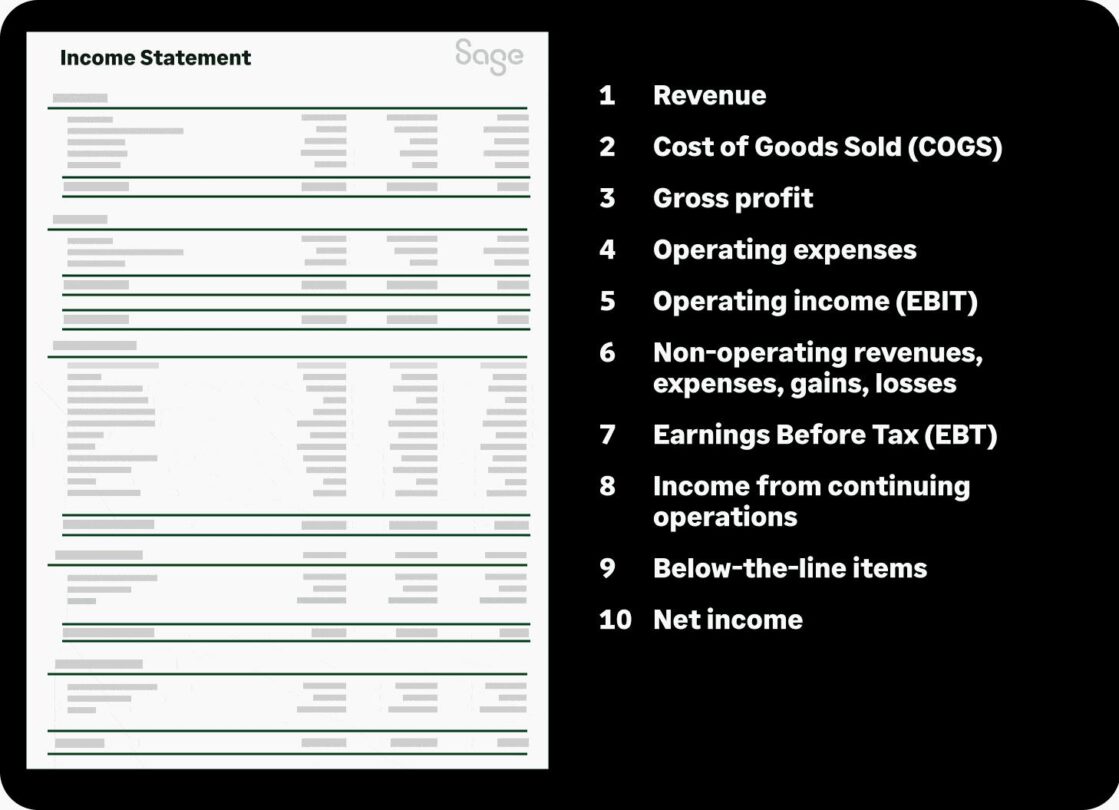
How to open a bar


Wondering how to start a bar business? It can be an exciting and profitable venture, but it also takes a lot of careful planning and consideration.

From choosing the right location to crafting a unique brand identity, there are numerous steps involved in successfully launching your bar.

In this comprehensive guide, we’ll walk you through each aspect of what you need to consider to open a bar, providing valuable insights and tips to help you navigate the process.

Whether you dream of owning a cozy neighbourhood dive, a sophisticated wine bar, or something in between, our guide covers everything you need to know to turn your vision into reality.

Here’s what we’ll cover:

Different types of bars

Before you dive into the process of opening a bar, it’s essential to define the type of bar you want to operate.

There are lots of different types of bars, catering to different clientele and offering distinct experiences, so start by considering the venue and vibe you want to create, as well as the audience you want to attract.

Opening a neighbourhood bar?

A neighbourhood bar typically serves a local clientele and focuses on providing a friendly, comfortable atmosphere. It often features a broad selection of beers, simple cocktails, and may have a pool table or dartboard for entertainment.

Opening a wine bar?

Wine bars specialise in serving a wide range of wines, focusing on quality, grape varietals, and regions. These bars often offer food pairings, charcuterie, and cheese to complement the wine experience, and customers are likely to expect staff with a solid knowledge of the products.

Opening a cocktail bar?

Cocktail bars are known for their creative and expertly crafted cocktails. They should have well-trained and skilled bartending staff, a diverse cocktail menu, and typically a stylish ambiance.

Opening a microbrewery or beer bar?

Microbreweries or beer bars serve a variety of craft beers, including their own brews. They may have a rotating selection of craft beers on tap and in bottles, and some offer food menus to complement the brews.

Opening a sports bar?

Sports bars are primarily designed for fans who want to watch live sporting events on large screens. They often serve pub-style food, a wide range of beers, and create a lively atmosphere during game nights.

Create your bar business plan

Once you’ve landed on what type of bar business you want to start, you can set about building your bar business plan.

A well-structured business plan is the foundation of your bar venture; it outlines your business goals, strategies, and financial projections.

A typical business plan for a bar should cover all of the aspects we’ve outlined below.

  • Executive summary – the executive summary of your bar business plan provides an overview of your bar concept, its unique selling points, and your long-term vision.
  • Business description – explain the type of bar you plan to open, its location, and your target audience. This description should also discuss the mission, vision, and values that underpin your ambition to start a bar.
  • Market research – analyse the local market, competition, and customer demographics. Identify trends and opportunities in the industry, highlighting how you see your business standing out or fitting in.
  • Organisation and management – describe the structure of your bar business, including ownership and key personnel, plus an outline of the roles and responsibilities of each team member.
  • Products and services – include details of your planned menu, drinks, and any additional services your bar will offer. Make sure you highlight any unique offerings or signature drinks.
  • Marketing and sales strategy – develop a marketing plan, including strategies for attracting and keeping your customers. This should include details of your pricing and sales strategies.
  • Funding – map out what you’ll need to open the bar, both in terms of the initial capital and ongoing or recurring costs and expenses. Include a detailed budget and financial projections.
  • Licenses and permits – list the necessary licenses and permits that you’ll need to start a bar that fits your criteria. You should also explain how and when you plan to obtain them.
  • Risk assessment – identify potential risks and challenges associated with your proposed bar business. Make sure you also describe your planned strategies to mitigate these risks.
  • Financial projections – the financial projections of your bar business plan should provide income statements, cash flow forecasts, and balance sheets. It’s also a good idea to include a break-even analysis and return on investment (ROI) estimates.

Choose the right location for your bar

When starting a new bar business, selecting the right location is a critical decision that can significantly impact how successful your venture is. Consider the following factors when choosing a location:

  • Target audience: identify the demographic you want to serve and choose a location where your target customers live, work, or spend time.
  • Foot traffic: high foot traffic areas, such as downtown districts, shopping centres, or busy streets can attract more customers—but can also be more expensive.
  • Competition: analyse the competition in the area you’re interested in. Is there demand for your type of bar, and can you differentiate yourself?
  • Accessibility: make sure your bar is easily accessible by car, public transportation, and by foot. Consider parking options for your customers.
  • Zoning and council regulations: check local zoning and council regulations, including Permitted Development Rights (PDR), to make sure you can legally operate a bar at your chosen location or venue and whether you need planning permission to do so.
  • Rent and lease terms: evaluate the cost of rent or lease and negotiate favourable terms with the landlord. Factor in the total occupancy cost in your budget.
  • Visibility and signage: a visible location with eye-catching signage can attract more customers. Assess the visibility of your bar from the street.

Bar equipment, suppliers, and inventory

With the perfect location sorted and your bar business plan nailed down, it’s time to turn your attention to bar equipment, furniture, food, and drink.

To start a bar and run it successfully, you’ll need a wide range of equipment, suppliers, and a well-managed inventory.

In this section, we’ve listed a number of important points for you to consider when sourcing your bar supplies.

Essential bar equipment

Create a bar equipment list covering all the essentials, including bar stools, tables, glassware, cocktail shakers, blenders, and refrigeration, and get sourcing.

Remember to consider your bar concept and menu, investing in bar equipment that aligns with your overall vision, as well as what you plan to serve and how you want to serve it.

Alcohol and drink suppliers

Spend time finding reliable alcohol distributors and suppliers and establishing good working relationships with them, allowing you to negotiate favourable terms for buying alcohol and ingredients.

You’ll also need to stock non-alcoholic beverages, mixers, and garnishes to cater to all customer preferences, providing options for designated drivers and non-drinkers.

Food suppliers

If you’re planning to start a bar business that offers food, you’ll need to secure suppliers for fresh ingredients and menu items for that too.

Try to make sure you have a consistent supply of quality food products and consider sourcing locally where possible.

Bar inventory management

To make stock management easier, consider getting set up with an effective inventory software system that can automate the tracking of stock levels, reduce waste, and help you minimise theft.

Review your bar inventory regularly to make sure you have enough supplies at all times.

Bar licences, permits, and insurance

It probably goes without saying that compliance with legal requirements and risk management are essential for a successful bar business, but we’re going to say it anyway: make sure you dot the i:s and cross the t:s.

Here are some of the key aspects to bear in mind:

Bar licences and permits

You’ll need a premise licence and a personal license to sell alcohol in your bar. You might also need Change of Use / planning permission. Check with your local authorities to find out what’s required.

Employer PAYE Reference and VAT registration

If you’re hiring any staff members, you’ll need to register as an employer with HM Revenue and Customs (HMRC) to set up a PAYE (Pay As You Earn) scheme for tax and National Insurance.

You also have to register for VAT with HMRC if you’re bar’s taxable turnover is expected to exceed the current VAT registration threshold.

Insurance

You will need public liability insurance as well as employers’ liability insurance if you’re hiring staff. You should also consider buildings or commercial property insurance and contents cover.

Music and entertainment licenses

If you intend to play any copyrighted music (live or recorded) you’ll need a music licence from PPL PRS Ltd.

And if you’re going to be showing live sports or other TV programmes on screens, you’ll need a TV Licence and commercial subscriptions from the relevant broadcasters.

Food hygiene rating / registration

If you plan to serve food or snacks in your bar, you’ll need to register as a food business with your local authority a minimum of 28 days before opening your doors to the public.

You’ll be subject to food hygiene inspections and will be given a food safety rating based on the inspection findings.

It’s widely recommended that any team members handling or preparing food have a Level 2 Food Hygiene Certificate.

Signage permit

You might need a signage permit, depending a bit on your local council’s regulations and the size and location of your outdoor signage.

Bar name, brand and marketing

Creating a strong brand identity and an effective marketing plan are crucial for attracting people and building a loyal customer base when you start a new bar.

It’s about putting your own personal stamp on your business and creating an environment that feels special to your target audience.

Choose a unique and memorable name that reflects your bar’s concept and personality, and create a brand identity, including a logo, colour scheme, and brand story, that stands out.

You might also want to consider trademarking your name and logo within the geographical region you operate. This might involve hiring an intellectual property attorney.

Bar marketing strategy and customer experience

Develop a comprehensive marketing plan for your bar that includes online and offline strategies.

Social media, a user-friendly, mobile responsive website, email marketing, and local advertising can all be effective ways to reach your target audience.

Focus on providing exceptional customer service and an overall good customer experience.

You could also encourage customer loyalty and positive word-of-mouth through promotions, loyalty programs, and events.

Consider bar design ideas

Your bar design plays a significant role in shaping the atmosphere and customer experience.

It should reflect your brand identity and values, while appealing to the customer demographics that you want to attract.

Bear in mind that bar designs can be pricey to change, so aim for a look and feel that can stand the test of time.

When playing around with bar design ideas, consider the following:

  • Interior design: create an inviting and comfortable interior space that aligns with your bar’s concept. Select appropriate furniture, lighting, and décor to enhance the ambiance.
  • Layout and flow: plan the layout to make sure it facilitates efficient service, easy access to the bar, and a smooth flow of customers. Designate areas for sitting, standing, and socialising.
  • Theme and décor: choose a theme or décor style that complements your bar’s concept. Pay attention to details like artwork, music, and lighting to set the mood.
  • Outdoor space: if possible, consider an outdoor patio or seating area for patrons who prefer to enjoy their drinks in the open air.

Hire the right bar staff

Creating the right space and vibe will help you build your brand, but perhaps even more important is making sure you have the right people in your team.

After all, what good is a luxurious cocktail lounge if your bartenders can’t make a first class Negroni or Paloma?

Your bar staff plays a crucial role in providing the kind of customer experience your guests expect and maintaining your bar’s reputation.

Make sure you think carefully about the team members you’ll need, as well as your bar staff’s duties and responsibilities.

Here are some tips for finding, hiring, and training the right team:

  • Bartenders: hire experienced bartenders with knowledge of cocktails, drink preparation, and customer service. Look for individuals who are personable and can engage with customers.
  • Servers: choose attentive and customer-focused servers who can efficiently take orders and deliver drinks. Provide training on your bar’s menu and customer service standards.
  • Kitchen staff: if your bar serves food, hire skilled kitchen staff with experience in the type of cuisine you plan to serve. Maintain high food quality and consistency.
  • Security and door staff: employ trained security personnel to ensure the safety of your customers. Implement a clear entrance and exit policy with professional door staff.
  • Staff training: provide training on responsible alcohol service, safety procedures, and your bar’s specific expectations. Encourage teamwork and open communication among staff members.

As a starting point, try hospitality recruitment websites like Hospitality Jobs UK and Caterer.com.

Top tip: consider investing in smart recruitment software to make the hiring and onboarding processes seamless.

How much does it cost to open a bar?

Understanding how much it will cost to open a bar is essential for your financial planning.

While this can vary widely depending on location, size, concept, and many other factors, as a rough ballpark expect to spend somewhere in the region of £97,500 to £325,000 (as a minimum).

The cost might be lower if you’re looking to take over an existing bar.

Similarly, it could also easily go significantly higher—into the millions even, if you’re opening an upmarket bar in a sought-after big city neighbourhood, for example.

One-off costs to consider

One-off costs to start a bar can include expenses such as:

Venue

The cost to purchase or lease a property will vary dramatically based on your location and arrangement.

As a rough guide, expect to cover a security or mortgage deposit in the range of £20,000-£250,000.

Renovations

Depending on your specific renovation needs and interior specifications, this work could easily set you back around £50,000-£100,000 (or £50-£145 per square foot).

Bar furniture and equipment

For an average-size bar, you can expect to pay in the region of £20,000-£65,000 for furniture and equipment, including installation and kitchen equipment.

Initial inventory

You could be looking at roughly £2,000-£20,000+, including alcohol, non-alcoholic drinks, and food.

Licenses and permits

Expect to spend £10,000-£30,000 for premise licence, personal licence, other permits, and associated legal costs.

Point of Sale (POS) system

You can expect to pay around £20-£200 per handheld card reader, and anywhere from £250 to over £1,000 for a countertop terminal or full till system.

For the full system set-up, you could pay a total of around £3,000 or more, depending on the equipment you need and how complex your inventory management is.

Working capital/contingency funds

It’s a good idea to have at least £10,000-£25,000 set aside for the first 3-6 months of operations, to cover any unforeseen issues and expenses.

Ongoing and recurring costs

Then there’s the ongoing and recurring costs, which can include:

Venue costs

For a city centre bar location, rent averages £6,500 per month, while rent in a more suburban locations could range from around £2,000 to £4,000 monthly.

Staff

Payroll, staff salaries, and training will vary significantly from business to business, but staff wages represent the largest variable cost, often accounting for 25-35% of total revenue.

That could easily amount to £8,000-£15,000 per month, covering management, bar and kitchen staff, and cleaners for an average sized bar.

Insurance

You’ll typically pay around £2,000 to £5,000 annually for comprehensive insurance coverage for a pub, depending on your location, level of coverage, and risk factors.

Tax

If your bar’s taxable turnover exceeds the VAT threshold, you’ll need to register for VAT.

The VAT rate is currently 20% of most sales in a pub or bar, including all alcoholic drinks, hot food, and any food or drink consumed on the premises.

You’ll also have to pay corporation tax at a rate of 19%-25% depending on your turnover, as well as Business Rates (tax for non-domestic properties) and PAYE / National Insurance (if you plan to employ staff).

Utilities

Between your electricity, gas, water, and waste disposal, you can expect to pay anywhere from around £500 to £1,500 monthly, depending on your bar size and energy efficiency.

Food & drink inventory

You could easily spend from £2,000 to £10,000 monthly depending on sales volume and product mix.

POS system

In terms of ongoing costs for integrated payment software, solutions typically range from around £20 to £200+ per month.

To help you get to grips with both one-off and recurring expenses, we’ve created a handy bar startup costs spreadsheet template.

It might also be worth buying a smart, intuitive accounting system to keep your finances and tax records up-to-date and compliant.

Have a look at our Sage Accounting plans to find out more about how they can help your business as you launch and grow.

How to get funding for a bar

Let’s face it; there are lots of costs to cover if you’re looking to start a bar business.

It might seem daunting—and it’s important to be realistic about your budget and what you can achieve before you launch.

That said, there are various bar funding options available in the UK that can help you get up and running. Consider the following:

  • Personal savings: let’s start with the obvious. Using your savings is one of the most common ways to fund a bar startup. If you’ve managed to save up some money, investing this in your business can help demonstrate your commitment to the business and minimise the need for external financing.
  • Start Up Loans: consider applying for government-backed Start Up Loan of up to £25,000.
  • Small business loans: you could apply for a secured or unsecured small business loan from a bank or other business lender. Your chance of being approved and the amount you can borrow will depend on your circumstances and the lender.
  • Investors: you could seek investors, such as angel investors. Focus on building relationships with relevant investors and creating a strong business plan and pitch. Start by looking at platforms like the UK Business Angels Association (UKBAA), UK Angel Investment Network, and SyndicateRoom.
  • Crowdfunding: consider crowdfunding platforms like GoFundMe, Indiegogo, Kickstarter, or Crowdfunder to raise money for your bar.
  • Grants and business finance support: research grants that cater to small businesses and startups. Some offer financial support, mentorship, and resources.
  • Franchising and pub partnerships: explore franchising opportunities with established bar chains that offer support and financing options to franchisees. Or you could partner with a pub company, like the Stonegate Group, which can provide a range of pub partnership opportunities, from leased and tenanted, to operator-led and Free of Tie agreements.
  • Family and friends: some entrepreneurs turn to family and friends for financial support. If you go down this route, make sure you have a clear agreement and repayment plan in place.

Final words about starting a bar

If you’re in the process of researching how to open a bar in the UK, hopefully this guide has given you some helpful pointers.

There’s no denying that starting a bar business comes with challenges, but it can also be a rewarding endeavour.

The bottom line is that the more carefully you plan and prepare for your new venture, the more likely you are to set yourself up for success.

With a clear business plan and the right funding, you can turn your dream of owning a bar into a thriving reality.

Keep in mind that the bar industry is highly competitive, so continuous innovation, exceptional customer service, and effective marketing will be key to your long-term prosperity.

Looking to start a different type of business?

We’ve created a range of guides about startups and startup costs in a host of sectors and trades.

How to use the bar startup cost worksheet

Our bar startup cost worksheet is simple and intuitive to use. Once downloaded, it’s fully customisable to fit your needs.

The template includes both high and low-end estimates, so you can get a full picture of how much it will take to start your bar.

  1. Download the free template.
  2. Add or remove fields applicable to your bar venture.
  3. Assess your needs and related costs.
  4. Make a note of costs that might change or costs to be determined.
  5. Plug in your numbers and enjoy the simplified breakdown of your startup and ongoing costs.
Important information about these bar startup costs

The startup costs shown here by industry are merely guidelines and average estimates based on information pulled from a variety of sources. While we have attempted to present the most accurate information available, please be aware that startup costs can vary greatly according to a number of factors, including but not limited to your location, local fees, and contractor quotes. The information presented here is intended to help guide prospective business owners in the search for information on starting a business within a given industry, but should not be interpreted as an exact quote.

Sage provides the information contained here as a service to the public and is not responsible for, and expressly disclaims all liability for damages of any kind arising out of use of, reference to, or reliance on any information contained on this site. While the information contained on this site is periodically updated, no guarantee is given that the information provided is correct, complete, and up-to-date. Sage is not responsible for the accuracy or content of information contained on this site.


Automotive

Agen Togel Terpercaya

Bandar Togel

Sabung Ayam Online

Berita Terkini

Artikel Terbaru

Berita Terbaru

Penerbangan

Berita Politik

Berita Politik

Software

Software Download

Download Aplikasi

Berita Terkini

News

Jasa PBN

Jasa Artikel

How much does it cost to open a restaurant?


You’ve got an enterprising mind and passion for food. Perhaps you’re thinking about turning your talent into a business, but first there are important questions to answer and numbers to crunch.

So, how much does it cost to open a restaurant?

Whether it’s a small takeaway place or a high-end eatery, you’ll want to make sure you have a firm grasp of what to expect, in terms of your restaurant startup costs.

Here’s what we’ll cover:

How much does it cost to start a restaurant?

The amounts you’re looking at will of course vary significantly depending on the location, type of food business, and how you set it up.

The average restaurant startup cost tends to range from £150,000 to well over £1m.

Our restaurant startup cost checklist breaks down all the expenses you’ll need to consider to make your dream a reality.

Breaking down the cost to open a restaurant

Opening a restaurant comes with its own specific set of cost considerations.

The average restaurant startup and operating costs, plus associated expenses, will also vary depending on size, location and a range of other choices you make.

For instance, the cost of opening and running a sandwich shop or pop-up restaurant will be much lower than the cost involved in opening a fine dining 200-seater in an upscale neighbourhood.

Some owners have tested their concept as a pop-up before opening a full-fledged restaurant.

The overall restaurant startup cost could be anywhere from around £70,000 to £200,000—but it could also go into the millions if you’re looking to open a high-end establishment in a sought-after area.

Regardless of the type of business you want to launch, it’s helpful to break down your restaurant startup costs into two categories: one-time costs and recurring costs.

One-time restaurant startup costs

One-time, fixed costs to open a restaurant are exactly what they sound like—the things you only have to spend money on once.

Keep in mind that some of these are true one-time restaurant startup costs (e.g. the security deposit on the building), while others (e.g. kitchen and cooking equipment, tableware and linens) may need to be replaced down the line due to wear and tear.

Property deposit

This cost varies a lot depending on the size and location of your restaurant.

You can expect to cover a deposit of 25%-40% of the property value if you’re buying the restaurant space, or 3-6 times the monthly rent if you’re leasing it.

Premise licence

You’ll need a food licence, which is free to register for. But if you plan to provide entertainment, serve alcohol, or serve hot food and drinks between 11pm and 5am, a premise licence will be required.

The cost to apply for this ranges from around £100 to £2,000, depending on the fee band of your venue, and there may also be an annual charge.

If you plan to serve food outdoors (on public land), you’ll may also need “street trading consent”, which many councils charge for.

There’s a lot of paperwork and even more legalities involved in a business set-up. You’ll most likely need help from an experienced lawyer to make sure your operation is legal.

For a smaller law firm or solo practitioner, you can typically expect to pay £100-£300 per hour, depending on the lawyer’s experience and the complexity of the work.

The average hourly rate for top UK law firm is around £450.

Building refurbishments

You may need to factor in refurbishment costs to get your space set up. As with all of these figures, the costs will vary greatly depending on your venue, location, and circumstances.

But as a rough guide, you might pay £75,000-£150,000 for a small cafe or wine bar started from scratch with new equipment (20-50 covers); £150,000-£750,000 for a small restaurant with an existing kitchen (50-70 covers); £300,000 to around £1m for a medium-sized restaurant (70-150 covers) with a new rear building extension; and £500,000-£2.5m for a large restaurant and function area (300 users).

Note that you are also duty-bound by the Equality Act 2010 to take reasonable steps to make your venue accessible to disabled people.

Kitchen and cooking equipment

The cost of setting up a commercial kitchen will typically range from around £30,000 to around £150,000.

In addition to your cooking equipment (ovens, cooking ranges, industrial mixers etc.), you’ll need sinks, workstations, proper refrigeration, a commercial dishwasher etc.

One money-saving option is to look for good quality, second-hand equipment. Restaurants that have recently gone out of business may be looking to sell their wares online to recover costs.

Tables, furniture, and tableware

This cost will vary based on the quantity you need and the quality you opt for. However, on average you can expect to spend £15,000-£35,000 on tables, chairs, decorations, etc.

Point of Sale (POS) systems

You’ll need a way to be paid and keep track of orders and inventory. That’s where a POS system comes in handy.

In terms of the hardware, you can expect to pay around £20-£200 per handheld card reader, and £250 to over £1,000 for a countertop terminal or full till system.

Signage and advertising

You’ll want to make a splash with your grand opening. You’re looking at around £2,200 at lower end of the scale, to £50,000 or more if you’re going all out.

Monthly restaurant expenses and ongoing costs

When considering how much it costs to start a restaurant, you also need to factor in a number of monthly expenses and variable or recurring bills.

It’s true that you have to spend money to make money—below are some of the key expenses.

There’s a lot to take in here, but the good news is it can all be managed easily using expense tracking software.

Mortgage or lease

One of the main recurring and ongoing cost to running a restaurant is your monthly lease or mortgage payment.

This will vary based on a number of factors, including location, restaurant size, deposit payment, and the mortgage or lease deal you negotiate—but it’s likely to cost you at least £2,000 – £5,000 per month.

Staff salaries

Unless you’re starting a one-person empire, you’ll need to make sure your business budget includes restaurant staff salaries.

The average base salary for restaurant workers is £12.11 per hour or £24,749 per year. You can expect to pay on average £37,900 per year for your head chef and just over £32,000 for line cooks.

Food and drink costs

This is quite literally your bread and butter, but food and drink costs vary drastically from restaurant to restaurant.

It will depend entirely on what kind of food and drinks you’re serving, as well as the size of your business.

Ways to help minimise these costs could include carrying out regular price comparisons for the items you buy regularly; building and maintaining good relationships with multiple suppliers; and negotiating better prices with new and existing suppliers.

Utilities

You have to keep the lights on and the ovens cooking.

Small restaurants can typically expect to pay around £2,400–£3,700 per year on average for electricity, and medium-sized restaurants around £3,800 – £7,250.

For gas, you’re looking at around £820–£1,500 a year on average for a small business, and about £1,500–£2,250 for a medium-sized business.

Marketing and advertising

For success, you’ll need to have a consistent presence. If you want to go the route of print or broadcasting, ad space is at a premium.

Web advertising is typically less expensive or even free if you take to social media.

Insurance and licencing

Basic public/product liability and employers’ liability coverage for a small restaurant starts from around £500 per year.

But bear in mind that the above figure is the lower end of the scale; it isn’t unusual for restaurant insurance to cost thousands of pounds per year, depending on the coverage needs.

POS software subscription

In addition to the POS system, you’ll need payment management software. You can get a basic pay-as-you-go app for free or spend from £19 to £200+ per month for more sophisticated solutions.

Miscellaneous expenses

These include anything and everything you might not expect. Repairs on equipment or fixtures can get costly, so you should always work the what-ifs into your budget.

Common restaurant startup myths and mistakes

There’s a lot to navigate when calculating restaurant startup costs and strategies—it’s easy to get bogged down by preconceived notions of what is and isn’t necessary.

So, we’ve compiled the most common mistakes new restaurant owners make to help you avoid headaches and unnecessary costs.

  1. Don’t overspend on equipment. This is the number one mistake startups make. It’s incredibly easy to go overboard when outfitting your dream kitchen. We know it’s tempting to go all out and get the newest gadgets, but you have to keep your budget in mind. For the necessities, make sure you shop around—second-hand equipment from eBay or the like could save you thousands.
  2. Keep your refurbishment budget in check. This goes hand in hand with equipment overspending. Refurbishing costs can add up frighteningly quickly. Be modest and resourceful with your decor, utilising the internet for design ideas. Leave space in the budget for contingencies—a solution to a problem that hasn’t happened yet may not be the most glamorous thing, but you’ll be glad to have peace of mind.
  3. Don’t go overboard with food expenses. Make sure you shop around for your supplies. You certainly shouldn’t skimp on quality, but don’t be a fool for fancy marketing either. If you’re buying in bulk consistently, vendors will often work out deals to keep the steady business. Another option to consider is striking a partnership with local farmers and co-ops for fresh, locally-grown foods. Constantly reevaluate your portions, as well as what gets wasted—only buy what you need.
  4. Pay attention to the contract. If you’re buying a restaurant, make sure you look over the contract closely—ideally with the help of an experienced lawyer—before signing it. There’s a ton of public record information available to you regarding the restaurant in question, and you should scour it. Often, issues the seller fails to mention will show up in public records of infestation or compliance issues.
  5. Be smart about marketing. Advertising can be a pricey endeavour, so don’t drain your budget when you don’t have to. Your best bet is to find low-cost avenues to promote your restaurant. The internet is an extremely powerful tool to get your name out there. Make sure to take advantage of free social media platforms and consider web advertising at reduced rates.

Restaurant startup costs: Industry tip

Running a restaurant is hard work. Don’t get bogged down tracking expenses—consider upgrading to online accounting software with Sage Accounting to save time and money.

How to use the restaurant startup cost worksheet

Our restaurant startup cost spreadsheets are simple and intuitive to use. Once downloaded, they’re fully customisable to fit your needs.

Plug in your numbers and enjoy the simplified breakdown of your startup and ongoing costs.

  1. Download the free restaurant budget template.
  2. Add or remove fields applicable to your startup.
  3. Assess your needs and related costs.
  4. Make a note of costs that might change or costs to be determined.

Sage lets you focus on building your business, not tracking expenses

Figuring out how much it will cost to open the restaurant of your dreams is the first step. But running your business successfully takes a lot of ongoing work.

Day in and day out you invest your time, energy and focus into creating something amazing. So why waste your valuable time and efforts tracking expenses the old-fashioned way?

Administrative tasks can now be fully automated—so upgrade your business model with Sage Accounting.

You have enough on your plate and our online accounting software can save you time and money. Outsource the busy work and get back to doing what you do best—making your business a success.

Additional startup cost templates

Is our sample restaurant startup cost calculator not what you’re looking for? Have a look at our other startup costs guides and templates.

Important information about these restaurant startup costs
The startup costs shown here by industry are merely guidelines and average estimates based on information pulled from a variety of sources. While we have attempted to present the most accurate information available, please be aware that startup costs can vary greatly according to a number of factors, including but not limited to your location, local fees, and contractor quotes. The information presented here is intended to help guide prospective business owners in the search for information on starting a business within a given industry, but should not be interpreted as an exact quote.

Sage provides the information contained here as a service to the public and is not responsible for, and expressly disclaims all liability for damages of any kind arising out of use of, reference to, or reliance on any information contained on this site. While the information contained on this site is periodically updated, no guarantee is given that the information provided is correct, complete, and up-to-date. Sage is not responsible for the accuracy or content of information contained on this site.


Automotive

Agen Togel Terpercaya

Bandar Togel

Sabung Ayam Online

Berita Terkini

Artikel Terbaru

Berita Terbaru

Penerbangan

Berita Politik

Berita Politik

Software

Software Download

Download Aplikasi

Berita Terkini

News

Jasa PBN

Jasa Artikel